
If you’ve ever typed “write a job description” into ChatGPT and gotten back three paragraphs of corporate filler, you already know the problem. The tool isn’t bad — the instructions were just too thin to work with.
Quick answer: Below are 50 ready-to-use ChatGPT prompts for HR, grouped by the part of the employee lifecycle they support — recruiting, onboarding, performance, policy, engagement, analytics, and offboarding. Each one follows a simple formula (task + context + tone + format + audience) so the first draft you get back is something you can actually edit and send, not something you have to rewrite from scratch. We’ve also flagged which prompts need a human review step before anything reaches a candidate or employee, because not every HR task is safe to hand to AI unsupervised.
If you manage a team’s hiring, onboarding, communications, or HR reporting, this list is built for you. And if you’d rather not copy-paste from a web page, you can grab all 50 prompts as editable templates — more on that at the end.
For a broader collection covering every department, take a look at our full AI prompts library, and if you’re exploring how AI fits into your wider operations, see how AI is reshaping HR, finance, and operations.
Why Most HR Teams Get Mediocre Results From ChatGPT
Here’s the honest truth: 90% of “ChatGPT doesn’t work for HR” complaints come down to one thing — the prompt gave the AI nothing to work with.
Type “write an onboarding email” and you’ll get a generic template that could apply to any company on earth. Type “write a Day 1 onboarding email for a new Customer Success rep joining our 60-person SaaS company, friendly but professional tone, mention our Slack-first culture and that their manager will message them at 9am” — and you’ll get something you can send with minor edits.
The difference isn’t the tool. It’s the brief.
The HR Prompt Formula
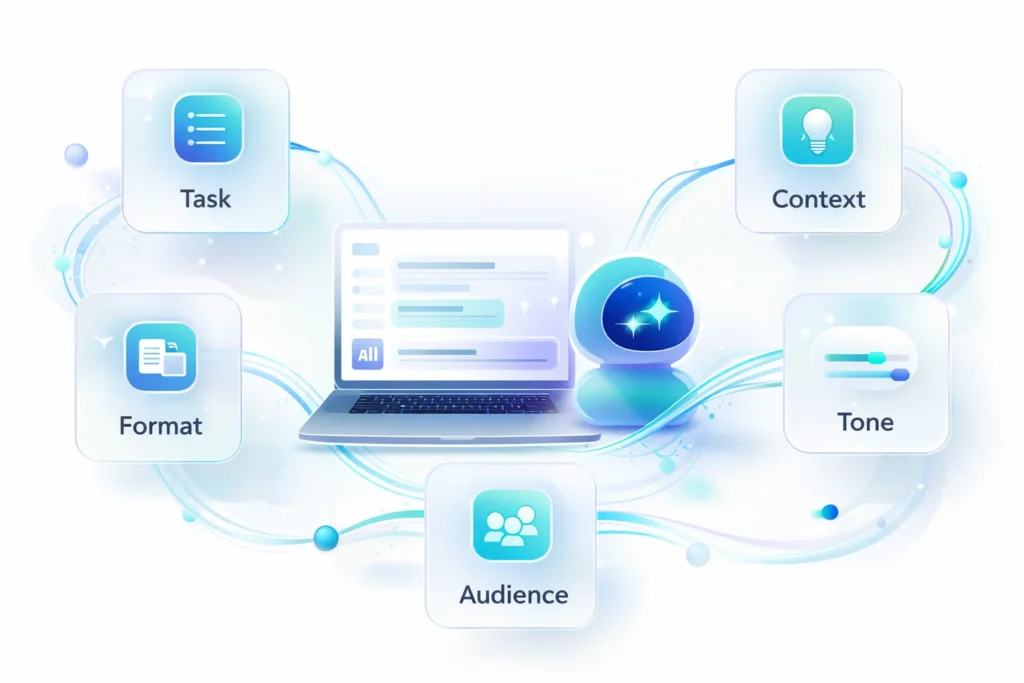
Every prompt in this guide is built around five components. You don’t need all five every time, but the more you include, the less editing you’ll do afterward:
| Component | What it does | Example |
|---|---|---|
| Task | The specific action you want | “Write a rejection email” |
| Context | Background the AI needs (role, company, situation) | “for a Marketing Coordinator candidate who made it to round 2” |
| Tone | How it should sound | “warm but concise” |
| Format | The structure of the output | “under 120 words, no subject line needed” |
| Audience | Who’s reading it | “the candidate directly” |
Put together: “Write a rejection email for a Marketing Coordinator candidate who made it to round 2 but wasn’t selected. Tone should be warm but concise. Keep it under 120 words and don’t include a subject line.”
That one sentence will save you more editing time than ten generic prompts.
Weak Prompt vs. Strong Prompt
| Weak Prompt | Strong Prompt | Why It’s Better |
|---|---|---|
| “Write a job description for a sales role” | “Write a job description for a Mid-Market Account Executive at a 50-person B2B logistics SaaS company. Include a 2-sentence intro about the role’s impact, 5 responsibilities, 4 must-have qualifications, and 2 nice-to-haves. Tone: confident, not corporate.” | Specifies industry, seniority, structure, and tone — output needs minimal editing |
| “Help me with a performance review” | “I have rough notes on an employee’s performance this quarter (pasted below). Turn them into a structured review with sections for Achievements, Areas for Growth, and Goals for Next Quarter. Keep feedback specific and balanced — not just positive or just critical.” | Tells the AI exactly what raw material to use and how to balance the tone |
| “Write a policy about remote work” | “Draft a remote work policy for a hybrid company (3 days in-office). Cover eligibility, core hours, equipment stipends, and communication expectations. Write it in plain language a new hire could understand in one read. Flag any sections that should be reviewed by legal.” | Adds structure, plain-language requirement, and a built-in compliance flag |
ChatGPT vs. Gemini vs. Copilot vs. Claude vs. HR-Native AI Tools
ChatGPT gets most of the attention, but it’s not the only option — and for some HR tasks, it’s not even the best one. Here’s how the major options stack up for day-to-day HR work.
| Tool | Best For | HRIS/Data Integration | Data Privacy Controls | Cost (typical) |
|---|---|---|---|---|
| ChatGPT (Plus/Team/Enterprise) | Drafting, brainstorming, policy summaries, general writing | None natively; works only with what you paste in | Enterprise/Team tiers exclude data from training; free/Plus tiers may not | Free–$30/user/month |
| Google Gemini | Drafting inside Docs/Gmail/Sheets if you’re a Workspace shop | Native Google Workspace integration | Workspace admin controls apply | Often bundled with Workspace |
| Microsoft Copilot | HR teams already living in Outlook, Word, Teams, SharePoint | Strong if you use Microsoft 365 + Dynamics | Enterprise data boundary under Microsoft 365 commercial terms | $30/user/month (add-on) |
| Claude (Anthropic) | Long policy documents, nuanced tone, careful/compliance-sensitive writing | None natively; works only with what you paste in | Enterprise plans exclude data from training | Free–$30/user/month |
| HR-native AI (e.g., built into your HRIS) | Tasks needing live employee data — PTO balances, org charts, headcount | Built-in, often via direct system access | Controlled by your HRIS vendor’s existing security model | Usually included in HRIS subscription |
The practical takeaway: general-purpose tools like ChatGPT, Gemini, Claude, and Copilot are excellent for drafting — job descriptions, emails, policy language, survey questions. They’re the wrong tool for anything that needs real, current employee data (PTO balances, salary history, performance scores), because they don’t know that information and may guess. For those tasks, lean on whatever AI features your HRIS already has, where the data connection is built in and access is permission-based.
50 ChatGPT Prompts for HR Professionals
Each prompt below is written so you can copy it, swap out the bracketed details [like this], and paste it straight into ChatGPT, Gemini, Copilot, or Claude — they all respond well to this format.
Recruitment & Job Descriptions
1. “Write a job description for a [job title] at [company name], a [industry] company with [team size] employees. Include a short intro about the role’s impact, 5–6 responsibilities, 4 must-have qualifications, and 2 nice-to-haves. Tone: [confident / friendly / formal].”
2. “Here’s a job description [paste it]. Rewrite it to remove gendered or exclusionary language (e.g., ‘rockstar,’ ‘must have no gaps in employment’) while keeping the responsibilities and requirements accurate.”
3. “Suggest 5 alternative job titles for [current title] that could attract more qualified applicants. For each, note one pro and one con compared to the original title.”
4. “Turn this job description [paste it] into a 100-word LinkedIn post announcing the opening. Include a clear call to action and 3 relevant hashtags.”
5. “Generate 10 interview questions for a [job title] role that assess [specific skill, e.g., ‘project management under deadline pressure’]. Avoid any questions that could touch on age, family status, health, or other protected characteristics.”
6. “Write a 2-paragraph compensation philosophy summary for [role/level] based on these data points: [paste salary band, benefits highlights]. This will be included in offer letters — keep it factual and easy to understand.”
7. “Review this list of qualifications for a [job title] role [paste list] and separate them into ‘must-have’ and ‘nice-to-have.’ Flag any requirement that might unnecessarily shrink the applicant pool without being essential to the job.”
8. “Write a ‘day in the life’ description (150 words) for a [job title] at our company, to use on our careers page. Base it on these notes about a typical day: [paste notes].”
Sourcing & Candidate Outreach
9. “Write a LinkedIn outreach message to a passive candidate for a [job title] role. Mention that I noticed their experience with [specific skill/project]. Keep it under 80 words, warm and not salesy, and end with a low-pressure call to action.”
10. “Write 3 variations of a follow-up email for candidates who haven’t responded to an initial outreach message after 7 days. Each should have a different angle: one curiosity-based, one value-based, one direct.”
11. “Write a ‘why work here’ one-pager for recruiting purposes highlighting these three things about our culture: [point 1], [point 2], [point 3]. Tone should feel like it’s written by an actual employee, not a marketing team.”
12. “Draft an internal email announcing our employee referral program for [open role/department]. Explain the bonus structure, how to submit a referral, and why this role matters to the team.”
13. “Suggest 5 Boolean search strings I could use on LinkedIn Recruiter or a job board to find candidates with the title [job title] and skills in [skill 1], [skill 2], located in [location].”
Interview Prep & Candidate Screening
14. “Create a structured interview scorecard for a [job title] role with 5 criteria aligned to the job requirements: [paste requirements]. Include a 1–4 rating scale and a short description of what a ‘4’ looks like for each criterion. (Have this reviewed before use across multiple interviewers — see compliance notes below.)“
15. “Write 4 behavioral interview questions to assess [competency, e.g., ‘conflict resolution’]. For each, include one example of a strong answer and one example of a weak answer, to help interviewers calibrate.”
16. “Write an email inviting a candidate to a final-round interview for [job title]. Include the format (panel/1:1/virtual), expected length, who they’ll meet, and one sentence on what to expect.”
17. “Write a rejection email template for candidates who reached the final round but weren’t selected for [job title]. Tone: respectful, brief, and leaves the door open for future roles. Under 100 words.”
18. “Create a 5-question candidate experience survey to send after the interview process ends, designed to identify friction points in our hiring process without asking for feedback on the hiring decision itself.”
Onboarding
19. “Build a 30-60-90 day onboarding plan template for a [job title] joining [department]. Include weekly milestones, check-in points with their manager, and a list of resources they’ll need access to.”
20. “Write a 3-part welcome email sequence (Day 1, End of Week 1, End of Month 1) for a new hire joining [department]. Each email should be under 150 words and build toward helping them feel settled and confident.”
21. “Create a one-page guide explaining how our onboarding buddy program works, including what a buddy is expected to do, what they’re not responsible for, and a sample 4-week check-in schedule.”
22. “Write an FAQ document answering 10 common questions new hires ask in their first week, covering topics like [IT setup, benefits enrollment, dress code, expense policy — list what applies].”
23. “Write a short ‘how we work’ starter guide for new hires explaining our communication norms (e.g., Slack response times, meeting culture, async vs. real-time expectations) in a friendly, practical tone.”
Employee Communications & Policy Writing
24. “Here’s a section of our [policy name] policy [paste text]. Rewrite it in plain language an average employee could understand on first read, without changing the meaning or removing any requirements.”
25. “Draft a company-wide email announcing a change to [policy, e.g., ‘PTO accrual’]. Explain what’s changing, why, when it takes effect, and include a short FAQ section addressing likely employee questions.”
26. “Write an email to all staff about [organizational change, e.g., ‘a department restructure’]. Tone should be transparent, calm, and reassuring without overpromising. Keep it under 250 words.”
27. “Create a one-page summary of the steps employees need to take during open enrollment, including deadlines and where to go for help. Format as a numbered checklist.”
28. “Write talking points for managers to use when discussing [sensitive topic, e.g., ‘return-to-office expectations’] with their teams. Include 3 likely employee concerns and a suggested response to each.”
29. “Draft a remote/hybrid work policy covering eligibility, core working hours, equipment stipends, and communication expectations. Write it for a [company size]-person company. Flag any sections that should be reviewed by legal or compliance before publishing.”
Performance Management
30. “Create a performance review template with sections for Key Achievements, Areas for Growth, and Goals for Next Quarter. Include 2–3 guiding questions under each section to help managers write more specific feedback.”
31. “I have rough notes from a manager about an employee’s performance this quarter [paste notes]. Turn these into a structured, balanced performance review draft using the template above. Keep the feedback specific and avoid vague phrases like ‘good job.'”
32. “Create a SMART goal-setting worksheet employees can fill out during quarterly check-ins, with an example goal filled in for the role of [job title].”
33. “Help a manager prepare for a difficult conversation about [performance issue, e.g., ‘missed deadlines on a key project’]. Write 4–5 talking points that are direct but empathetic, plus one open-ended question to invite the employee’s perspective.”
34. “Write a short recognition message celebrating [employee/team]’s achievement of [accomplishment], suitable for posting in a company Slack channel or newsletter. Keep it genuine, not over-the-top.”
Learning & Development
35. “Design a 4-week learning path for [skill, e.g., ‘data storytelling’] for employees in [role/department]. Include weekly themes, suggested resources (articles, videos, or courses — describe the type, don’t invent specific titles), and one practice activity per week.”
36. “Create a lunch-and-learn session outline on [topic]. Include a title, why it matters to employees, a 45-minute agenda (intro, main content, interactive element, Q&A), and 3 discussion questions.”
37. “Build a skills gap analysis template comparing our team’s current skills against the skills we’ll need for [upcoming initiative/project]. Format as a table with columns for Current Level, Target Level, and Suggested Development Action.”
38. “Write a one-page overview of a new mentorship program, including how mentors and mentees are matched, expectations for both sides, and a suggested meeting cadence for the first 3 months.”
39. “Create a training module outline for managers on [topic, e.g., ‘giving constructive feedback’]. Include 2 realistic workplace scenarios managers can use for role-play practice.”
Employee Engagement & Culture
40. “Write 10 pulse survey questions to measure employee sentiment about [topic, e.g., ‘workload and burnout’]. Use a 1–5 scale for 9 questions and end with one open-ended question.”
41. “I have a set of open-ended survey comments [paste examples or describe themes]. Suggest a structure for summarizing this feedback into 3–5 themes, with an example of how each theme might be worded for a report to leadership.”
42. “Design an employee recognition program framework appropriate for a company with a [budget level, e.g., ‘modest’] budget. Include recognition criteria, suggested frequency, and 3 reward ideas that don’t rely solely on cash bonuses.”
43. “Create a template for a monthly internal newsletter with sections for: company news, team shoutouts, upcoming events, and a ‘culture spotlight’ feature. Include a sample for each section.”
44. “Write announcement copy for a new [wellness initiative, e.g., ‘mental health days’]. Explain what it is, who it applies to, how employees can use it, and where to go with questions. Tone: warm and clear, not clinical.”
HR Analytics & Reporting
45. “Create an outline for a quarterly HR report to leadership summarizing headcount changes, turnover rate, and engagement survey results. Suggest which 3 metrics deserve the most attention based on typical HR priorities.”
46. “Here’s our raw turnover data by department and quarter [paste data]. Write a narrative summary identifying any notable trends and 2–3 possible explanations worth investigating further — be clear these are hypotheses, not conclusions.”
47. “Translate these HR metrics [paste metrics] into a one-paragraph executive summary connecting them to business impact (e.g., cost of turnover, productivity, hiring timelines) for a board presentation.”
Offboarding
48. “Create an offboarding checklist covering IT access revocation, equipment return, knowledge transfer documentation, and final paperwork. Organize it by timeline: before last day, on last day, and after departure.”
49. “Write a set of 8 exit interview questions designed to surface honest feedback about management, workload, and culture — phrased in a way that feels safe for a departing employee to answer candidly.”
50. “Write a short farewell announcement to the team about a departing colleague, [name/role], who is leaving on good terms. Tone: warm and appreciative, but brief — 3–4 sentences.”
Which of These Prompts Carry Compliance Risk?
Not all 50 prompts carry the same level of risk, and pretending otherwise is how HR teams end up in headlines for the wrong reasons. As of 2026, several U.S. states and cities (including New York City and California) have rules requiring bias audits or disclosures for automated tools used in hiring decisions, and the EEOC has made clear that “the AI did it” isn’t a defense under Title VII. None of that means you should avoid AI in HR — it means you should know where the line is.
| Category | Risk Level | Why | Recommended Practice |
|---|---|---|---|
| Job descriptions, social posts, outreach messages | Low | Drafting/brainstorming, no decision made about a person | Use freely; have a second person skim for tone before publishing |
| Onboarding plans, internal comms, newsletters | Low | Informational content, not evaluative | Use freely |
| Interview questions & scorecards | Medium | Could influence what’s assessed, even if a human asks the questions | Have HR/legal review before rolling out across multiple interviewers; never let AI score live candidate responses |
| Performance review drafts | Medium | Feedback about a real person’s work | Manager must personally verify accuracy and add specifics; AI draft is a starting point, not the final word |
| Resume screening / candidate ranking | High | Directly affects who advances — this is where most legal exposure sits | Avoid using general-purpose AI to screen or rank real candidates; if using any automated screening tool, ensure it’s been validated and audited per your state’s requirements |
| Policy drafts (PTO, remote work, benefits) | Medium | Inaccurate policy language can create legal exposure | Always route through legal/compliance before publishing, regardless of who wrote the first draft |
Expert insight: In our work helping mid-sized companies build AI workflows, the single biggest mistake we see isn’t HR teams using AI too much — it’s HR teams treating every prompt the same way. Drafting a newsletter and ranking job applicants are not the same task, and they shouldn’t go through the same approval process. Build your prompt library with risk tiers baked in from day one, so people don’t have to guess.
Real-World Example: How a 140-Person Company Built Its HR Prompt Library
A mid-sized logistics company (around 140 employees, one HR generalist and one recruiter) was spending roughly 12 hours a week on writing tasks: job postings, candidate emails, policy updates, and internal announcements. None of it was strategic — it was just volume.
Here’s what they actually did, in order:
- Audited where time went. For one week, the HR generalist tracked every writing task in a simple spreadsheet — what it was, how long it took, and whether it followed a repeatable pattern. About 70% of tasks fell into 8 recurring categories (the same categories used in this article).
- Built a shared prompt doc. Instead of each person reinventing prompts, they created a shared Google Doc with one tested prompt per recurring task, each one following the Task + Context + Tone + Format + Audience formula above. Anyone on the team could copy, fill in the brackets, and go.
- Set risk tiers. Using a version of the table above, they marked each prompt category as “use freely,” “review before sending,” or “don’t use for this.” Interview scorecards and anything touching candidate evaluation went into the “review” tier with a mandatory second-person check.
- Measured the result after 60 days. Writing time for recurring tasks dropped from roughly 12 hours/week to about 5 hours/week — not because AI replaced judgment, but because the first draft stopped being the time sink. The HR generalist redirected the recovered time toward manager coaching and a long-overdue update to the performance review process.
The lesson isn’t “AI saves time” — everyone already believes that. The lesson is that a shared, categorized prompt library with risk tiers is what actually makes the time savings stick, instead of every person on the team rediscovering the same prompts from scratch.
7 Mistakes HR Teams Make With ChatGPT
| Mistake | What Happens | Better Approach |
|---|---|---|
| Pasting real employee names, salaries, or performance data into a general AI tool | Creates a data privacy and security risk | Replace identifying details with placeholders (e.g., “Employee A,” “$X salary band”) |
| Using one-line prompts (“write a job description”) | Generic, unusable output that needs a full rewrite | Use the Task + Context + Tone + Format + Audience formula |
| Sending AI-drafted rejection or feedback emails without review | Tone-deaf or inaccurate messaging reaches real people | Treat AI output as a first draft, always personalize before sending |
| Using AI to rank or score real candidates | Potential legal exposure under disparate impact rules | Use AI for drafting questions/scorecards, not for scoring actual people |
| Assuming AI “knows” your company policies | Confidently wrong answers about benefits, PTO, etc. | Paste your actual policy text into the prompt — don’t rely on AI’s general knowledge |
| Treating every AI output the same regardless of risk | High-stakes content gets the same light-touch review as low-stakes content | Apply the risk-tier approach — match review effort to potential impact |
| Never saving good prompts for reuse | Team reinvents the wheel constantly, inconsistent quality | Build a shared prompt library (see case study above) |
A Quick Privacy Checklist Before You Paste Anything Into ChatGPT
- Remove names, employee IDs, and contact details — use placeholders like “Employee A” or “[Name]”
- Remove or generalize salary figures, performance ratings, and medical/health information
- Check whether your organization is on an Enterprise/Team plan (which typically excludes data from model training) versus a free or personal account
- When in doubt, ask: “Would I be comfortable if this text were screenshotted and shared outside the company?”
- Review your company’s AI usage policy — if one doesn’t exist yet, that’s worth flagging to leadership
FAQs
What are the best ChatGPT prompts for HR professionals? The best ChatGPT prompts for HR are specific to one task and include company context, tone, and the format you need (email, table, checklist, etc.). High-value starting points cover job descriptions, onboarding plans, policy summaries, performance review drafts, and engagement survey questions — all included in the 50 prompts above.
Is it safe to use ChatGPT for HR tasks that involve employee data? Only if you remove personally identifiable information first. Replace employee names, IDs, salaries, and health-related details with generic placeholders before pasting any text into a general-purpose AI tool, and confirm what data-handling terms apply to your account tier.
Can ChatGPT replace HR software or an HRIS? No. ChatGPT and similar tools are excellent for drafting written content but don’t have access to your real employee records, PTO balances, or org charts. For tasks that need live, accurate data, use the AI features built into your HRIS rather than a general-purpose chatbot.
How do I write a good HR prompt for ChatGPT? Use the formula: Task + Context + Tone + Format + Audience. State exactly what you want, give relevant background (company size, industry, role), specify the tone, describe the output format, and note who will read it. The more detail you give upfront, the less editing you’ll do afterward.
Which AI tool is best for HR — ChatGPT, Gemini, Copilot, or Claude? For drafting and brainstorming, all four perform similarly well — the better choice often comes down to which ecosystem you’re already in (Google Workspace favors Gemini, Microsoft 365 favors Copilot). For nuanced or compliance-sensitive writing, some HR teams prefer Claude or ChatGPT for their handling of longer, more careful documents.
Can I use ChatGPT to screen or rank resumes? This is the highest-risk use case in HR AI. General-purpose AI tools aren’t validated for hiring decisions and can introduce bias that creates legal exposure under disparate impact rules. Use AI to draft job postings, interview questions, and outreach — but avoid using it to screen or rank actual candidates unless through a properly audited, compliant tool.
What’s the difference between an AI prompt and HR automation (like MCP integrations)? A prompt generates text based on what you type in — it has no access to your live systems. Automation tools (sometimes using protocols like MCP) connect AI directly to your HR platform, so it can pull real data (like an actual PTO balance) and, in some cases, take actions. Prompts are for drafting; automation is for working with live data.
How many ChatGPT prompts should an HR team have ready to use? Most HR teams cover 80% of their recurring writing tasks with 15–20 well-built prompts across recruiting, onboarding, communications, and performance management. The 50 prompts in this guide cover the full employee lifecycle, so you can start with the categories most relevant to your role and expand from there.
Will using ChatGPT prompts get my company sued for discrimination? Using AI to draft content (job postings, emails, policy summaries) carries minimal legal risk on its own. The risk increases significantly when AI is used to make or influence decisions about real candidates or employees — screening, ranking, or scoring. Keep AI in a drafting role for those processes and you stay on much safer ground.
How do I get the free HR Prompt Kit? You can download an editable version of all 50 prompts — organized by category and ready to customize with your company’s details — using the download link at the end of this article.
Final Thoughts
None of this requires becoming a “prompt engineer” or learning a new tool. It requires treating your prompts the same way you’d treat any other reusable HR asset — like an offer letter template or an onboarding checklist. Write it once, get it right, and reuse it.
Start with the two or three categories that eat up the most of your week. For most HR professionals, that’s recruiting and employee communications — so start there, customize the prompts with your company’s details, and see how much editing time disappears.
If you’d rather skip the copy-pasting, download the free HR Prompt Kit — all 50 prompts above, organized by category, formatted as editable templates you can drop your company details into and start using today.
For more ways to apply AI across recruiting, finance, and operations, explore Our full AI prompts library or see how AI is reshaping HR, finance, and operations.

Ahmad Hussain
ACCAAhmad builds advanced Excel models, Power BI dashboards, and AI automation for businesses. He writes AI Foresight 360 himself, and every pricing figure and feature claim is verified against official documentation at the source.
Connect on LinkedIn