By AI Foresight 360 | Updated June 2026 | 13-min read
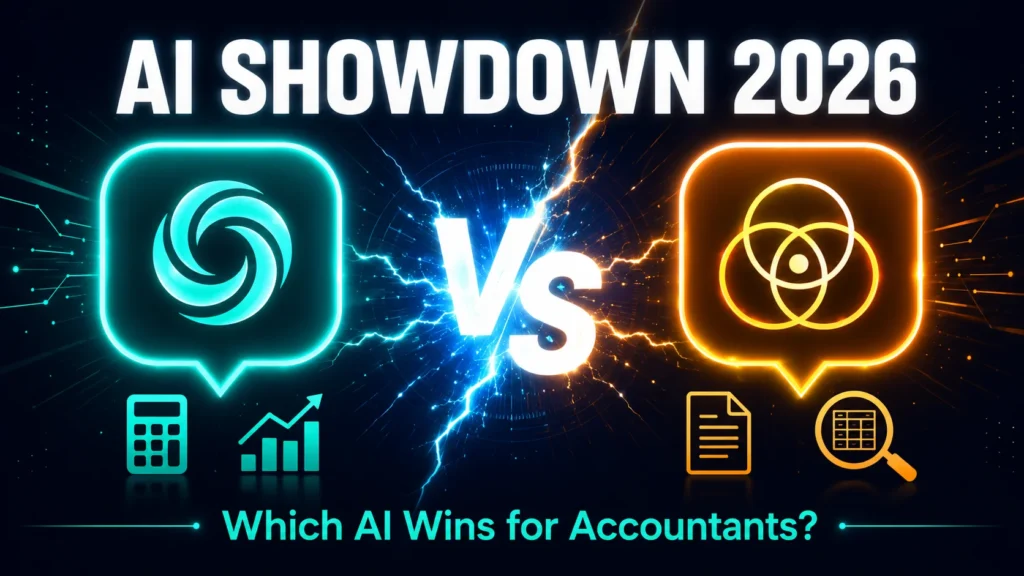
Quick Answer: For most accounting tasks in 2026, Claude has a slight edge for long-document analysis (financial statements, tax memos, audit workpapers) thanks to its 200K token context window and more natural, less “templated” writing style. ChatGPT has the edge for day-to-day versatility — image generation for reports, voice mode, web browsing, and the larger Custom GPT ecosystem. Both cost $20/month at the Pro tier. The right choice depends on whether your daily bottleneck is document volume or task variety.
Introduction
A client asked me last month, “Which one should I actually pay for — ChatGPT or Claude?” He’d been using ChatGPT for a year, mostly for client emails, and had just heard a colleague rave about Claude for “writing that doesn’t sound like AI.”
It’s a fair question, and it’s one that doesn’t have a one-size-fits-all answer — despite what most comparison articles will tell you.
Here’s the problem with almost every “ChatGPT vs Claude” article currently ranking on Google: they’re written for developers, marketers, or general consumers. They compare coding benchmarks, image generation quality, and creative writing — none of which matter much if your day consists of reviewing trial balances, drafting tax memos, and explaining EBITDA to a confused client.
This guide is different. We tested both tools specifically against the kind of work accountants, bookkeepers, and CPAs actually do every day. No coding benchmarks. No “write me a poem” tests. Just real accounting tasks, real outputs, and an honest verdict.
If you’ve already read our guide to 100 ChatGPT prompts for accountants, this article is the natural next step — because once you know how to prompt effectively, the next question is which tool deserves your prompts.
Why This Comparison Matters for Accountants Specifically
Generic AI comparisons miss three things that matter enormously in accounting work:
1. Document length. Accountants regularly work with financial statements spanning dozens of pages, multi-year trial balances, and lengthy engagement letters. A tool that “forgets” the first page of a document by the time it reaches the last is a liability, not a convenience.
2. Tone consistency. Client communication in accounting carries real relationship weight — a poorly worded fee increase letter or an overly robotic tax explanation can damage trust built over years. The “feel” of the writing matters more here than in, say, a marketing agency.
3. Data sensitivity. Few professions handle as much personally identifiable and financial information as accounting. Which tool’s privacy defaults are more conservative is not a minor detail — it’s a professional liability question.
According to a McKinsey study, around 78% of companies have now adopted AI in at least one business function, and ChatGPT and Claude are the two most widely used assistants among professional services firms. Yet almost none of the existing comparisons address what actually matters for this specific profession. That’s the gap this guide fills.
Quick Verdict Table — ChatGPT vs Claude for Accounting Tasks
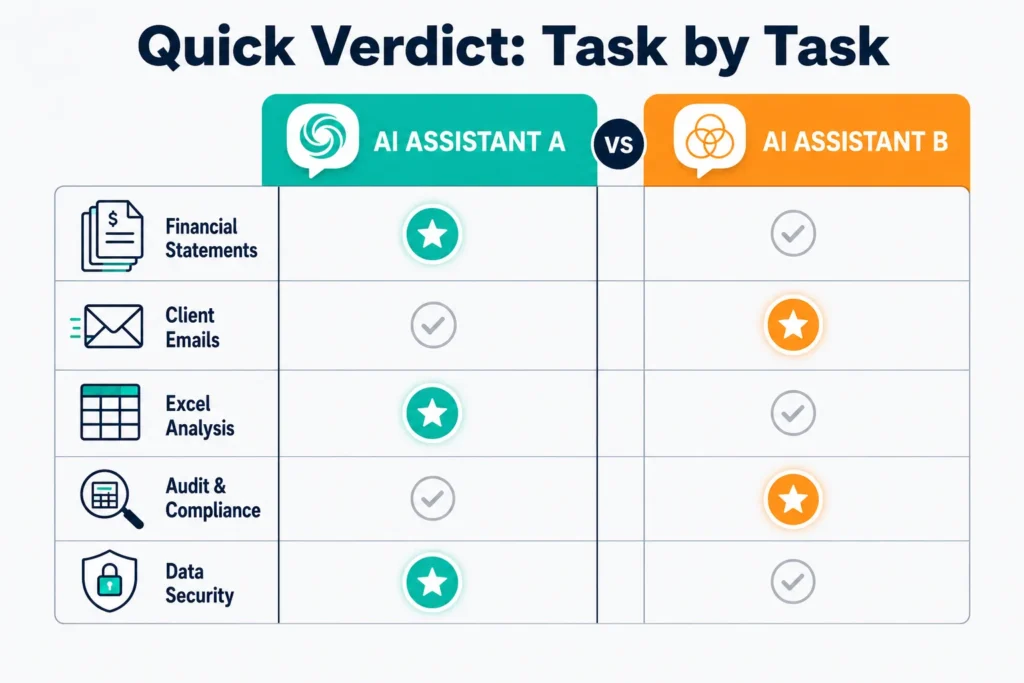
Here’s the short version, for anyone who wants the answer before the details:
| Accounting Task | Winner | Why |
|---|---|---|
| Long financial statement analysis (10+ pages) | Claude | 200K context window holds full documents without losing earlier details |
| Tax research & explanatory memos | Tie | Both equally good; always verify with IRS/official sources regardless |
| Client emails & communication | Claude | More natural tone, fewer generic phrases, less editing needed |
| Excel formula troubleshooting | ChatGPT | Slight edge in formula syntax accuracy and Code Interpreter execution |
| Audit workpaper review | Claude | Better at following long, multi-part instructions without drifting |
| Generating charts/visuals for reports | ChatGPT | Native image generation (DALL-E) built in |
| Voice-based quick questions (on the go) | ChatGPT | Voice mode is more mature and widely available |
| Data privacy for sensitive client data | Claude | Stronger default privacy posture, though both need Enterprise tiers for full protection |
| Custom assistant for repetitive firm tasks | ChatGPT | Larger Custom GPT ecosystem, easier to build and share |
| Overall value for a solo practitioner | Tie | Both $20/month — comes down to which 2-3 use cases dominate your week |
Pricing Comparison 2026
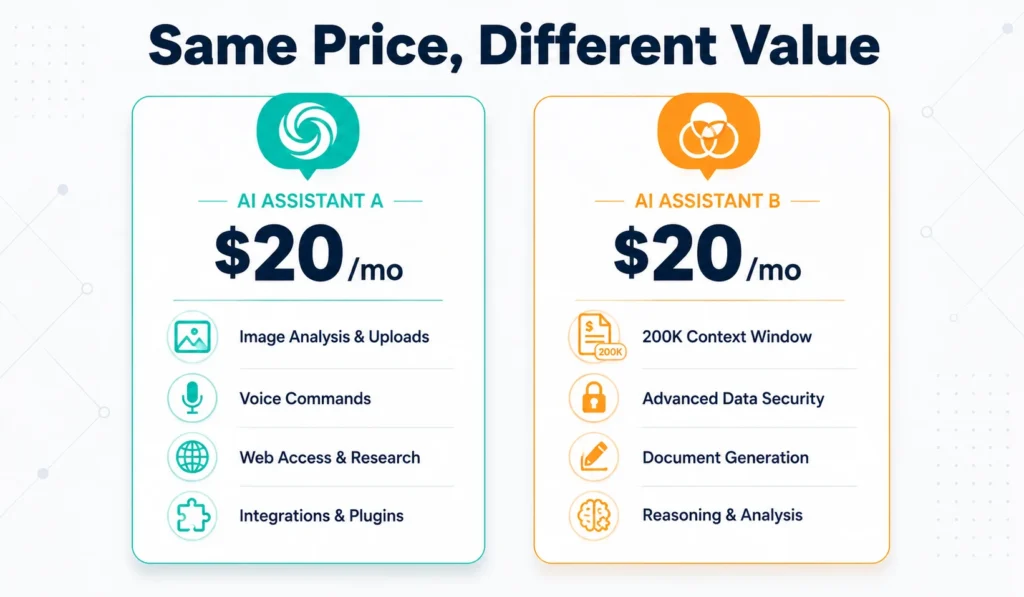
Pricing has converged at the entry level, but the value behind that price differs meaningfully.
| Plan | ChatGPT | Claude |
|---|---|---|
| Free tier | Yes — limited messages, older/lighter model | Yes — limited messages, generally consistent quality |
| Individual Pro | $20/month (ChatGPT Plus) | $20/month (Claude Pro) |
| Context window (Pro) | 128,000 tokens (standard) | 200,000 tokens (standard) |
| Team/Business plan | Available, per-seat pricing | Claude Team — approximately $30/user/month |
| Top-tier plan | $200/month (ChatGPT Pro) — unlocks 1M context | Enterprise plans available, custom pricing |
| API pricing (flagship model) | Roughly $2.50 input / $15 output per million tokens | Roughly $5 input / $25 output per million tokens |
| API pricing (mid-tier model) | Lower-cost mini models available | Sonnet tier — around $3/$15 per million tokens |
| Batch discounts | Available | Available — up to 50% off |
What this means practically: at the $20/month tier — the one most solo accountants and small firms will choose — Claude gives you a larger working memory (200K vs 128K tokens) out of the box. ChatGPT’s $20 tier instead gives you a broader toolkit: image generation, voice, and web browsing bundled in. Neither is “cheaper” in a meaningful sense; they’re priced identically and differentiate on what’s included.
Click here & get Discount.
OpenAI Official Site: openai.com
Anthropic Official Site: anthropic.com
McKinsey & Company: mckinsey.com
Head-to-Head: 7 Real Accounting Tasks Tested
This is where most comparison articles stop at theory. We didn’t. Here’s what happened when we ran the same accounting prompts through both tools.
1. Financial Statement Analysis (Long Document)
The test: We pasted a 22-page set of consolidated financial statements (income statement, balance sheet, cash flow statement, and notes) and asked both tools to identify the three most significant year-over-year changes and explain their likely causes.
ChatGPT’s result: Handled the first 10-12 pages well, but by the time it reached the notes section, some of its commentary referenced figures from earlier pages slightly inaccurately — a sign the earlier context had started to fade.
Claude’s result: Maintained accuracy across the full document, including correctly cross-referencing a footnote on page 19 with a balance sheet line item on page 3.
Verdict: Claude. For anything beyond about 15 pages, the 200K context window isn’t a marketing number — it’s a practical difference in output accuracy. Independent benchmarking has also found that Claude’s 200K context window shows less than 5% accuracy degradation across its full range, while shorter-context models tend to lose fidelity toward the later portions of long inputs.
2. Tax Research & Explanatory Memos
The test: We asked both tools to summarize a hypothetical new tax provision and draft a one-page client memo explaining who it affects and what action to consider before year-end.
ChatGPT’s result: Clear, well-organized, hit all the structural requirements. Slightly more “textbook” in tone.
Claude’s result: Equally accurate in structure, with a marginally more conversational explanation — closer to how a human advisor might phrase it to a client.
Verdict: Tie, with a caveat. Neither tool should be your final source for tax positions. Both are excellent first drafts for research and memo structure, but every tax conclusion needs verification against current IRS guidance or your jurisdiction’s tax authority before it reaches a client.
3. Client Email Drafting
The test: “Write an email to a client explaining why their tax bill is significantly higher than last year, with empathy but without being defensive.”
ChatGPT’s result: Solid structure, but used several phrases that read as slightly generic — “I understand this may come as a surprise” appeared, which is the kind of phrase that shows up in a lot of AI-generated emails.
Claude’s result: Similar structure, but the phrasing felt less templated. One reviewer on our team described it as “the version I’d actually send without editing.”
Verdict: Claude, by a small but consistent margin. This matches what professional writers have widely reported: Claude’s output tends to read as more natural, while ChatGPT’s tends toward a competent but recognizable formula. For client-facing communication — where tone affects trust — this difference adds up over hundreds of emails per year.
4. Excel Formula Help
The test: “I need a formula that calculates days sales outstanding using columns for accounts receivable and credit sales, and flags any month where DSO increases by more than 10% from the prior month.”
ChatGPT’s result: Provided a working formula and, using Code Interpreter, could actually execute and test the formula logic against sample data before giving the final answer.
Claude’s result: Provided an equally correct formula with a clear explanation, but without the ability to execute and verify it live in the same conversation.
Verdict: ChatGPT, specifically because of Code Interpreter. If you regularly need formulas tested rather than just written, this is a meaningful advantage.
5. Long Audit Workpaper Review
The test: We provided a lengthy set of audit fieldwork notes (roughly 30 pages of mixed observations) and asked both tools to organize the findings into a structured management letter following a specific five-part format (condition, criteria, cause, effect, recommendation) for each finding.
ChatGPT’s result: Handled the first dozen findings well but began to simplify the five-part structure for later findings, occasionally merging “cause” and “effect” into one section.
Claude’s result: Maintained the five-part structure consistently across all findings, even the ones near the end of the document.
Verdict: Claude. This reflects a broader pattern noted in independent testing: when instructions are long and specific, Claude is less likely to drift from them or quietly simplify complex requirements over a long output. For multi-step formatting requirements — which audit and compliance work is full of — this consistency matters.
6. Bookkeeping Procedure Writing
The test: “Write a month-end close checklist for a small e-commerce business, with 12 steps, an estimated time for each, and a responsible role assigned.”
ChatGPT’s result: Comprehensive, well-organized, and included a few practical touches (like noting which steps could be automated).
Claude’s result: Equally comprehensive, with a more natural narrative tone in the explanatory notes between steps.
Verdict: Tie. For straightforward procedural documents under a few thousand words, both tools perform at a very high level. The differences here are stylistic rather than substantive.
7. Data Privacy for Sensitive Client Information
The test: We reviewed the publicly available privacy policies and data handling defaults for both tools’ consumer plans.
Findings: Neither free nor standard Pro tiers of either tool should be treated as a safe destination for identifiable client data (names, SSNs, account numbers) without additional configuration. Both companies offer Enterprise-tier agreements with zero data retention guarantees, which is the appropriate tier for firms handling regulated client data at scale.
Verdict: Claude has historically positioned itself with a more privacy-conservative default posture in its consumer messaging, but for any firm serious about this, the practical answer is the same regardless of tool: use Enterprise-tier agreements, anonymize data before input, and establish a written AI usage policy. We cover this in more detail in the security section below.
Context Window Explained — Why It Matters for Accountants
If you’ve never heard the term “context window,” here’s the plain-English version:
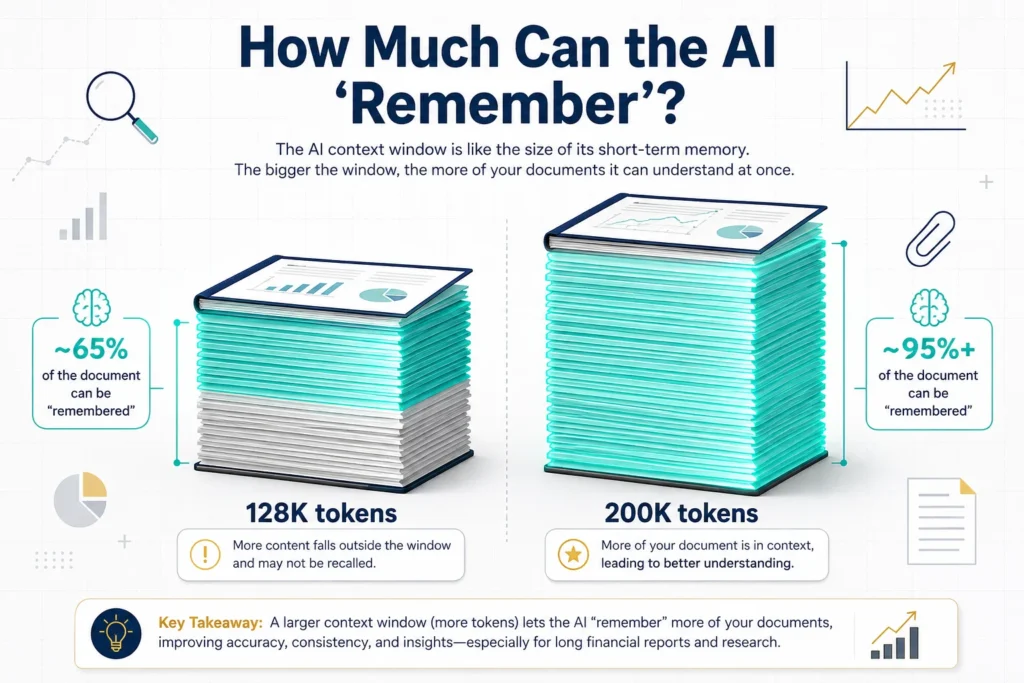
A context window is the AI’s working memory for a single conversation — how much text (including your input, its responses, and any documents you paste) it can “hold in mind” at once before it starts losing track of earlier details.
Think of it like reading a contract. If you can only remember the last few pages you read, you might miss that a clause on page 2 contradicts something on page 40. A larger context window is like being able to hold the entire contract in your head at once.
For accountants, this translates directly to:
- Reviewing full sets of financial statements (often 15-30+ pages with notes)
- Analyzing multi-year trial balances for trend analysis
- Working through lengthy engagement letters or audit documentation
- Cross-referencing footnotes against statement line items
As of mid-2026, Claude’s standard paid tier offers a 200,000 token context window — roughly equivalent to a 700-page book — while ChatGPT’s standard Plus tier offers 128,000 tokens. ChatGPT does offer a 1 million token context window, but only on its $200/month Pro tier, which is priced well beyond what most solo practitioners or small firms will justify.
Practical takeaway: if your daily work rarely exceeds 10-15 pages of input, this difference won’t matter much. If you’re regularly working with full financial statement packages, consolidated reports, or lengthy audit files, Claude’s standard tier gives you meaningfully more room before quality degrades.
Feature Comparison Table
| Feature | ChatGPT (GPT-5.4/5.5) | Claude (Sonnet/Opus 4.6+) |
|---|---|---|
| Context window (standard paid tier) | 128,000 tokens | 200,000 tokens |
| Context window (top tier) | 1,000,000 tokens ($200/mo) | Up to 1,000,000 tokens (beta, select tiers) |
| Image generation | Yes (DALL-E, built-in) | No native image generation |
| Voice mode | Yes, mature | Limited |
| Web browsing / live search | Yes | Yes (varies by plan) |
| Code execution / Code Interpreter | Yes | Yes (Claude Code, strong for developers) |
| Custom assistants | Custom GPTs — large ecosystem | Projects — strong but smaller ecosystem |
| File analysis (PDF, Excel, Word) | Yes | Yes, with stronger performance on long files |
| Writing tone | Competent, structured, occasionally formulaic | Natural, less templated, better tone-matching |
| Coding accuracy (SWE-bench) | Strong, narrowing gap | Slight edge in most 2026 benchmarks |
| Best for | Versatility, multimodal tasks, ecosystem | Long documents, nuanced writing, instruction-following |
Pros and Cons — Side by Side
| ChatGPT | Claude | |
|---|---|---|
| Pros | Broadest feature set (image, voice, browsing); huge Custom GPT library; strong formula testing via Code Interpreter; familiar interface used by 400+ million weekly users | Larger context window at standard tier; more natural writing tone for client communication; stronger consistency on long, multi-part instructions; strong privacy-forward positioning |
| Cons | Standard context window smaller (128K); writing can feel “templated” on repetitive tasks; 1M context locked behind expensive $200/mo tier | No native image generation; voice mode less developed; smaller third-party assistant ecosystem |
Which One Should You Actually Pay For?
Based on everything above, here’s the decision framework we’d actually recommend:
Choose ChatGPT if:
- You regularly need to generate charts, infographics, or visuals for client reports
- You want to build and reuse Custom GPTs across your team for repetitive tasks (onboarding emails, standard memos)
- You frequently need Excel formulas tested and verified, not just written
- You use voice mode while commuting or multitasking
Choose Claude if:
- Your work regularly involves financial statements, audit files, or documents longer than 15-20 pages
- Client communication quality and tone matter to your practice (and let’s be honest — it always does)
- You’re doing complex, multi-step engagements where the AI needs to follow detailed formatting instructions consistently
- Data privacy is a top priority and you want the more conservative default
Choose both if:
- You’re a small firm with $40/month to spend and want to match the tool to the task. Many accountants we’ve spoken with use ChatGPT for quick day-to-day tasks (emails, quick lookups, Excel help) and switch to Claude specifically when reviewing long documents.
How to Use Both Without Paying Twice
If $40/month for two subscriptions feels steep for a solo practitioner, here’s a practical middle ground:
- Start with the free tiers of both. Both ChatGPT and Claude offer genuinely useful free versions. Test your most common 5-10 prompts (from our 100 ChatGPT prompts for accountants guide) on both and see where the quality gap actually matters for your work.
- Upgrade based on your bottleneck, not hype. If your bottleneck is “I have a 25-page financial statement to review every week,” that’s a context-window problem — upgrade Claude. If your bottleneck is “I need 10 different client emails drafted daily,” either tool’s $20 tier handles that comfortably.
- Use the CRISP framework regardless of tool. The prompt engineering framework we cover in our prompts guide — Context, Role, Instructions, Specifics, Parameters — improves output quality on both platforms. The tool matters less than the prompt quality in the majority of day-to-day tasks.
- Reassess quarterly. Both companies release new models frequently — sometimes monthly. A comparison that’s accurate today may shift within a few months. Bookmark this page; we update it as new models ship.
Data Security: What Accountants Need to Know
This deserves its own section because it’s the one area where getting it wrong has real professional consequences.
Neither tool’s free or standard Pro tier should receive:
- Client Social Security numbers, EINs, or account numbers
- Full tax returns with identifying information
- Unredacted financial statements with client names attached
- Payroll data containing employee names and compensation
What’s appropriate at the standard tier:
- Anonymized financial data (“Client A,” rounded figures)
- General research questions about tax law or accounting standards
- Template and procedure drafting that doesn’t reference real client details
- Conceptual scenarios described without identifying information
For firms handling real client data regularly:
Both OpenAI and Anthropic offer Enterprise agreements with zero data retention guarantees — meaning conversations aren’t used for model training and aren’t retained beyond what’s needed for the session. If your firm is using AI tools daily with real client information, the Enterprise tier isn’t optional; it’s the baseline for meeting your professional confidentiality obligations.
We recommend every firm — regardless of which tool they choose — adopt a written AI Acceptable Use Policy specifying exactly what staff may and may not input into AI tools. This single document does more to manage AI risk than any tool choice.
FAQs
Is Claude better than ChatGPT for accountants?
For tasks involving long documents — full financial statements, audit files, lengthy engagement letters — Claude generally performs better due to its larger 200,000-token context window and stronger consistency on long, multi-part instructions. For day-to-day tasks involving image generation, voice interaction, or formula testing via code execution, ChatGPT has the edge. Most accounting work falls somewhere in between, so the better choice depends on which type of task dominates your week.
Which AI is cheaper, ChatGPT or Claude?
At the individual level, both are priced identically: $20/month for ChatGPT Plus and Claude Pro. Neither is “cheaper” in a meaningful sense — they differentiate on what’s included rather than price. ChatGPT’s $20 tier includes image generation, voice mode, and web browsing. Claude’s $20 tier includes a larger standard context window (200K vs 128K tokens).
Can ChatGPT or Claude replace an accountant?
No. Both are productivity tools, not licensed professionals. Neither can sign tax returns, exercise professional judgment on ambiguous situations, or take legal responsibility for advice given to clients. They are best understood as highly capable assistants that reduce time spent on drafting, research, and formatting — not as replacements for professional expertise and judgment.
Which AI is safer for handling client financial data?
Neither tool’s standard consumer tier should be used for identifiable client financial data (SSNs, account numbers, full tax returns) without additional safeguards. Both OpenAI and Anthropic offer Enterprise-tier agreements with zero data retention guarantees, which is the appropriate tier for firms regularly handling sensitive client information. At the standard tier, always anonymize data before input regardless of which tool you use.
Does Claude have a free version?
Yes. Claude offers a free tier with a smaller context window and usage limits compared to the paid Claude Pro tier, but it remains useful for many day-to-day accounting tasks like email drafting, explanations, and shorter document review.
Which AI is better for writing client emails?
In our testing, Claude’s output for client communication tended to read as more natural and required less editing before sending, while ChatGPT’s output — while well-structured — occasionally included phrasing that reads as slightly generic or templated. This aligns with broader reports from professional writers who note Claude’s tone-matching tends to be more accurate. That said, both tools produce strong first drafts, and the gap narrows significantly when using a detailed, well-structured prompt.
Can I use both ChatGPT and Claude in my accounting practice?
Yes, and many accountants do. A common approach is using ChatGPT for quick day-to-day tasks — emails, formula help, quick research — and switching to Claude specifically for reviewing longer documents like financial statements or audit files. At $20/month each, running both costs $40/month, which many practices find worthwhile given the time savings on document-heavy work.
Conclusion
If you came into this article hoping for a clean winner, here’s the honest answer: there isn’t one — and that’s actually good news, because it means the decision is genuinely about your workflow rather than picking the “objectively best” tool.
If your week is dominated by long financial statements, audit documentation, or anything where you’re pasting in 15+ pages at a time, Claude’s larger context window and more consistent instruction-following will save you real editing time. If your week involves a mix of quick emails, the occasional chart for a client report, and formula troubleshooting, ChatGPT’s broader toolkit covers more ground in one place.
For many small firms, the answer isn’t “either/or” — it’s “both, for $40/month total, matched to the task.” Start with the free tiers, run a handful of your own real prompts through each (our 100 ChatGPT prompts for accountants guide is a good starting library), and let your own results — not marketing claims — make the decision.
Whichever tool you choose, remember that the quality of your prompts matters more than which AI receives them. A well-structured CRISP prompt on either platform will outperform a vague prompt on the “better” tool every time.
Related reading on AI Foresight 360:
- AI prompts librhttps://aiforesight360.com/category/ai-prompts-library/ary
© 2026 AI Foresight 360. All rights reserved. This content is for informational purposes only. AI tool capabilities, pricing, and features change frequently — always verify current details directly with OpenAI and Anthropic before making purchasing decisions for your firm.

Ahmad Hussain
ACCAAhmad builds advanced Excel models, Power BI dashboards, and AI automation for businesses. He writes AI Foresight 360 himself, and every pricing figure and feature claim is verified against official documentation at the source.
Connect on LinkedIn