Most small businesses do not have a video team, a designer on call, or a studio budget. A Higgsfield AI marketing strategy promises to close that gap: describe an idea, and the platform returns a finished video or ad. What matters is what you actually get, what it costs in credits, and what still needs a human.
We tested it on a real site, our own. Over several sessions we produced a 30 second brand film with voiceover, two static ads, and two automated ad concepts, then logged every credit spent and every limitation we hit. This is the field report, followed by a prompt library you can adapt. It is written for small business owners, consultants and lean marketing teams who want a realistic plan rather than a sales pitch.
The Short Verdict
Higgsfield is useful for producing marketing assets quickly and cheaply. It does not replace a clear message, a human review, or a measurement habit. The rest of this article shows where the line sits.
How We Ran This Test
Higgsfield provided access to the platform for a 30 day testing period. That access did not change how we report the results, including the limitations below. For more on pricing and plans, see our Higgsfield AI pricing guide, and for the broader product picture, our Higgsfield AI review.
Here is the method:
- The account was on the Ultra plan and started with 2,068 credits.
- Generations ran through Higgsfield’s MCP connector, which lets an AI assistant submit jobs on your account. Ahmad Hussain directed every step and reviewed the outputs.
- We checked the credit cost before each major spend and recorded the balance afterward.
- Marketing Studio templates cannot be run through the connector, so we did not test them. Higgsfield states this on its own Marketing Studio help page.
The Strategy in One Page: Four Layers
We organized the work in layers, so each one answers a different marketing need.
One budget rule came out of the testing. Draft at low resolution first and finalize once. Our three 480p drafts cost 180 credits combined, while the single final 30 second 1080p film cost 360. Finishing early would have wasted most of that.
Field Notes: What Happened in Each Test
Test 1: The 30 second brand film
Our first idea was a rotating cube with text. After reviewing the draft, we changed the concept: panels should fly in one at a time, snap into a cube, rotate cinematically, then open to reveal the logo. We uploaded the logo as a reference image for the final frame instead of asking the model to draw it.
The next draft added a 30 second timeline, a scripted voiceover and animated on screen text. For the final 1080p version we tightened the pacing: the voice starts within half a second, and something new moves on screen every 2 to 3 seconds. The author approved the final film.
Lessons:
- Write the exact voiceover script and on screen lines into the prompt.
- Supply your real logo as an image.
- Judge pacing in the cheap draft, not the expensive final.
- Higgsfield suggested an unrelated preset for our prompt. We declined it, so read tool notices before accepting them.
Test 2: Two static ads
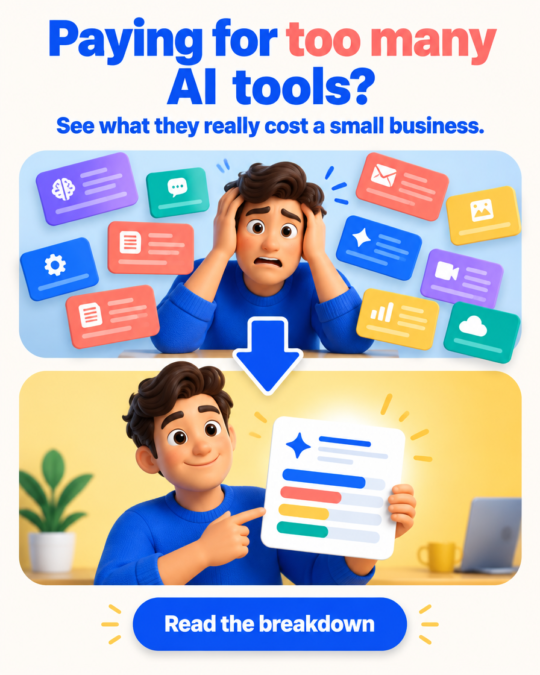
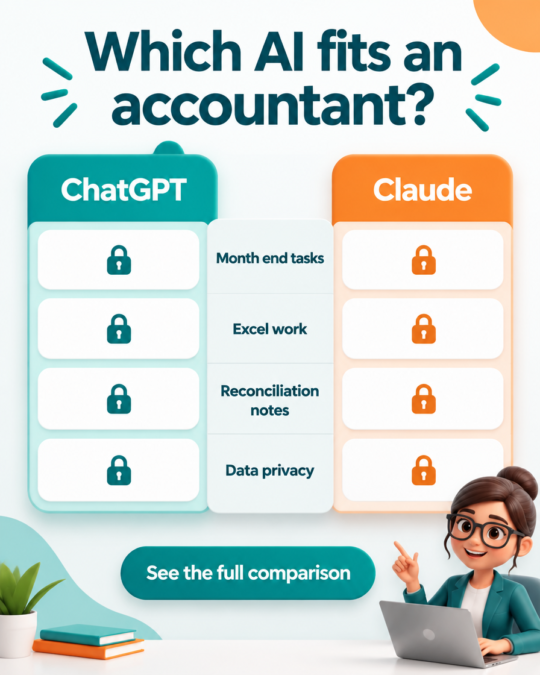
We generated two 4:5 ads with GPT Image 2.5. The first was a problem to solution ad about paying for too many AI tools. The second was a comparison ad with the answers deliberately hidden, so the article stays the destination. Both prompts contained exact headline text, no numbers and no brand logos. An image cost 0.25 credit in our preflight check, and both ads together cost 0.5. They passed the author’s review for spelling and layout.
Test 3: Ads Studio from a website address
We gave Ads Studio our homepage address. It researched the brand and produced a tagline, an audience description and eight products. All eight were consulting services taken from our About page, such as dashboards and AI automation workflows. It did not treat our blog posts as products.
Our site exists to publish blog guides, help businesses use AI and build AI automation, so we generated only a brand ad and an AI Automation Workflows ad at 3:4. Each cost 4 credits, 8 in total, and the brand research itself showed no credit cost. Both ads passed the author’s review.
Test 4: Virality Predictor
The tool accepts videos of 16 seconds or less. It rejected our final 30 second film, so we ran it on a 15 second draft (480p, no voiceover).
The scale for Hook Score was not shown on the screen we saw, so we treat the number as directional. Higgsfield describes the tool as an estimate to guide your choice, not a guarantee. The draft had no voice or on screen text, which likely explains the low audio and language bars. We cannot say the final film scores better, because it could not be tested. If you want to use the predictor, build a cut of 16 seconds or less.
The Credit Ledger
The balance moved from 2,068.03 to 1,519.53. A 15 second 1080p clip quoted at 180 credits, half the price of the 30 second version. What credits cost in money depends on your plan, so check our Higgsfield AI pricing guide and the cost shown before you confirm any job. For wider budgeting, see what AI tools cost a small business.
What Broke or Surprised Us
- The predictor refused anything over 16 seconds.
- Marketing Studio templates are not available through the connector.
- Ads Studio read services as products and ignored the blog.
- A preset suggestion did not match our concept.
- A 30 second 1080p film cost twice as much as a 15 second one.
- On screen text and voice in generative video are known risks, which is why we fixed the wording in the prompt and reviewed the result.
Which Higgsfield Tool Fits Which Business
This table follows the categories documented in Higgsfield’s Marketing Studio overview. We have not tested the rows marked as untested.
Higgsfield notes that UGC Videos need a product image or a reference ad, and that Motion Design is the option when there is no physical product.
Prompt Lab: Advanced Prompts You Can Copy
Strong prompts share eight parts.
| Part | What to write | Why it matters |
|---|---|---|
| Hook | What happens in the first second | Holds attention |
| Subject | Who or what is shown | Avoids random visuals |
| Visual style | Palette, lighting, mood | Keeps it on brand |
| Camera and motion | Orbit, push in, speed | Makes it feel produced |
| On screen text | Exact wording in quotes | Reduces misspelling |
| Audio and voice | Voice type, exact script, music | Controls sound |
| Constraints | Length, ratio, pacing | Fits the platform |
| Negatives | What must not appear | Prevents errors |
Prompts we ran
The first is our brand film prompt, shortened. Replace the bracketed field with your own script of about 60 to 70 words.
Premium 30 second vertical 9:16 brand film in high end motion graphics style with cinematic lighting on a clean light studio background. Pacing: fast and tight, the voice starts within half a second, a new visual beat every 2 to 3 seconds, a strong hook in the first second. Palette: cobalt blue, coral, warm yellow, teal, violet. Typography: large bold sans serif, perfectly spelled, kinetic text, readable for at least 2 seconds, inside the safe area. Voiceover: one professional female narrator, warm and confident, brisk natural pacing, speaking exactly this script and nothing else: [your script]. Timeline: 0 to 3s six glossy panels with simple icons fly in one by one. 3 to 8s the panels snap into a cube with a soft impact. 8 to 15s the cube rotates with a macro lens and shallow depth of field. 15 to 22s the camera orbits and faces light up. 22 to 26s on screen text with a punchy scale animation. 26 to 30s the cube opens like petals and the supplied logo settles as the final frame, unchanged. Audio: soft whoosh, gentle impact, bright shimmer, light music bed under the voice. No human faces, no third party logos, no statistics, no flicker, no extra words.
The second is the problem to solution ad.
Problem to Solution social media ad, 4:5 vertical. Top half: a friendly 3D animated small business owner looking overwhelmed, surrounded by many floating generic subscription cards. Bottom half: the same character calm, holding one clean breakdown card. A bold arrow connects the halves. Headline in very large bold sans serif, exact spelling: 'Paying for too many AI tools?'. Subline: 'See what they really cost a small business.' Button text: 'Read the breakdown'. Saturated cobalt blue, coral and warm yellow on a light background, rounded panels, soft shadows. No numbers, no prices, no brand logos, no extra words.
The third is the comparison ad. It shows questions only, so the answers stay in your article.
Comparison social media ad, 4:5 vertical. Headline in very large bold sans serif, exact spelling: 'Which AI fits an accountant?'. Two equal rounded panels labeled with the plain text 'ChatGPT' and 'Claude', text only, no logos. Four rows with exact labels: 'Month end tasks', 'Excel work', 'Reconciliation notes', 'Data privacy'. Every answer cell is empty with a small lock icon. No winner, no checkmarks, no scores. Button text: 'See the full comparison'. Saturated teal, orange and white, rounded corners, soft shadows. No numbers, no extra words.
Templates we have not tested
Replace each bracketed field with your own facts.
Product ad video (needs a product photo)
Vertical 9:16 15 second ad for [product], using the supplied product photo as the hero. Hook in the first second: [problem it solves]. Show the product in [setting]. Camera: slow push in, then a close up of [key feature]. On screen text, exact spelling: '[headline]' then '[call to action]'. Natural light, [brand colors]. Audio: light upbeat music and one friendly voice reading exactly: '[15 word script]'. No extra text, no claims or numbers that are not in my brief.
Local business promo
Vertical 9:16 15 second promo for a [type of business] in [neighborhood]. Hook: [what makes it different]. Show [three real services or products]. Warm friendly style, bright natural light. On screen text, exact spelling: '[business name]' and '[opening hours or offer]'. Audio: soft upbeat music, one local sounding narrator reading exactly: '[script]'. No fake reviews, no invented prices.
Service explainer
Vertical 9:16 20 second explainer for [service]. Hook: the one question your customer asks first. Three simple animated steps, each with an icon and a short label: '[step 1]', '[step 2]', '[step 3]'. Clean modern motion graphics, [brand colors]. Voiceover, exact script: '[script]'. End on the supplied logo. No statistics, no promises of results.
Social proof ad (use only real reviews you have permission to publish)
Social proof ad, 4:5 vertical. A clean quote card with this real customer review, exact words: '[review]', attributed as '[first name]'. Soft background in [brand colors], large readable type, one star row only if the review included a rating. Button text: '[call to action]'. No extra words.
Seasonal offer ad
Seasonal offer ad, 4:5 vertical for [business] and [season or occasion]. Headline, exact spelling: '[headline]'. Offer line only if it is real: '[offer]'. [Seasonal visual], festive but clean, [brand colors], rounded panels, soft shadows. No invented discounts, no extra words.
Before You Post: Disclosure, Rights and Brand Safety
- Disclosure. According to YouTube’s official help page on altered or synthetic content, creators must disclose meaningfully altered or generated content that appears realistic, while unrealistic content and minor edits do not need it. Rules differ on Meta, TikTok and ad networks, and they change, so check each platform’s current policy before posting. Our film uses stylized graphics and a synthetic narrator, and we would label it as AI generated.
- Rights. Use only logos and images you own or have permission to use. Keep third party logos and real people out of prompts.
- Claims. Do not publish prices, statistics or testimonials you cannot verify, and never promise results.
- Human review. Check spelling, how the brand name is pronounced, the logo and any claim before every post.
How to Measure Whether It Works
We did not publish our assets during this test, so we have no performance data to share. Here is how to measure your own.
| Asset | Measure | Where to find it |
|---|---|---|
| Brand film | Watch time and profile visits | Platform analytics |
| Static ads | Link clicks and saves | Platform analytics and a tagged link |
| Concept ads | Clicks per concept | Ad platform reports |
| All assets | Credits per usable asset | Your own ledger |
Compare a few posts over several weeks and keep the ledger. Treat predictor scores as a tie breaker, not proof.
What We Did Not Test
- Marketing Studio templates, UGC Videos and Product Shots
- Soul ID characters and avatars
- Video reformatting to other aspect ratios and dubbing
- Real publishing, reach or conversion results
- The predictor on our final 30 second film
FAQ
Is Higgsfield good for small business marketing?
It is a fast, low cost way to produce brand films and ads, provided you review every output. It does not supply strategy or results.
How many credits does a brand video cost?
In our test, a 30 second 1080p film cost 360 credits and a 15 second one quoted at 180. Cost depends on model, length and resolution, so read the cost shown before confirming.
Can an AI assistant run Marketing Studio templates?
Higgsfield’s help center says the template based Marketing Studio is not yet available through MCP or other agentic channels, so you run it on the website.
Do I need to write prompts?
Not for Marketing Studio templates, according to Higgsfield. A prompt path exists for formats the templates do not cover, and the library above helps there.
Do I have to say my ad is AI generated?
It depends on the platform and on how realistic the content is. Check the current policy of every platform you post on.
Can the Virality Predictor score any video?
Not in our test. It accepted only videos of 16 seconds or less.
Conclusion
Higgsfield works best as a production layer in a plan you already have. Start with one cheap draft, lock your exact wording, supply your real logo, and keep a credit ledger. Review every output before it goes live, disclose AI use where the rules require it, and measure the results yourself.
If you want to build a repeatable content or AI automation workflow for your business, explore more in our Business & AI category, browse the AI Insights Hub, or get in touch. Comparing video tools first? See our guide to the best AI video generators.

Ahmad Hussain
ACCAAhmad builds advanced Excel models, Power BI dashboards, and AI automation for businesses. He writes AI Foresight 360 himself, and every pricing figure and feature claim is verified against official documentation at the source.
Connect on LinkedIn