Google’s Veo 3.1 turns a paragraph of text into an eight second product video with synchronised sound. That part is easy. Writing a paragraph that returns something you would spend ad budget on is not. Most Veo 3.1 prompts fail for the same three reasons: they describe a product instead of directing a shot, they ignore the audio track Veo generates whether you asked for one or not, and they request things the model cannot deliver at the chosen settings.
This library gives you 30 Veo 3.1 prompts for product videos, grouped by the kind of business buying the ad, plus the constraints that decide whether a prompt works before you click generate. Every specification and price below comes from Google’s own documentation, verified in August 2026. For the wider collection, start with the AI prompts library guide.
Want a structure that works across video tools? See the eight part prompt formula in our Higgsfield marketing strategy guide.
What Makes Veo 3.1 Prompts Work for Product Videos
Veo 3.1 prompts work for product videos when they read like shot instructions rather than product descriptions. The model needs a subject, one physical action, a camera behaviour, a lighting mood and an explicit audio cue. Adjectives such as premium, stunning or eye catching give the model nothing to render and usually return generic stock footage.
The second thing to understand is that Veo does not composite your product photo into a scene. It generates every frame from scratch, including your product. A prompt saying “our moisturiser jar” returns the model’s idea of a moisturiser jar, not yours. Real packaging needs reference images, covered further down.
Third, audio is not optional. Native audio is always on for Veo 3.1, per Google’s Veo API documentation. Leave it unspecified and the model invents a soundtrack, usually generic library music with odd room tone. One sentence of audio direction is the highest return edit you can make to any of your Veo 3.1 prompts.
The Seven Part Formula Behind Strong Veo 3.1 Prompts
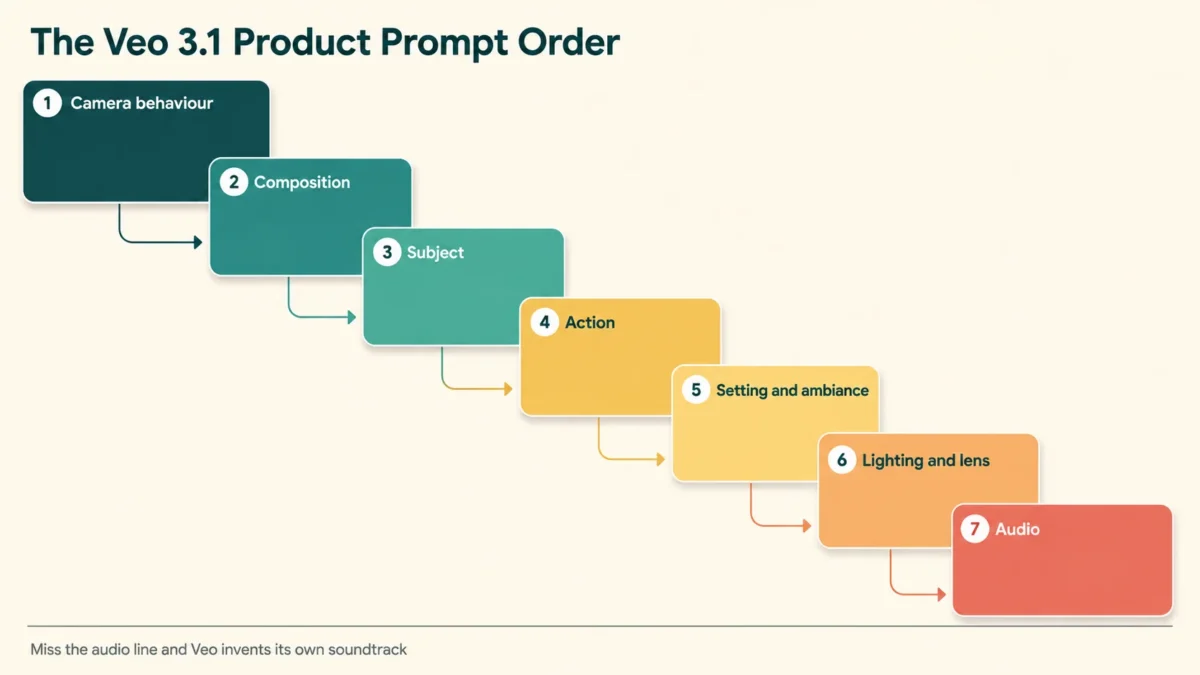
Google’s prompt guidance lists seven building blocks: subject, action, style, camera positioning and motion, composition, focus and lens effects, and ambiance. Veo 3.1 prompts that include all seven plus an audio line consistently beat longer prompts that only pile on more adjectives.
This is the order that works for commercial shots:
- Camera behaviour. Slow dolly in, static locked off shot, orbiting tracking shot, top down shot.
- Composition. Close up, macro, medium shot, wide shot.
- Subject. The product described physically: material, colour, finish, size in frame.
- Action. What happens in eight seconds. One action, not four.
- Setting and ambiance. Surface, background, colour palette, time of day.
- Lighting and lens. Soft window light, hard key light, shallow focus, macro lens.
- Audio. Ambient sound, sound effects, and any spoken line inside quotation marks.
Google recommends putting dialogue in quotation marks and describing sound effects and ambient soundscape separately. The official Veo 3.1 prompting guide from Google Cloud goes deeper on cinematic vocabulary.
One constraint on dialogue in Veo 3.1 prompts: an eight second clip fits roughly the number of words a person actually speaks in eight seconds. Short lines land accurately. Long lines get compressed or clipped.
Limits to Know Before You Write Veo 3.1 Prompts
Veo 3.1 generates clips of four, six or eight seconds at 720p, 1080p or 4K, always at 24 frames per second, in 16:9 or 9:16 only. Several settings force each other. Reference images, 1080p and 4K all require the full eight seconds. Extension runs at 720p only. These interactions decide what you can write.
| Specification | Veo 3.1 |
|---|---|
| Clip length | 4, 6 or 8 seconds |
| Forced to 8 seconds when | using reference images, 1080p or 4K |
| Aspect ratios | 16:9 (default) and 9:16 only |
| Frame rate | 24 fps |
| Resolutions | 720p, 1080p, 4K (no 4K on Lite) |
| Native audio | Always on |
| Reference images | Up to 3 |
| Videos per request | 1 |
| Prompt length | 1,024 tokens |
| Storage of output | 2 days, then deleted |
| Watermark | SynthID on every output |
| Language | English fully supported |
Three of those matter more than the rest.
Your videos are deleted after two days. Google stores generated videos for two days, then removes them. Download every clip you like on the day you make it.
There is no free API tier for Veo. Current paid per second rates from the Gemini API pricing page are $0.40 for Veo 3.1 Standard at 720p and 1080p, $0.60 at 4K, $0.10 for Veo 3.1 Fast at 720p, and $0.05 for Veo 3.1 Lite at 720p. One eight second clip therefore costs $3.20 on Standard at 1080p, $0.80 on Fast, and $0.40 on Lite.
Veo 3.1 is still a preview model. Veo 3 and Veo 2 are marked deprecated, and preview status means behaviour can change. Treat any prompt library, this one included, as a starting structure.
Draft on Lite, iterate on Fast, render the winner on Standard. Running 30 Veo 3.1 prompts once each on Lite costs about $12 at published rates, against roughly $96 on Standard at 1080p. Our breakdown of AI tools cost for small business puts that against the rest of the stack.
30 Veo 3.1 Prompts for Product Videos
The 30 Veo 3.1 prompts below are grouped into six sets of five by the kind of business running the ad. Replace the bracketed placeholders with your own details. All 30 Veo 3.1 prompts are written for a single eight second clip and keep camera, lighting and audio as separate elements.
Hero Product Reveal Prompts
These Veo 3.1 prompts suit launch announcements, homepage hero loops and top of funnel paid social.
1. Slow dolly in on a static [PRODUCT] centre frame on polished dark stone. A single hard key light rakes across the [MATERIAL] finish while the background stays in deep shadow. Shallow depth of field, cinematic grade. Audio: low ambient hum, one soft chime as the camera settles. No dialogue.
2. Macro close up of [PRODUCT] rotating slowly against a seamless white background. Bright even studio lighting, no visible shadows, clinical product photography style. The camera holds steady as the label passes through frame. Audio: quiet room tone and one soft whoosh on rotation. No music.
3. Top down shot of [PRODUCT] on linen beside [TWO PROPS]. A hand enters from the right, slides the product two inches toward the lens, then withdraws. Warm morning window light, soft shadows, natural palette. Audio: fabric rustle and a gentle placement sound.
4. Orbiting tracking shot circling [PRODUCT] floating at eye level in a dark studio with slow drifting haze. Cool blue rim lighting picks out the edges. Premium technology advertisement style. Audio: a deep synth pad rising slowly, one low impact on the final frame.
5. Static locked off medium shot of [PRODUCT] on a concrete plinth. Lighting shifts gradually from cool blue to warm amber, revealing texture on the [MATERIAL] surface. Minimal architectural composition with generous negative space. Audio: studio silence and one soft tonal swell.
Ecommerce Demonstration Prompts
Demonstration Veo 3.1 prompts show the product working, which converts better than beauty shots for retargeting.
6. Close up of two hands opening [PRODUCT] on a clean wooden table, revealing [CONTENTS] inside. Soft diffused daylight from the left, natural colours, no styling gloss. Camera stays level with the table. Audio: cardboard opening, light paper rustle, quiet kitchen ambience. No music.
7. Medium shot of a person pressing the button on [PRODUCT] and the [VISIBLE EFFECT] starting immediately. Bright modern interior, high key lighting, contemporary grade. Single continuous shot, no cuts. Audio: a crisp mechanical click followed by a soft operating hum.
8. Macro shot of [PRODUCT] being applied to [SURFACE], showing the texture change in fine detail. Extremely shallow focus on the point of contact, everything else blurred. Neutral daylight balance. Audio: a soft contact sound and quiet room tone. No dialogue, no music.
9. Side profile medium shot of [PRODUCT] folded from open to closed by two hands in one smooth movement. Grey seamless background, soft top light, honest demonstration style. Audio: a hinge or fabric sound matched to the movement, plus low room tone.
10. Static overhead shot of [PRODUCT] beside the item it replaces, with a hand pushing the older item out of frame to the left. Even bright lighting, flat lay composition, plain background. Audio: one short sliding sound and quiet ambience. No music, no voiceover.
Founder and Customer Testimonial Prompts
Face to camera clips outperform polished ads on most feeds. Keep the spoken line inside these Veo 3.1 prompts short.
11. Handheld medium close up of a woman in her thirties in a bright home office, holding [PRODUCT] beside her shoulder. She looks into the lens and says, “I built this because nothing else did the job properly.” Natural window light, unpolished vlog aesthetic. Audio: her voice, quiet room tone.
12. Selfie style shot of a man in a workshop, phone at arm’s length, [PRODUCT] on the bench behind him. He says, “Six months of testing and this is version nine.” Overcast daylight through a large window, slightly desaturated grade. Audio: his voice plus faint workshop ambience.
13. Static medium shot of a customer seated in a cafe holding [PRODUCT] still at chest height, turning it once toward the lens. She says, “It paid for itself in a month.” Warm interior lighting, shallow focus, blurred background. Audio: her voice, low cafe murmur, no music.
14. Close up of a man’s face in a plain interior, no product visible, speaking directly to camera. He says, “I nearly did not buy this.” Soft frontal key light, neutral background, documentary interview framing. Audio: his voice only, clean room tone, no music, no subtitles.
15. Handheld waist up shot of a woman walking slowly through a shop aisle carrying [PRODUCT]. She glances at the lens and says, “Third one this year.” Fluorescent retail lighting, realistic colour, slight camera movement. Audio: her voice, footsteps, faint retail background noise.
Food, Drink and Retail Prompts
Texture and sound do the persuading here, so the audio line in these Veo 3.1 prompts carries real weight.
16. Macro shot of [DRINK] poured slowly into a clear glass filled with ice, condensation forming outside. Backlit against a dark background so the liquid glows. Shallow focus on the pour point. Audio: liquid pouring, ice cracking, no music.
17. Extreme close up of a knife cutting through [FOOD ITEM], revealing the interior texture as the halves separate. Warm overhead kitchen lighting, natural wooden board, appetising grade. Audio: a crisp cutting sound and quiet kitchen ambience.
18. Slow push in on [DISH] plated on ceramic, steam rising gently, herbs scattered around the rim. Soft side lighting from a window, moody restaurant palette, shallow depth of field. Audio: faint sizzling, distant kitchen sounds, no dialogue.
19. Static shot of a shop owner placing [PRODUCT] on a wooden counter and sliding it toward the lens. Warm interior lighting, shelves softly blurred behind. Independent retail atmosphere. Audio: an object placement sound, a distant shop bell, quiet ambience.
20. Top down shot of hands wrapping [PRODUCT] in tissue paper and placing it into a branded box. Bright even daylight, clean neutral surface, calm unhurried pace. Audio: paper folding and rustling, one soft box closing sound. No music.
Professional Services Prompts
Accountancy practices, consultancies and agencies rarely have a product to film, so these Veo 3.1 prompts build credibility instead.
21. Static medium shot of an accountant in a bright office reviewing a printed report, laptop open beside her. She looks up and says, “Most of these errors repeat every quarter.” Soft daylight, muted professional palette, shallow focus. Audio: her voice, faint keyboard sound, quiet office tone.
22. Slow tracking shot moving past a wall mounted screen showing a clean financial dashboard with rising bar charts. Modern office interior, cool neutral lighting, corporate documentary style. Audio: a low ambient drone and quiet office background. No dialogue.
23. Close up of two hands signing a document on a wooden desk, a fountain pen moving steadily across the page. Warm window light from the side, shallow depth of field, professional service atmosphere. Audio: pen on paper, a quiet room, no music.
24. Medium shot of a consultant beside a glass wall covered in handwritten notes, gesturing once toward it. He says, “The number was never the problem.” Cool daylight, corporate interior, steady locked off camera. Audio: his voice with a slight room reflection.
25. Over the shoulder shot of a person scrolling a clean invoicing interface on a laptop in a quiet home office. Warm desk lamp light against evening darkness outside the window. Calm focused mood. Audio: soft mouse clicks, distant traffic, no music, no dialogue.
Vertical Social Hook Prompts
Set the aspect ratio to 9:16 for these. The Veo 3.1 prompts in this set are written to hold attention in the first second.
26. Vertical 9:16 shot. Extreme close up of [PRODUCT] filling the frame, then the camera pulls back rapidly to reveal it in an unexpected setting. High contrast lighting, bold saturated colours. Audio: one sharp impact on the pull back, then an upbeat rhythmic beat.
27. Vertical 9:16 shot. A hand drops [PRODUCT] onto a soft surface in slow motion, the object bouncing once and settling. Bright even lighting, clean single colour background. Audio: a soft muffled impact and a short satisfying chime. No dialogue.
28. Vertical 9:16 handheld shot of a person walking toward camera holding [PRODUCT] at chest height, city street behind them. They stop and say, “This replaced four things on my desk.” Natural daylight, realistic street colour. Audio: their voice, street ambience.
29. Vertical 9:16 static shot of [PRODUCT] centre frame while the background changes colour three times across the clip. Studio lighting stays constant on the product. Bold graphic advertising style. Audio: three synchronised percussion hits, one per colour change.
30. Vertical 9:16 top down shot of hands arranging [THREE PRODUCTS] into a neat row on a plain surface, one item at a time. Soft even lighting, calm pace, minimal composition. Audio: three light placement sounds and quiet ambience. No music, no voiceover.
How Do You Keep Your Real Product on Screen?
Veo 3.1 accepts up to three reference images to guide the generated video. Google’s documentation states you can supply images of a person, character or product to preserve the subject’s appearance in the output. For anyone advertising a real physical item, this is the single most important feature, and it changes how you write your Veo 3.1 prompts.
Three rules make it work.
Use clean isolated product shots. A busy background gives the model competing information. Plain background, even lighting, product filling most of the frame.
Accept the eight second lock. Reference images force the clip to eight seconds. You cannot combine them with a four or six second clip.
Keep packaging movement slow. Label text is the most common visual failure in AI video. Prompt for the product held still or turned once, not tossed or unpacked quickly. If the brand name must be legible, frame it large and steady.
You can generate those reference images with Google’s image model and feed them straight into Veo. Our guide to Nano Banana 2 infographic prompts covers the style that produces clean isolated assets.
Veo 3.1 also supports first and last frame interpolation. Supply a starting image and an ending image and the model generates the transition, the most reliable way to control how a shot begins and ends.
How Do You Build a 30 Second Ad From 8 Second Clips?
No single call produces a 30 second Veo clip. You build longer ads either by generating several eight second clips and cutting them together, or by using extension, which adds seven seconds at a time to a video Veo generated previously. That choice shapes how you sequence your Veo 3.1 prompts.
The documented extension rules are specific:
- Extension adds 7 seconds per call and can be applied up to 20 times
- Combined output can reach 148 seconds
- Input must be a Veo generated video of 141 seconds or less
- Extension runs at 720p only, in 16:9 or 9:16
- Extension is not available on Veo 3.1 Lite
- Speech does not extend well unless a voice is present in the final second of the input clip
That last point catches people out. If a clip ends on a silent product shot and the extension is asked to continue a voiceover, the voice usually will not carry.
For most small business ads, cutting four eight second clips together gives more control than chaining extensions, because you can drop the two that did not work. At the published Fast rate at 720p, four clips cost about $3.20 before retries.
Should You Use Veo 3.1 or Gemini Omni Flash for Product Ads?
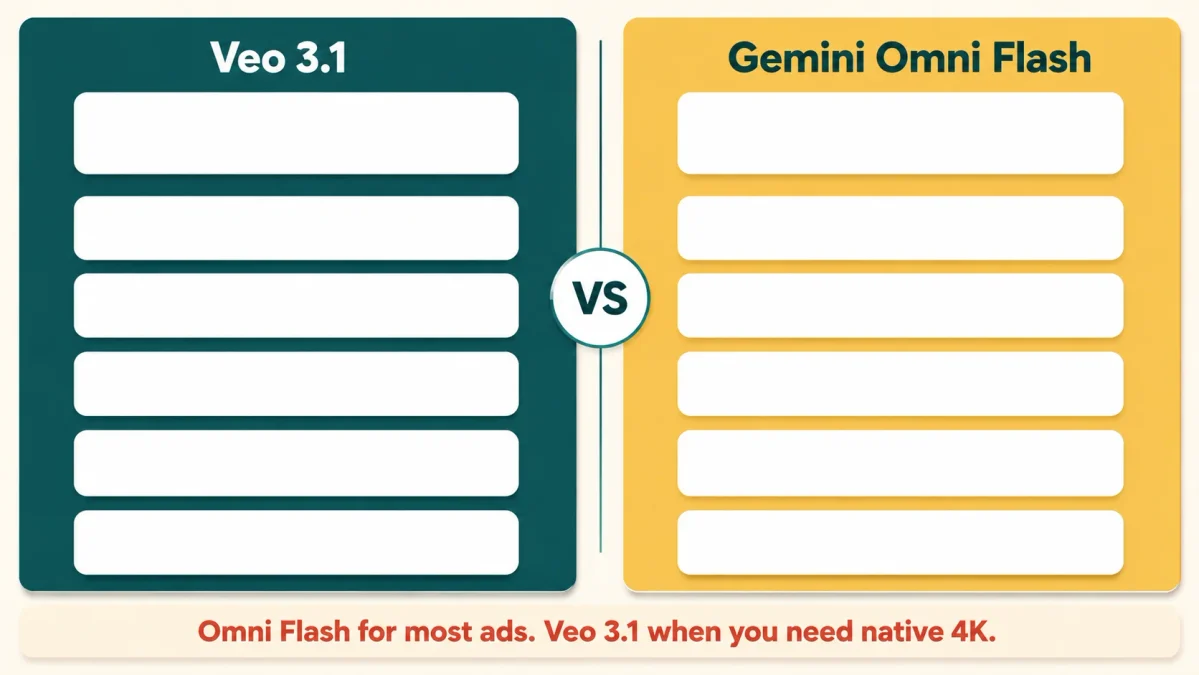
For most product advertising in late 2026, Gemini Omni Flash is the stronger default and Veo 3.1 remains better for maximum visual fidelity. Omni Flash is generally available, generates longer clips, renders on screen text, accepts timecode instructions and supports conversational editing. Veo 3.1 is still preview but offers native 4K.
| Capability | Veo 3.1 | Gemini Omni Flash |
|---|---|---|
| Model status | Preview | Generally available |
| Clip length | 4, 6 or 8 seconds | Up to 10 seconds, extendable to 40 total |
| Maximum resolution | 4K native | 4K upscaled |
| Approximate price, 720p with audio | $0.05 to $0.40 per second by tier | About $0.10 per second |
| On screen text | Not a documented feature | Documented and supported |
| Timecode prompting | No | Yes, using [0-3s] style syntax |
| Conversational editing | No | Yes, across turns |
| Product reference inputs | Up to 3 images | Images and video references |
Two Omni Flash behaviours change how you adapt existing Veo 3.1 prompts. First, the model defaults to producing several shots and building a small narrative, so if you want one unbroken product shot you must say so explicitly with phrasing such as single continuous shot or no scene cuts. Second, negative prompts are not supported as a parameter, so exclusions go inside the prompt text, for example no on screen text or no dialogue.
Every prompt here transfers with one edit: add a single scene instruction at the start. Full parameter details sit in the Gemini Omni Flash documentation. Google is not the only option either. Our head to head on Kling 3.0 versus Veo 3.1 and the roundup of the best AI video generators cover the alternatives.
Timing explains why this question is live. OpenAI discontinued the Sora web and app experiences on 26 April 2026, and per OpenAI’s own discontinuation notice the Sora API shuts down on 24 September 2026. Teams that built automated ad generation on it are choosing a replacement right now.
What Veo 3.1 Still Gets Wrong
No amount of prompt craft fixes these, and knowing them saves money before you rewrite your Veo 3.1 prompts for the fifth time.
Legible text is unreliable. Labels, price tags and packaging copy frequently render as approximations. Cut to a real product photograph for any beat where the name must be readable.
Only English is fully supported. Google states other languages have not been evaluated and results can vary. To advertise in Urdu, Arabic or Spanish, generate silent video and add voiceover separately.
One video per request. There is no batch of variations to pick from, and each generation is a separate charge.
Person generation is regionally restricted. In the EU, UK, Switzerland and MENA locations, Veo 3.1 permits only the allow_adult setting. Image to video, interpolation and reference image workflows are limited to allow_adult everywhere.
Latency is unpredictable. Google gives a range of 11 seconds to 6 minutes at peak, so do not build a live client demo around it.
Disclosure, Watermarking and Ad Platform Rules
Every video Veo generates carries a SynthID watermark, Google’s invisible system for identifying AI generated content. It never appears on screen, but it can be detected programmatically, and platforms increasingly use provenance signals to label AI content automatically. That covers output from every one of the Veo 3.1 prompts here.
Three implications for a small business running paid ads:
- Assume your ad can be identified as AI generated, and decide whether that matters in your category before you spend.
- Check the AI content labelling policy of each platform you advertise on, because these change frequently.
- Never generate video implying a real identifiable person endorses your product without consent.
None of this is a reason to avoid AI video. It is a reason to treat generated advertising the way you treat any other advertising claim. Our roundup of the best AI tools for marketing covers compliance across the wider stack.
How We Evaluated These Prompts
Transparency beats a testing claim we cannot back. These Veo 3.1 prompts were not generated and scored in a controlled test. They were built by working backwards from Google’s published prompt structure, the documented parameter table and the constraints in the official API reference, then written to fit the formats small businesses actually buy: hero shots, demonstrations, testimonials and vertical social.
Every number here comes from Google’s documentation rather than a pricing aggregator. During research, published per second Veo rates on reseller sites varied by more than tenfold against Google’s official rate card. Check the source before budgeting from anyone’s figures, including ours, because preview pricing changes. More collections sit in the AI Prompts Library.
Frequently Asked Questions
How long can a Veo 3.1 video be?
A single Veo 3.1 generation produces a clip of four, six or eight seconds at 24 frames per second. Eight seconds is mandatory when using reference images, 1080p or 4K. Longer videos are built by extending a Veo generated clip by seven seconds at a time, up to 20 times, reaching a maximum combined length of 148 seconds at 720p, so plan your Veo 3.1 prompts in eight second beats.
Do Veo 3.1 prompts need to include audio instructions?
Yes. Native audio is always on, so the model generates a soundtrack whether or not you asked for one. Veo 3.1 prompts that leave audio unspecified typically return generic music and mismatched room tone. Specify ambient sound, sound effects, and any dialogue inside quotation marks.
How much does one Veo 3.1 product video cost?
Using Google’s published Gemini API rates, one eight second clip costs about $0.40 on Veo 3.1 Lite at 720p, $0.80 on Fast at 720p, and $3.20 on Standard at 1080p. There is no free API tier, so every second is billed from the first second, which makes drafting Veo 3.1 prompts on the cheapest tier worthwhile.
Can Veo 3.1 use my real product photo?
Yes. Veo 3.1 accepts up to three reference images to preserve the appearance of a person, character or product. Use clean isolated shots on a plain background, and note that reference images force the clip to a full eight seconds, which constrains how you write the accompanying Veo 3.1 prompts.
Are Veo 3.1 videos safe to use in paid advertising?
Google applies safety filters to generated videos and watermarks every output with SynthID. The videos are yours to use commercially, but platform rules on labelling AI generated content differ and change often, so check each ad platform’s current policy before running a campaign.
The Short Version
Strong Veo 3.1 prompts are shot instructions with an audio line attached, not product descriptions with more adjectives. Give the model a camera behaviour, one physical action, a lighting mood and an explicit soundtrack, then supply reference images when real packaging has to appear. Draft on the cheapest tier, render the winner on the best one, and download everything within two days before Google deletes it.
Copy the 30 Veo 3.1 prompts above, swap in your product, and change one variable at a time. That discipline improves results faster than any prompt library, this one included.

Ahmad Hussain
ACCAAhmad builds advanced Excel models, Power BI dashboards, and AI automation for businesses. He writes AI Foresight 360 himself, and every pricing figure and feature claim is verified against official documentation at the source.
Connect on LinkedIn