
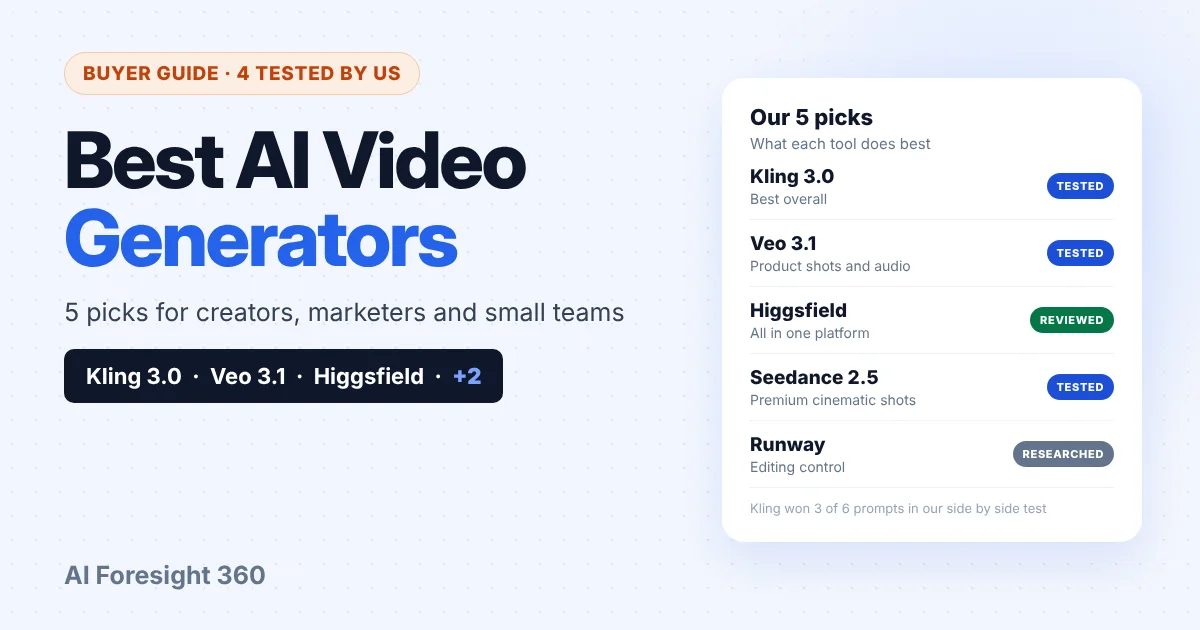
The best AI video generators in late 2026 are Kling 3.0, Veo 3.1, Higgsfield, Seedance and Runway. Each one wins at a different job. We tested Kling 3.0 and Veo 3.1 side by side on six prompts, spent 30 days on Higgsfield, made a rooftop test clip and a 30 second brand film with Seedance, and researched Runway from its official documentation.
Most lists of AI video tools rank twenty names they have never used. This one is shorter on purpose. For every tool below, we say clearly whether the verdict comes from our own clips or from the vendor’s own pages, what it costs, and the kind of video it is actually good at.
Quick picks
- Best overall: Kling 3.0, for fast motion, talking clips and price
- Best for product shots and audio: Veo 3.1
- Best all in one platform: Higgsfield, which gives you Kling, Veo, Seedance and more in one account
- Best for premium cinematic shots and brand films: Seedance
- Best for editing control: Runway
How Did We Choose These AI Video Generators?
We picked tools that a small business, creator or marketer can actually buy today, and then tested the ones we could. Kling 3.0 and Veo 3.1 ran the same six prompts. Higgsfield was used for 30 days, including a Seedance test. Runway is included from official sources and is labeled that way.
Our hands on test ran in two rounds. Round 1 used each model’s own app. Round 2 ran five prompts on Higgsfield on October 22, 2026, with 8 second clips, 16:9 and audio on, so the cost of every generation was visible before we confirmed it. All ten Round 2 clips finished on the first attempt.
We judged each pair by watching the clips together. That is a practical test, not a laboratory benchmark, and the full results, prompts and every clip are in our Kling 3.0 vs Veo 3.1 test.
We left out tools we could not verify properly, and we did not include Sora. OpenAI discontinued it this year, as explained further down.
What Are the Best AI Video Generators Right Now?
The best AI video generators right now cover five different needs. Kling 3.0 is the strongest default for most people. Veo 3.1 makes the most polished slow product shots. Higgsfield is a platform rather than a model. Seedance won our premium cinematic test. Runway is a full editing workspace.
| Tool | Best for | Max clip length | Audio | Our verdict based on |
|---|---|---|---|---|
| Kling 3.0 | Fast motion, talking clips, value | Up to 15 seconds | Native | Our test: won 3 of 6 prompts |
| Veo 3.1 | Product shots, audio | 4, 6 or 8 seconds | Always on | Our test: won 2 of 6 prompts |
| Higgsfield | Many models in one account | Depends on the model | Depends on the model | Our 30 day review |
| Seedance 2.5 | Premium cinematic shots, brand films | Up to 15 seconds, multi shot (Seedance 2.0 launch post) | Stereo | Our test: won a 3 model rooftop test |
| Runway | Editing control | Depends on the model | Depends on the model | Official Runway help center |
Clip lengths and audio from each vendor’s own documentation. Test results from our Kling 3.0 vs Veo 3.1 test (October 2026) and our Higgsfield review.
1. Kling 3.0: best overall (tested by us)
Kling 3.0 is the model we would use first. In our test it won three of six prompts against Veo 3.1, lost two and tied one, and it cost a quarter of Veo’s credits on Higgsfield: 20 credits for an 8 second clip at Pro quality, against 80.
Its wins came where AI video usually breaks. A skateboarder landing a trick looked believable on Kling and clearly worse on Veo. Two colleagues talking across a table looked more natural, and a bakery sign that had to read OPEN came out better. At Pro quality, Kling also returned full 1080p.
Kling 3.0 launched in February 2026 and makes clips of up to 15 seconds with native audio and multi shot storytelling, according to Kuaishou’s launch announcement. Bought directly, Kling’s credits policy sets $1 at 66 credits at standard pricing, and failed generations are refunded.
Watch out for: slow, carefully composed product shots, where it lost both of our tests to Veo. There is also no fixed price per second, because each generation uses whatever the interface shows at the time.
2. Veo 3.1: best for product shots and audio (tested by us)
Veo 3.1 is Google’s video model, and it produced the most polished results in our test when the shot was slow and controlled. It won both product style prompts, a coffee cup on a cafe table and a mug with a slow camera orbit, and its audio was the stronger of the two models.
Its weaknesses were the mirror image of Kling’s strengths. It lost the fast motion, dialogue and text tests, and at the basic quality setting we used on Higgsfield it returned 1280 × 720 rather than 1080p, while costing four times as many credits.
Access has also changed. Google’s Veo developer documentation says the Veo 3.1 preview models in the Gemini API were shut down on October 22, 2026, and it now recommends Gemini Omni Flash as the default video model for developers. Google DeepMind’s Veo page still presents Veo 3.1 as its leading video model, available in the Gemini app and Google Flow, and platforms such as Higgsfield still offer it.
Watch out for: clip length. Veo 3.1 makes 4, 6 or 8 second clips, so anything longer needs extension or editing.
3. Higgsfield: best all in one platform (reviewed by us)
Higgsfield is not a single model. It is a platform that runs many of them, including Kling 3.0, Veo 3.1, Seedance, MiniMax Hailuo, Wan and its own Cinema Studio models, under one credit balance. That is why we ran our second test round there: both models in one place, with the price shown before every generation.
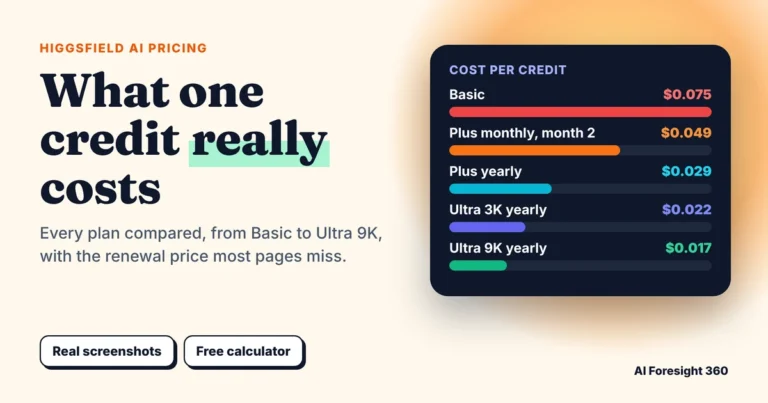
We used Higgsfield for 30 days for our Higgsfield AI review. The main advantage is choice: you can send a fast action shot to Kling and a product hero shot to Veo without paying for two subscriptions. Individual plans start at $9 a month for Basic, with Plus at $49 and Ultra at $129 at full monthly price and lower prices on yearly billing, and the plans shown differ by country, as covered in our Higgsfield pricing guide.
Watch out for: two things from our test. Higgsfield automatically rewrote our Veo prompts into longer scene descriptions, and in one clip it added a spoken line we never asked for. And the cheapest plan has the highest cost per credit, so Basic is better for trying the platform than for regular output.
4. Seedance: best for premium cinematic shots (tested by us)
Seedance is ByteDance’s family of video models, and on Higgsfield it produced the best single clip we have made. In our Higgsfield AI review, we ran one rooftop prompt, a person in a red jacket at golden hour with wind moving the fabric, through Seedance 2.5, Higgsfield’s Cinema Studio 4.0 and Kling 3.0.
Seedance 2.5 won. Its golden hour light on the fabric was the most convincing, the skyline held its detail, and the motion looked cinematic rather than synthetic. It returned 1920 × 1080 at a high bitrate for 60 credits. Cinema Studio 4.0 came a close second, and Kling 3.0 came third, but at only 10 credits for a 720p clip.
We used Seedance 2.5 again for a 30 second vertical brand film with voiceover, documented in our Higgsfield marketing strategy test. Three 480p drafts cost 180 credits and the final 1080p film cost 360. Drafting at low resolution first saved most of the budget.
ByteDance’s Seedance 2.0 launch post explains the family’s strengths: it can combine up to 9 images, 3 video clips and 3 audio clips with a text instruction, and produce multi shot video with stereo audio of up to 15 seconds. The same post admits the model is still far from perfect, naming detail stability, multi subject consistency, text rendering and occasional audio distortion.
Watch out for: cost. At 60 credits a clip in our test, Seedance 2.5 cost six times as much as Kling 3.0 at 720p, so save it for shots that need to look premium. On Higgsfield’s Basic plan, the plan card lists Seedance 2.0 Fast and Mini but not Seedance 2.5.
5. Runway: best for editing control (not tested by us)
Runway is the choice when you need to shape a clip rather than just generate one. It is a full creative workspace built around its own Gen-4.5 model, and its Pro plan adds access to third party image and video models.
Runway’s credits guide prices Gen-4.5 at 12 credits per second of video, so a 10 second clip uses 120 credits. Its pricing page lists paid plans from $12 a month, and the Pro plan includes 2,250 credits a month. The Free plan gives a one time 125 credits, includes only Gen-4 Turbo image to video, and adds a watermark.
Watch out for: monthly credits on Standard and Pro expire at the end of each billing cycle, while purchased credits do not. We did not test Runway for this guide, so this section is based on its official help center.
Which AI Video Generator Should You Use?
Choose by the video you need to make, not by the model with the best reputation. Use Kling 3.0 for social clips, action and talking explainers. Use Veo 3.1 for polished product shots. Use Higgsfield if you want several models in one account, Seedance for premium cinematic shots and brand films, and Runway for heavy editing.
- Social media clips at volume: Kling 3.0. It won our motion and dialogue tests at a quarter of Veo’s credit cost.
- Product ads and hero shots: Veo 3.1. It won both product style prompts and had the best audio. Our Veo prompts for product videos are a good starting point.
- Explainers and testimonial style clips: Kling 3.0, which handled two people talking better than Veo.
- Brand films and premium hero shots: Seedance. It won our rooftop test and made our 30 second brand film.
- Editing, trimming and reshaping clips: Runway.
- A small team that needs all of the above: Higgsfield, so you can route each shot to the model that suits it.
For a full marketing workflow, our Higgsfield AI marketing strategy for small business shows how we tested a small business content plan on Higgsfield, with a full credit ledger.
How Much Do AI Video Generators Cost?
AI video is priced in credits, and a credit means something different on every platform. Kling sells 66 credits for $1, Higgsfield plans start at $9 or $19 a month, depending on your country, and Runway starts at $12 a month. The useful number is cost per usable clip, which depends on the model, the length, the resolution and how many attempts you need.
| Tool | How you pay | Starting price | What we saw or found |
|---|---|---|---|
| Kling 3.0 | Credits | $1 buys 66 credits | 20 Higgsfield credits per 8 second Pro clip; failed generations refunded by Kling |
| Veo 3.1 | Through the Gemini app, Google Flow or a platform | Depends on the service | 80 Higgsfield credits per 8 second clip at basic quality; Gemini API preview closed October 22, 2026 |
| Higgsfield | Monthly plan plus credits | $9 a month for 120 credits | Plus $49 for 1,000 credits, Ultra $129 for 3,000 at full monthly price; lower on yearly billing |
| Seedance 2.5 | Through platforms such as Higgsfield | Depends on the platform | 60 Higgsfield credits for a 1080p high bitrate clip; 360 for a 30 second 1080p film |
| Runway | Monthly plan plus credits | From $12 a month; Free plan with 125 one time credits | Gen-4.5 uses 12 credits per second; not tested by us |
Sources: Kling credits policy, Google Veo documentation, Higgsfield pricing page (November 14, 2026), Runway help center and pricing page, and our own test on Higgsfield, October 22, 2026.
In our own test on Higgsfield, an 8 second Kling 3.0 Pro clip cost 20 credits and a Veo 3.1 clip at basic quality cost 80. At 20 usable clips a month, that is 400 credits on Kling against 1,600 on Veo, before any retries. A mix of 18 Kling clips and 2 Veo hero shots came to 520 credits.
The single best budgeting habit is to plan for attempts, not finished clips. All ten of our Round 2 clips worked first time, but that is not a safe assumption for a month of production. For the wider cost of an AI tool stack, see what AI tools really cost a small business.
What Happened to Sora?
OpenAI discontinued Sora this year. Its Sora discontinuation notice says the Sora web and app experiences ended on April 26, 2026, and the Sora API was set to be discontinued on September 24, 2026. OpenAI says it permanently deletes Sora data after discontinuation and any final export window.
If you were using Sora, the closest replacements depend on how you used it. For creative clips made in an app, Kling 3.0 or Higgsfield are the easiest switch. For polished product style footage, Veo 3.1 through Google Flow or a platform. For developers, Google now points to Gemini Omni Flash for video in the Gemini API.
The bigger lesson is vendor risk. Sora closed within months of being a flagship, and Veo 3.1’s API preview has now closed too. Keep your prompts, settings and best outputs saved outside any one platform, so switching tools takes an afternoon rather than a project.
What Should You Check Before Paying for an AI Video Generator?
Check four things before you subscribe: whether your plan allows commercial use and removes the watermark, how long credits last, whether failed generations are refunded, and the real resolution you get at the setting you can afford. These details change the true cost far more than the headline price.
- Watermarks and commercial use. Runway’s Free plan adds a watermark, and commercial use terms differ by plan and platform. Confirm the terms on the exact plan you buy.
- Credit expiry. Runway’s monthly credits on Standard and Pro expire each billing cycle. Kling’s monthly membership credits last one month, while purchased credits last two years.
- Failed generations. Kling’s policy refunds credits for failed generations. Check this on any platform before you plan a large batch.
- Resolution at your setting. In our test, Veo 3.1 at basic quality returned 720p while Kling at Pro returned 1080p. The resolution on the marketing page is not always what your setting delivers.
Frequently Asked Questions
What are the best AI video generators in 2026?
The best AI video generators in 2026 are Kling 3.0, Veo 3.1, Higgsfield, Seedance and Runway. In our tests, Kling 3.0 won three of six prompts against Veo 3.1 at a quarter of the credit cost, Veo 3.1 made the best product shots, and Seedance 2.5 won a premium cinematic test.
Which AI video generator is best for beginners?
Higgsfield is the easiest place to start, because one account gives you several models and shows the credit cost before every generation. Kling 3.0 is the best single model to begin with, since it handled the widest range of prompts well in our test.
Is there a free AI video generator?
Some tools offer limited free credits. Runway’s Free plan gives a one time 125 credits, limited to Gen-4 Turbo image to video, with a watermark. Free tiers on most platforms are fine for trying a tool, but not for regular or commercial work.
Is Veo 3.1 still available?
Yes, but not through the Gemini API preview, which Google shut down on October 22, 2026. Google DeepMind’s Veo page still offers Veo 3.1 in the Gemini app and Google Flow, and platforms such as Higgsfield still provide it.
Which AI video generator is cheapest?
In our test on Higgsfield, Kling 3.0 Pro cost 20 credits for an 8 second clip, against 80 for Veo 3.1 at basic quality. Bought directly, Kling sells 66 credits for $1. The cheapest tool overall depends on how many attempts each usable clip takes.
What replaced Sora?
There is no single replacement. Kling 3.0 and Higgsfield suit creators who made clips in an app, Veo 3.1 suits polished product footage, and Google now recommends Gemini Omni Flash for developers generating video through the Gemini API.
The Verdict
The best AI video generators are the ones matched to the job. On our evidence, Kling 3.0 is the best default, Veo 3.1 is worth its higher price for product shots and audio, and Higgsfield is the most practical way to use both. Seedance is the pick for premium cinematic shots, and Runway fills the editing gap.
Before you commit a budget, run three or four of your own prompts on two tools, check the credit cost shown before each generation, and keep your prompts saved outside the platform. For a closer look at credits and plans, see our Higgsfield AI pricing guide and our head to head test of Kling 3.0 vs Veo 3.1.