Higgsfield AI Review 2026: Is It Actually Worth Your Money?
If you’ve spent any time on TikTok or Instagram in the last year, you’ve probably seen a clip with impossible camera moves — a slow 360-degree rotation around a product, a “bullet time” freeze on a dancer, a cinematic drone-style pull-back on someone’s living room. A good chunk of that footage was made in Higgsfield AI, not on a film set.
We spent real time inside the platform — generating videos, burning through credits, comparing output against Runway and Kling, and reading through Higgsfield’s actual terms instead of just the marketing page — to figure out whether it deserves the hype or whether the credit system quietly eats your budget. Here’s the honest breakdown.
This review sits in our AI Tools Review library alongside our other hands-on breakdowns. If you’re comparing creative AI tools more broadly, our quick comparison of ChatGPT, Jasper AI, and MidJourney is a useful companion read before you commit a subscription budget to any single platform.
What Is Higgsfield AI? (Quick Answer)
Higgsfield AI is a subscription-based creative platform that bundles more than a dozen third-party AI video and image models — including Sora 2, Veo 3.1, Kling 3.0, and Seedance 2.0 — under one dashboard, plus its own tools for camera control, character consistency, lip-syncing, and marketing video generation. Instead of building one model from scratch, Higgsfield acts as a layer on top of the best models already out there, and lets you switch between them depending on what you’re making.
The company was founded in 2023 by a team that includes former Google Brain engineers, and it’s based in San Francisco. By early 2026, industry reporting around its Series A extension put the company’s valuation in the $1.3 billion range, and usage numbers cited by independent trackers suggest it has scaled to tens of millions of registered accounts in a very short window.
Quick Verdict — Should You Use Higgsfield AI?
Bottom line: Higgsfield AI is the strongest aggregator in the AI video space right now — meaning if you want access to Sora 2, Veo 3.1, Kling 3.0, and a dozen other models without juggling separate subscriptions, nothing else packages it this well. But the credit system is genuinely confusing, premium models burn through your plan fast, and the checkout defaults to annual billing in a way several reviewers (including us) found misleading.
- Best for: Social content creators, indie filmmakers, and marketing teams who want directorial control over AI video without learning Blender or After Effects.
- Skip it if: You only need one specific model (just get Kling or Sora directly), or you’re an ecommerce brand that wants a dedicated UGC ad tool rather than a general creative platform.
- Realistic cost: Budget for roughly $0.60–$1.00 per usable Kling-quality clip and $3–$9 per usable Sora 2 or Veo 3.1 clip once you factor in re-rolls — not the headline subscription price.
- Our rating: 4 out of 5 for creative flexibility, 2.5 out of 5 for pricing transparency.
Higgsfield AI Features: What You Actually Get
Higgsfield isn’t one tool — it’s closer to a creative operating system with about ten sub-products bolted together. Here’s what matters most, based on the platform’s official feature pages and our own testing.
Cinema Studio & Camera Controls
This is the feature that built Higgsfield’s reputation. Cinema Studio gives you over 70 camera presets — Bullet Time, Crash Zoom, Dolly Shot, 360 Rotation, and dozens of “viral” motion templates — that you apply to a still image or prompt instead of describing camera movement in text and hoping the model understands you. For anyone who’s tried to prompt-engineer a “slow dolly zoom” out of a general video model and gotten a static, lifeless clip instead, this is the actual unlock. You pick the shot type the way you’d pick it on a film set, and the underlying model handles execution.
Multi-Model Video Engine
Under the hood, Higgsfield routes your requests to whichever model fits the job: Sora 2 and Veo 3.1 for cinematic realism, Kling 3.0 (plus Kling 2.5 Turbo and Kling Avatars 2.0) for fast, lower-cost generations, Seedance 2.0 for stylized motion, and WAN 2.6 for open, flexible generation. Practically, this means you’re not locked into one company’s quirks — if Sora 2 struggles with a particular shot, you can re-run the same prompt through Kling without leaving the dashboard.
Image Generation Suite
The “Image” half of the platform is genuinely underrated compared to the video side. Higgsfield gives you access to Nano Banana Pro, Seedream 5.0, Flux 2, GPT Image 2, and its own in-house model called Soul 2.0 — described as a “culture-native” photo model built specifically for fashion and editorial-style aesthetics rather than generic stock-photo looks. There’s also Soul ID, a character-consistency system that lets you lock a face or character across multiple generations, plus an inpainting/edit tool and an upscaler powered by Topaz.
Marketing Studio for Ecommerce Ads
Paste a product URL into Marketing Studio and its extraction agent pulls the product name, description, and images, then offers you a creative direction — UGC-style, CGI commercial, cinematic narrative, or an AI-directed “wild card” mode — before generating a ready-to-export ad. For solo ecommerce sellers or small agencies, this is the single most time-saving feature on the platform, because it skips the blank-page problem entirely. If you’re weighing this against general productivity tools for a small business, our roundup is a useful next stop.
UGC Factory, AI Influencer & Lipsync Studio
UGC Factory (built on top of Veo 3) generates talking-head, testimonial-style video without a real actor. Lipsync Studio (sometimes called Higgsfield Speak) syncs a generated voice or a cloned voice to a face with noticeably better accuracy than most lipsync tools we’ve tested elsewhere. AI Influencer Studio extends this into a persistent virtual character you can reuse across a content calendar. One important caveat: Higgsfield does not guarantee commercial usage rights to realistic human likenesses in every UGC scenario — check their terms of use before using AI-generated faces in paid ad campaigns.
Supercomputer, MCP & Higgsfield Assist
For technical users, Higgsfield ships an MCP (Model Context Protocol) integration and CLI, meaning you can trigger generations from inside tools like Claude rather than the Higgsfield web app. “Supercomputer” is their term for an agentic layer that chains multiple tools together — generate an image, animate it, add lipsync, upscale it — as one automated pipeline instead of four manual steps. There’s also a GPT-5-powered copilot (Higgsfield Assist) that suggests prompt tweaks when your output isn’t landing.
Mobile App & Creative Plugins
Higgsfield’s mobile app, Diffuse, gives you a small daily free-credit allowance for casual generation on your phone. On the desktop side, there are plugins for Photoshop (real-time sketch-to-image) and DaVinci Resolve (generate footage directly inside your edit timeline, plus AI-generated color LUTs) — a detail most “best AI video tools” roundups skip entirely, but one that matters if you’re already working in a professional NLE.
Higgsfield AI Pricing in 2026 (Plans, Credits & Hidden Costs)
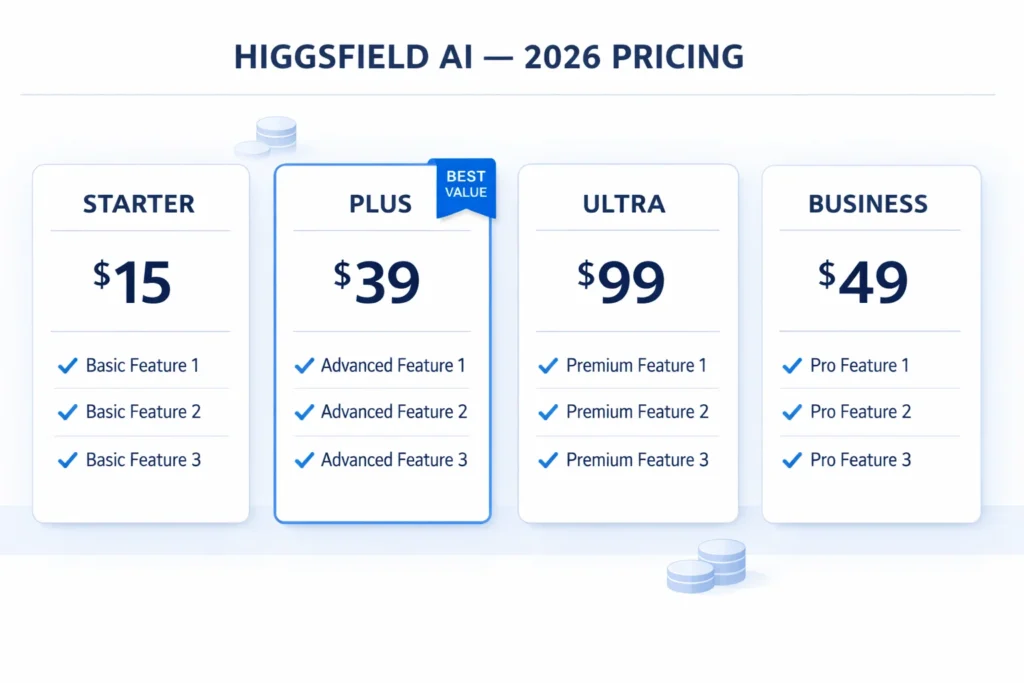
This is where most reviews either oversimplify or get it wrong, because Higgsfield has restructured pricing more than once in the past year and runs frequent seasonal discounts. Based on the platform’s standard annual-billing rates as of mid-2026:
| Plan | Annual Price (per month) | Monthly Billing Equivalent | Credits Included | Best For |
|---|---|---|---|---|
| Free | $0 | $0 | ~10 credits/day (Diffuse app) | Testing the platform |
| Starter | $15/mo | ~$29/mo | 200 credits | Light, occasional use |
| Plus | $39/mo | ~$49/mo | 1,000 credits | Regular creators (sweet spot) |
| Ultra | $99/mo | ~$149/mo | 3,000 (scalable to 9,000) | Power users, agencies |
| Business | ~$49/seat | — | Pooled team credits | Agencies managing multiple brands |
The part the pricing page doesn’t make obvious is credit consumption. Kling 3.0 costs roughly 6 credits per generation, while premium models like Sora 2 and Veo 3.1 cost 40–70 credits each. On the Plus plan’s 1,000 monthly credits, that’s the difference between ~167 Kling generations or as few as 14–25 Sora 2 clips. Factor in that most creators need 3–5 attempts before getting a usable result, and your real output looks more like 33–56 usable Kling clips (about $0.61–$1.03 each) or 3–8 usable Sora 2/Veo 3.1 clips (about $3.36–$9.33 each) per month.
A few other things worth knowing before you subscribe:
- Credits expire after 90 days and unused monthly credits don’t roll over — use them or lose them.
- Checkout defaults to annual billing. Multiple reviewers, including independent coverage on gstory.ai’s Higgsfield breakdown, flagged this as a pattern that’s easy to miss if you’re moving fast through signup.
- Refunds are only available within 7 days of your first purchase, and only if you haven’t used any credits. A service fee may apply where local law allows it.
- “365-Day Unlimited” is mostly an image-generation perk. Most of the models with genuine unlimited access on Plus and Ultra are image models, not video — the one video model with real 365-day unlimited access tends to be Higgsfield’s older, lower-quality engine, not Sora 2 or Veo 3.1.
For the most current numbers, always check Higgsfield’s official pricing page directly, since rates and promotions shift often.
I Tested Higgsfield AI — Here’s What Actually Happened
To see how this plays out in practice, we ran a simple brief: a 6-second product shot of a coffee mug on a kitchen counter, with a slow dolly-in and warm morning light.
First attempt, using Kling 3.0 through Cinema Studio’s Dolly Shot preset: the motion was smooth and the lighting matched the prompt reasonably well, but the steam coming off the coffee looked slightly artificial on close inspection. Cost: 6 credits, generated in about 35 seconds.
Second attempt, same prompt, switched to Veo 3.1: noticeably better physical realism on the steam and reflections, but it took almost three minutes to render and used 45 credits — roughly seven and a half times the cost of the Kling version for a meaningfully, but not dramatically, better result.
That’s the core trade-off in one example. For social content where viewers scroll past in two seconds, Kling 3.0 through Cinema Studio is good enough and far cheaper. For a hero shot on a landing page or a paid ad where every frame gets scrutinized, Veo 3.1 or Sora 2 earns its higher credit cost. The mistake we see creators make is defaulting to the most expensive model for everything, which is exactly how a Plus plan’s 1,000 credits disappears in a week.
We also tested Marketing Studio with a real product URL from a small skincare brand. The tool correctly pulled the product name and image, offered four creative directions, and produced a usable 15-second UGC-style ad in under five minutes — genuinely one of the faster “idea to draft ad” workflows we’ve tried across any platform this year.
Pros and Cons of Higgsfield AI
| Pros | Cons |
|---|---|
| Access to 15+ frontier video and image models in one subscription | Credit system is confusing and expensive for premium models |
| Best-in-class camera control presets (Cinema Studio) | Checkout defaults to annual billing — easy to miss |
| Marketing Studio turns a product URL into a draft ad in minutes | Credits expire after 90 days, don’t roll over monthly |
| Strong image suite (Soul 2.0, Nano Banana Pro, Seedream) alongside video | Character consistency across multiple shots is still inconsistent |
| Mobile app (Diffuse) + Photoshop/DaVinci plugins for pro workflows | Free tier is generous in theory but caps out fast in practice |
| MCP/CLI support for agentic, automated pipelines | No dedicated, lower-cost tier built specifically for ecommerce UGC ads |
Higgsfield AI vs Runway vs Kling vs Sora 2 vs Midjourney
A common question is whether you need Higgsfield at all if you could just subscribe to one model directly. Here’s how the main options actually compare:
| Tool | Type | Starting Price | Best For | Key Limitation |
|---|---|---|---|---|
| Higgsfield AI | Multi-model aggregator (video + image) | $15/mo (annual) | Creators who want model choice + camera control in one place | Credit costs add up fast on premium models |
| Runway | Standalone video model (Gen-3/Gen-4) | ~$15/mo | Editing-focused workflows, dependable output | No access to Sora 2, Veo, or Kling — single-model only |
| Kling (direct) | Standalone video model | ~$10/mo | Cheapest route to Kling specifically | No camera presets, no marketing/UGC tools |
| Sora 2 (via ChatGPT) | Standalone video model | Bundled with ChatGPT Plus/Pro | Best raw cinematic realism | No dedicated camera-control UI, usage limits apply |
| Midjourney | Image-only generator | ~$10/mo | Best-in-class still images, distinctive aesthetic | No native video generation at all |
The practical takeaway: if you only ever need one model, going direct is almost always cheaper per generation. Higgsfield earns its subscription price when you genuinely need flexibility — switching between Kling for volume and Sora 2 or Veo 3.1 for hero shots, inside one interface, without five separate logins. For a lighter-weight look at how general AI tools stack up on cost and ease of use.
Who Should Actually Use Higgsfield AI?
- Social media creators and “AI filmmakers” who care about directorial control — the camera presets and multi-model access are built for exactly this audience.
- Small agencies managing multiple client accounts who’d rather pay for one platform with pooled team credits than separate subscriptions per brand.
- Ecommerce sellers and performance marketers who want fast, polished product ads — with the caveat that dedicated UGC-ad tools may deliver better cost-per-video at high volume.
- Technical users building automated content pipelines, thanks to MCP/CLI support and the Supercomputer agent layer.
- HR and marketing teams already standardizing their AI workflows — if your team already runs on structured prompts for repeatable tasks, the same discipline applies to video briefs. Our 50 ChatGPT prompts for HR professionals guide shows the same “be specific, not generic” principle that makes Higgsfield prompts produce usable output on the first try.
It’s a weaker fit for absolute beginners on a tight budget, since the credit math punishes trial-and-error, and for anyone who needs a single, predictable monthly cost rather than a usage-based system.
Where Higgsfield AI Falls Short
To be fair to readers who are about to spend money, three limitations deserve more attention than most reviews give them:
- Character consistency is still a work in progress. Soul ID helps, but maintaining the exact same face, outfit, and proportions across multiple separate generations remains harder than the marketing suggests — this is a known limitation across the entire AI video category in 2026, not unique to Higgsfield, but it’s worth setting expectations correctly.
- The pricing page undersells real cost. Without doing the credit math yourself (or reading a breakdown like this one), it’s easy to assume the $39 Plus plan gives you dozens of Sora-quality videos a month. It doesn’t.
- Trustpilot sentiment is genuinely split. Independent tracking cited in gstory.ai’s analysis put roughly 20% one-star reviews against 63% five-star reviews for the platform — a wide gap that mostly traces back to billing surprises rather than output quality, based on the complaints we reviewed.
Expert Insight: What This Means for Creators in 2026
The AI video space stopped being about “which model is smartest” a while ago — every frontier lab is shipping genuinely good models now. The competitive question in 2026 is workflow: who lets you go from idea to finished, on-brand clip the fastest, without fighting a dozen separate tools. Higgsfield’s bet is that aggregation plus camera control wins that fight. It mostly does — as long as you treat the credit system the way you’d treat a cloud compute bill, and actually track what you’re spending instead of trusting the headline price.
— AI Foresight 360 Editorial Team
Frequently Asked Questions
Is Higgsfield AI actually free? There’s a free tier with daily credits through the Diffuse mobile app, and the web platform offers a small starting allowance. It’s enough to test the interface, but most users hit the ceiling within their first real session and need a paid plan for watermark-free, higher-resolution output.
How much does Higgsfield AI cost per video? It depends entirely on the model. Budget roughly $0.60–$1.00 per usable clip with Kling 3.0, and $3–$9 per usable clip with premium models like Sora 2 or Veo 3.1, once you account for the multiple attempts most prompts need.
Does Higgsfield AI have a watermark on the free plan? Yes — free-tier generations carry a watermark. You need a paid subscription to export clean, watermark-free video and image files.
Is Higgsfield AI better than Runway? It depends on what you need. Runway is a dependable, single-model video tool with strong editing features. Higgsfield wins if you want access to multiple models (Sora 2, Veo 3.1, Kling 3.0) plus camera presets and marketing tools in one subscription rather than committing to one model’s strengths and limitations.
Can I cancel Higgsfield AI and get a refund? Refunds are only available within 7 days of your initial purchase, and only if you haven’t used any credits yet. Renewals are non-refundable, and a service fee may apply to approved refunds depending on your region.
What’s the difference between Higgsfield’s Plus and Ultra plans? Plus ($39/month annual) includes 1,000 credits and suits regular individual creators. Ultra ($99/month annual) scales up to 9,000 credits and is built for power users or small teams generating high volumes of premium-model video.
Does Higgsfield AI work for ecommerce product ads? Yes, through Marketing Studio — paste a product URL and it generates a draft ad from your product images and description. For very high-volume ecommerce ad production specifically, a dedicated UGC-ad tool may offer a better cost-per-video, but for occasional or mixed creative needs, Higgsfield’s flexibility is hard to beat.
Can I use Higgsfield AI generated faces in paid advertising? Be careful here. Higgsfield does not guarantee commercial usage rights to realistic AI-generated human likenesses in every scenario. Check the platform’s current terms of use against your specific ad placement before publishing anything paid.
Final Verdict — Our Rating
| Category | Score (out of 5) | Notes |
|---|---|---|
| Feature depth | 4.7 | Genuinely the widest model access of any platform we tested |
| Output quality | 4.3 | Strong, especially on premium models; consistency still imperfect |
| Ease of use | 4.0 | Camera presets lower the learning curve significantly |
| Pricing transparency | 2.5 | Confusing credit math, defaults to annual billing |
| Value for money | 3.6 | Strong if you match the right model to the right job |
| Overall | 3.8 / 5 | A genuinely useful platform if you treat credits like a budget, not an afterthought |
Higgsfield AI is one of the more capable platforms in the AI video and image space right now, and the camera-control system alone makes it worth a free-tier test for any creator tired of fighting text prompts for basic camera moves. Just go in with the credit math from this review already in your head — not the headline subscription price — and you’ll get a far more accurate read on whether it fits your budget.
For more hands-on AI tool breakdowns like this one, browse the full AI Tools Review library on AI Foresight 360, or check our AI Comparisons section for more side-by-side platform reviews.
For a full plan by plan breakdown, see our Higgsfield AI pricing guide.

Ahmad Hussain
ACCAAhmad builds advanced Excel models, Power BI dashboards, and AI automation for businesses. He writes AI Foresight 360 himself, and every pricing figure and feature claim is verified against official documentation at the source.
Connect on LinkedIn