

Most guides about AI agents for small business are written as tool lists. Ten logos, a paragraph each, a comparison table built from whatever the vendors put in their press kits. That format is easy to write and almost useless to act on, because it skips the two things that actually decide whether an agent helps your business: what it will cost you next month, and what it will get wrong.
This guide takes a different route. Every price below for AI agents for small business was pulled from the vendor’s own pricing page in August 2026, not from an aggregator. Every failure claim traces to peer reviewed research. And the cost section walks through real arithmetic for three specific workflows, so you can see how the same amount of work produces wildly different bills depending on which platform you picked.
If you are new to the underlying concept, our complete guide to what AI agents are covers the definitions and architecture. This piece assumes you already know roughly what an agent is and want to know what happens when you actually deploy one.
What Makes AI Agents for Small Business Different From Regular Automation?
AI agents for small business decide which steps to take, while traditional automation follows steps you defined in advance. A Zap that copies form submissions into a spreadsheet runs the same path every time. An agent given the same inbox chooses whether to reply, escalate, file, or ignore, and picks its own tools to do it.
That distinction matters for cost, not just capability. Traditional automation is predictable because the step count is fixed. Agents are unpredictable because the step count depends on what the agent decides to do. A single instruction like “research this lead and write a follow up” might trigger three tool calls or thirty, and on most platforms you pay per tool call.
This is the single most important thing to understand before you buy anything. The pricing page shows you a monthly figure. Your actual bill is that figure plus however much your agents decided to work.
How Many Small Businesses Actually Use AI Agents?
Adoption of AI tools is now close to universal among small employers, but adoption of true AI agents for small business work is much narrower. The most reliable recent data comes from the Small Business and Entrepreneurship Council, which found that 82 percent of small business employers have adopted at least one AI tool, with the typical firm using a median of five.
That figure comes from the SBE Council Small Business Technology Use Survey, conducted by TechnoMetrica among 517 small business employers with 2 to 99 employees, fielded February 17 to 23, 2026 and released that March, with a credibility interval of plus or minus 4.4 percentage points.
Read that number carefully, because a lot of coverage misreads it. The survey measured AI tools, which SBE describes as a mix of assistants, marketing platforms, and automation tools. It did not measure autonomous agents. A business using ChatGPT, Canva, a scheduling tool, an email writer, and QuickBooks with AI features hits five tools without running a single agent.
The rest of the survey is more useful for planning than the headline. Sixty six percent of respondents reported revenue increases linked to AI, and 93 percent plan to keep investing, with 62 percent increasing spend. But the stated concerns are the part worth pinning to your wall: reliability and accuracy topped the list at 45 percent, data security and privacy followed at 42 percent, and 25 percent of these businesses had no formal procedure for reviewing AI output at all.
Those three numbers describe the entire risk profile of deploying AI agents for small business use. The technology is being adopted faster than the controls around it.
How Much Do AI Agents for Small Business Actually Cost in 2026?
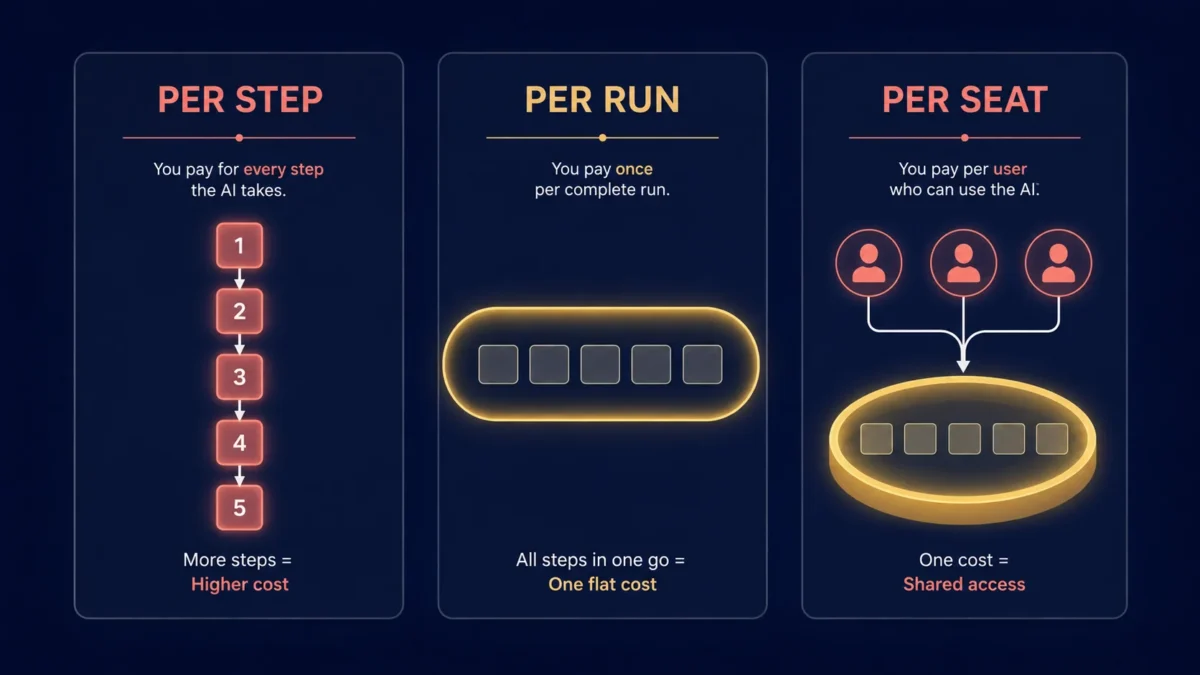
AI agents for small business start at roughly $12 to $30 per month on entry paid tiers, but the sticker price is close to meaningless on its own. What determines your bill is the metering unit each vendor uses, how many of those units your specific workflows consume, and what happens when you run out.
The Three Billing Models You Need to Understand
Almost every platform selling AI agents for small business uses one of three meters, and mixing them up is how people end up shocked by an invoice.
Per step. You pay each time the platform performs an action. Zapier calls these tasks, Make calls them credits, Relevance AI calls them Actions. A five step workflow costs five units per run. This is the most common model and the most expensive at volume.
Per run. You pay once per complete workflow execution, no matter how many steps are inside it. n8n is the main platform using this model, and its pricing page is explicit that an execution is a single run of your entire workflow regardless of step count or data volume.
Per seat plus a shared pool. You pay per user, and each seat contributes credits to one pool the whole team draws from. Lindy uses this structure.
There is also a fourth wrinkle specific to agents. Some vendors run a completely separate meter for agent products versus regular automation. Zapier is the clearest example: its main platform bills tasks, while Zapier Agents is a separate add on billing something called activities, and an activity is counted every time an agent takes an action, browses the web, or looks something up from attached knowledge.
Cost control starts at the configuration screen. The iteration limit and memory window together decide how many times your model gets billed for a single question, and both sit in the same node. We explain the trade-offs in our n8n agent settings and troubleshooting reference.
Verified Pricing for Five Agent Platforms
Every price below for these AI agents for small business platforms was taken from the vendor’s official pricing page on August 16, 2026. Prices in this category change frequently, so verify before you commit.
| Platform | Entry paid tier | Metering unit | Included at entry tier | What happens at the limit |
|---|---|---|---|---|
| Zapier platform | Professional from $19.99/mo | Tasks (action steps) | 750 tasks/mo at base tier | Auto switches to pay per task at a higher rate, or workflows pause if disabled |
| Zapier Agents | Agents Pro $33.33/mo ($400/yr) | Activities | 1,500 activities/mo | Free tier available at 400 activities/mo |
| Make | Core $12/mo | Credits (module actions) | 10,000 credits/mo | Scenarios stop running; buy extra in 1,000 or 10,000 bundles |
| n8n | Starter 20 euros/mo annual | Workflow executions | 2,500 executions/mo | Unlimited users and workflows on all tiers |
| Lindy | Plus $29.99/user/mo | Credits (work performed) | 3,000 credits per user/mo | Lindy pauses credit using actions, no overage bill |
| Relevance AI | Pro $19/mo annual | Actions plus Vendor Credits | 2,500 Actions and $20 credits/mo | Top ups at $80 per 1,000 Actions |
A few details from those pages deserve calling out because they change the math.
Zapier does not charge for triggers, and several built in tools including Filters, Paths, Formatter, Tables, and Forms consume no tasks at all. Only action steps count. That makes step ordering a real cost lever: putting a filter before your action steps rather than after means you stop paying for records you were about to discard.
Make excludes router and error handler modules from credit counting, and its code app costs 2 credits per second of execution time. Credits expire at the end of the term and do not roll over.
n8n includes unlimited users and unlimited workflows on every tier including the free self hosted Community Edition. Companies under 20 employees may qualify for 50 percent off its Business plan.
Relevance AI splits its meter in two. Actions cover platform work, while Vendor Credits cover the underlying model costs, passed through at wholesale with no markup. On paid plans you can connect your own OpenAI or Anthropic key and bypass Vendor Credits entirely.
The Overage Traps That Do Not Show on the Pricing Page
Three of these platforms handle running out of credit in ways that will surprise you.
Make simply stops. Your scenarios halt until you add credits, though you get warnings at 75 and 90 percent of your allowance, and overage protection is an Enterprise only feature.
Lindy also pauses rather than billing you, which is genuinely user friendly, but its seat definition is aggressive: anyone who uses Lindy takes a billable seat, including someone who merely mentions it in a Slack thread.
Relevance AI has the sharpest edge. Top ups are sold in minimum increments of 1,000 Actions at $80. If you exceed your Pro allowance by even 50 Actions, the smallest purchase available costs more than four times your $19 monthly subscription.
What Does a Realistic Monthly Bill Look Like?
The clearest way to see how much the billing model matters when you compare AI agents for small business is to run identical work through different meters. The scenario below models a six person professional services business running three agents. These are illustrative figures based on the published metering rules of each platform, not billing data from a live account.
Assumed monthly volume: 120 inbound leads, 250 supplier receipts, and 400 customer support emails.
| Workflow | Runs per month | Action steps per run | Zapier tasks | Make credits | n8n executions |
|---|---|---|---|---|---|
| Lead intake to CRM to follow up | 120 | 5 | 600 | 600 | 120 |
| Receipt capture to bookkeeping | 250 | 5 | 1,250 | 1,250 | 250 |
| Support email triage and drafting | 400 | 4 | 1,600 | 1,600 | 400 |
| Total monthly units | 3,450 | 3,450 | 770 |
The same three workflows consume 3,450 billable units on a per step platform and 770 on a per run platform. That is roughly four and a half times the metered volume for identical work, driven entirely by the billing model rather than by anything the business is doing differently.
In practical terms, that total sits comfortably inside Make’s 10,000 credit Core plan at $12 per month and inside n8n’s 2,500 execution Starter plan at 20 euros per month. On Zapier, 3,450 tasks is well past the 750 task base tier, so you would be buying a higher task tier on the pricing slider.
The seat based model behaves differently again. Lindy publishes its own credit bands: everyday requests like a lookup or a drafted reply consume 2 to 250 credits, while deep work such as triaging a day’s support queue consumes 250 to 1,000. Run that support triage every working day and you are looking at somewhere between 5,500 and 22,000 credits a month. A single Plus seat provides 3,000. That one workflow alone pushes you to the Pro tier at $99.99 per user per month, or higher.
None of this makes any platform wrong. It makes the choice of AI agents for small business genuinely consequential. Match the meter to the shape of your work: many short workflows favor per run pricing, while a few long ones can sit fine on per step pricing.
Most businesses bring someone in to scope this properly rather than doing it alone. That role has become a career in itself, and if you are considering it, our guide on starting an AI consulting business sets out the skills clients pay for and what they never ask about.
Which Three Workflows Should AI Agents for Small Business Handle First?
Start AI agents for small business on high volume, low judgment, easily verified work. The three below meet all three criteria and cover most small businesses.
Workflow One: Lead Intake to CRM to Follow Up
This is the highest return first agent for most businesses because leads are time sensitive and the failure mode is visible immediately.
Connect your web form or inbox as the trigger. Have the agent enrich the contact from public sources, create or update the CRM record, draft a personalized follow up, and post a notification to your team channel. Critically, route the draft to a human for approval rather than letting it send.
Keep the enrichment step tightly scoped. Open ended instructions like “research this company” are what turn a five unit workflow into a fifty unit one, because the agent keeps searching until it feels finished.
Workflow Two: Receipt and Invoice Capture to Bookkeeping
Finance workflows suit agents well because the output is structured and errors surface during reconciliation rather than in front of a customer.
Point the agent at a dedicated receipts inbox or folder. Have it extract vendor, date, amount, tax, and category, validate the extraction against expected ranges, write the entry to your accounting system, and file the original document with a consistent naming convention.
Build in a confidence threshold. Anything the agent is unsure about, anything above a value you set, and anything from a new supplier should go to a review queue rather than straight into the ledger. If you want to compare purpose built options for this workflow specifically, we reviewed the leading tools in our guide to the best AI bookkeeping agents for small business, and covered the accounting platform side in our Intuit AI agents review.
Workflow Three: Customer Email Triage and Draft Replies
Triage is a better first support use case than autonomous replying, and the research supports being conservative here.
Have the agent read incoming messages, classify them by topic and urgency, apply tags, route to the right person, and prepare a draft reply using your existing help documentation. Your team reviews and sends.
The value here is not the draft quality. It is that nobody spends the first hour of the day sorting an inbox. Even if half the drafts get rewritten, the classification and routing has already paid for itself.
Where Do AI Agents for Small Business Still Fail?
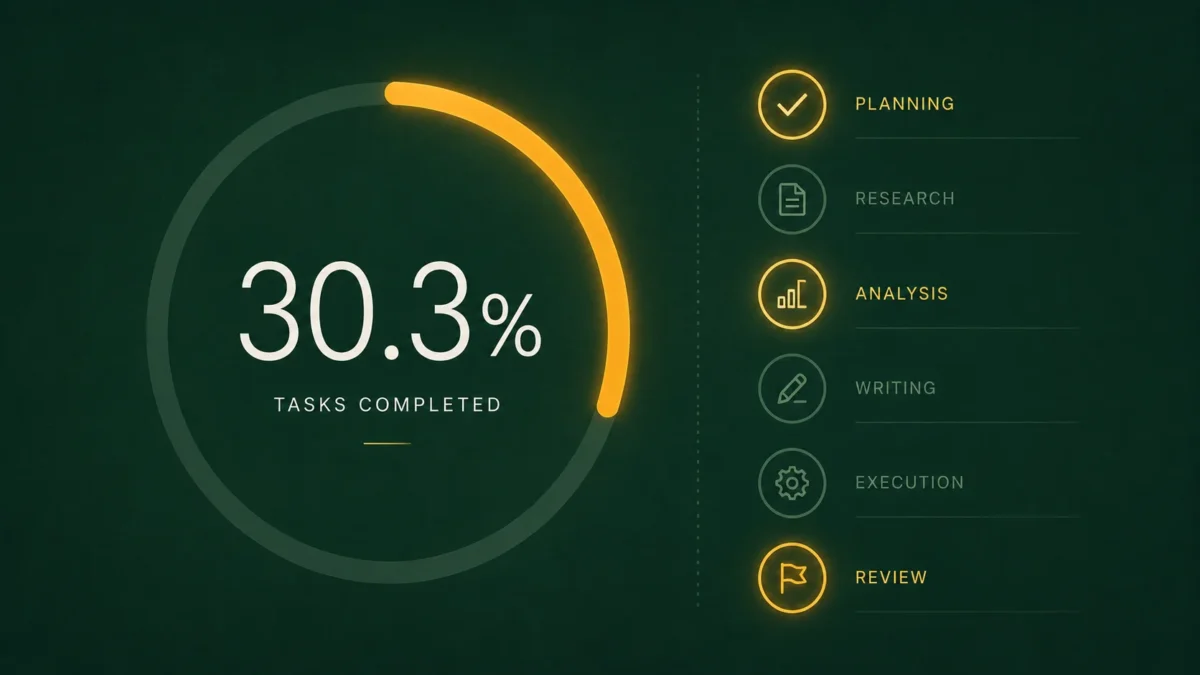
AI agents for small business fail most often on long, multi step tasks that cross several applications, and the research on this is consistent rather than anecdotal. Benchmark results show autonomous completion rates well below half on realistic workplace tasks, and reliability has not improved at the same pace as raw capability.
The most relevant study is TheAgentCompany, built by a team at Carnegie Mellon and published in the NeurIPS 2025 Datasets and Benchmarks Track. It places agents inside a simulated small company with internal websites, colleagues to message, and 175 real tasks drawn from software engineering, project management, data science, administration, HR, and finance. The best performing model tested, Gemini 2.5 Pro, completed 30.3 percent of tasks autonomously and scored 39.3 percent on a metric awarding partial credit. The authors describe the picture as nuanced: simpler tasks are frequently solved, while longer horizon work remains out of reach.
Two caveats keep that honest. The benchmark’s finance category contains only 12 tasks, so it is thin evidence for accounting specifically. And the researchers did not collect human completion times for the same tasks, so there is no baseline telling us how hard these tasks were to begin with.
The second relevant finding concerns reliability rather than capability. Research published at ICML 2026 on the science of agent reliability found that reliability showed minimal improvement across roughly 24 months of model releases even as accuracy climbed, and that all frontier providers clustered together on the measure. In other words, this is an industry wide plateau, not something you solve by switching vendors.
In practice, the failures owners running AI agents for small business actually hit look like this:
Compounding errors on long chains. Each step has some chance of going wrong, and those chances multiply. A chain that is individually reliable at each step can still be unreliable end to end.
Confident wrong answers. Agents rarely announce uncertainty. An incorrectly categorized expense looks exactly like a correctly categorized one until someone reconciles the account.
Runaway loops. An agent that retries on failure without a hard ceiling on tool calls can burn through a month of credits in an afternoon. This is a cost risk, not just a reliability one.
Social and contextual judgment. Knowing that a particular customer is annoyed, that an invoice discrepancy is a known issue with one supplier, or that a request needs the owner’s attention are exactly the things agents handle worst.
The correct response to all of this is not to avoid AI agents for small business. It is to scope them to short chains, put a human at every step that touches a customer or the ledger, and treat the failure rate as a design input rather than a surprise.
How Do You Set Up Your First AI Agent Safely?
Deploy one agent, on one workflow, with approval gates and a spending cap, and run it in parallel with your existing process for at least two weeks before you trust it. Resist the temptation to automate three things at once, because when something goes wrong you will not know which agent caused it.
Pick the narrowest useful task. Not “handle customer support” but “classify and tag incoming support email.” You can widen the scope later.
Set a hard spending ceiling before the first run. Every platform above lets you cap usage or will pause at the limit. Configure this deliberately rather than accepting the default, particularly on any platform that auto purchases overage.
Require approval for anything with outside impact. Sending an email, updating a customer record, posting publicly, or writing to your accounting system should all wait for a human. Lindy enforces this by default, holding externally visible actions for approval while allowing read only lookups to proceed. Replicate that policy manually on platforms that do not.
Run in shadow mode first. Let the agent produce output that nobody acts on, and compare it against what your team actually did. Two weeks of this tells you more than any vendor demo.
Log everything and review weekly. Given that a quarter of small businesses in the SBE survey had no formal review procedure, a simple weekly check of what the agent did and what it got wrong puts you ahead of most of your peers.
Write down who owns it. Governance is the step most guides on AI agents for small business skip entirely, and agents drift when nobody is responsible for them. One named person should review the logs and hold authority to switch it off.
For businesses in regulated or client facing finance work, the control layer matters as much as the automation. Our breakdown of IRS guidance on AI for tax professionals covers the documentation and oversight expectations in more detail. If you would rather have this designed and implemented properly the first time, our team builds automated financial reporting and workflow systems for small finance teams, and you can get in touch here.
How Do You Choose the Right Platform for AI Agents for Small Business?
Match the pricing meter of any AI agents for small business platform to the shape of your workload, then check whether its failure behavior fits your risk tolerance.
Choose per run pricing like n8n if you have long multi step workflows, some technical comfort, and want the most predictable bill. The self hosted Community Edition costs nothing beyond your server.
Choose per step pricing like Make if you want a visual builder, moderate volume, and the widest range of prebuilt modules at a low entry price. Make’s Core plan gives the most included units per dollar of the hosted options here.
Choose Zapier if integration breadth matters more than cost. It connects to more applications than anything else in the category, and you pay a real premium for that convenience.
Choose Lindy if you want an assistant your team talks to rather than a workflow you build, and you value the built in approval behavior. Watch the seat count.
Choose Relevance AI if you are building multi agent systems and want model costs passed through at wholesale with your own API keys.
Whichever you pick, run one real workflow on the free tier for a week and measure actual consumption before you commit to annual billing. Every vendor on this list offers a free tier or trial, and a week of real data beats any estimate in this article, including mine.
Frequently Asked Questions
How much do AI agents for small business cost per month?
Entry paid tiers range from about $12 to $30 per month as of August 2026. Make Core is $12, Relevance AI Pro is $19 annually, n8n Starter is 20 euros, Lindy Plus is $29.99 per user, and Zapier Agents Pro is $33.33. Your real cost depends on usage volume, since all of these meter consumption on top of the base fee.
Are AI agents reliable enough for a small business to depend on?
Not yet for unsupervised work. The best agent tested in TheAgentCompany benchmark completed 30.3 percent of realistic workplace tasks autonomously. AI agents for small business are reliable enough for drafting, classifying, and extracting data with human review, but not for sending, publishing, or posting to your accounts without approval.
What is the difference between an AI agent and an automation?
An automation follows a fixed sequence of steps you defined in advance. An AI agent decides which steps to take and which tools to use based on the situation. That flexibility is why agents handle messy inputs better, and also why their running costs are harder to predict.
Which AI agents for small business platform is cheapest?
Self hosted n8n Community Edition is free apart from server costs. Among hosted options, Make Core at $12 per month includes 10,000 credits, which is the most included volume per dollar. But cheapest depends on workflow shape, since a per run platform can cost far less than a per step one for identical work.
Do I need technical skills to set up AI agents for small business use?
No for most platforms. Zapier, Make, Lindy, and Relevance AI are all designed for non developers, and Make and Zapier use visual drag and drop builders. n8n self hosting requires comfort with servers, though its cloud version does not.
What should my first AI agent actually do?
Point your first AI agents for small business setup at one high volume, low judgment task where mistakes are easy to spot. Lead intake, receipt data extraction, and support email triage are the three strongest starting points. Run it alongside your existing process for two weeks before relying on it.
The Short Version
AI agents for small business are genuinely useful for high volume, low judgment work, and genuinely unreliable for anything long, cross application, or customer facing without review. The published research puts autonomous completion at around 30 percent on realistic workplace tasks, and reliability has plateaued across the industry rather than at any one vendor.
On the cost of AI agents for small business, the number on the pricing page tells you very little. The metering unit tells you almost everything. Identical work can generate four and a half times the billable volume on a per step platform compared to a per run one, and the overage rules differ enough that running slightly over your allowance costs $80 on one platform and nothing at all on another.
Start with one workflow, cap the spend, keep a human on anything that leaves your building, and measure a week of real consumption before you sign an annual contract. That approach costs almost nothing to try and protects you from the two ways these projects usually go wrong.
Explore more practical AI guidance for owners and operators in our Business and AI section, or browse everything we have published in the AI Insights Hub.

Ahmad Hussain
ACCAAhmad builds advanced Excel models, Power BI dashboards, and AI automation for businesses. He writes AI Foresight 360 himself, and every pricing figure and feature claim is verified against official documentation at the source.
Connect on LinkedIn