
Every number in the example checked by handOpened and tested in Excel and Google Sheets
A fixed asset register is the list of every long term asset your business owns: what it cost, when it went into use, how much has been depreciated and what it is worth on the books today. Our free fixed asset register template excel file keeps that list for you. Type each asset in once, and the formulas work out the monthly depreciation, net book value, any gain or loss on a sale, the year end roll-forward, the journal entries and a check against your general ledger.
It is built for small businesses, bookkeepers and accountants who have outgrown a plain list but do not need fixed asset software. Below you will find both files, a worked example with five assets where every figure is shown, and the exact rules the formulas follow, so you can trust what the sheet gives you.
Free download, no sign up
Two files: start blank, or learn from the example
Same 7 sheets in both. The example is filled in with 5 assets for the year ended 12/31/2026, so you can see every formula working before you add your own.
Blank template
Room for 500 assets, ready for your data
Filled example
5 assets, one sale, one missing asset
✓Key takeaways
- 01Two free files: a blank template with room for 500 assets, and a filled example with 5 assets and one sale. No macros and no sign up.
- 02Depreciation is straight line with the full month rule: a full month in the month an asset goes into use, and none in the month it is sold.
- 03Seven sheets cover the whole year end: the register, a roll-forward by category, journal entries, a GL check, a physical count list and your category list.
- 04Six automatic checks flag a ledger mismatch, unbalanced entries, missing details, items under your threshold and assets not found in the count.
- 05We opened the example in Excel and in Google Sheets, and the formulas and checks gave the same results in both.
- 06Need declining balance, MACRS or a monthly schedule for one asset? Use our free straight line depreciation calculator.
What is a fixed asset register, and what should it include?
A fixed asset register is a schedule of the long term physical assets a business owns, one line per asset. Each line should identify the asset, record its cost and the date it went into use, hold the depreciation inputs, and show accumulated depreciation and net book value, so the register can be tied to the balance sheet.
IAS 16 describes these assets as tangible items held for use in producing or supplying goods or services, for rental to others or for administration, and expected to be used for more than one period (IAS 16, paragraph 6). Think machinery, vehicles, computers, furniture and building improvements. A laptop you will use for three years belongs in the register. Printer paper does not.
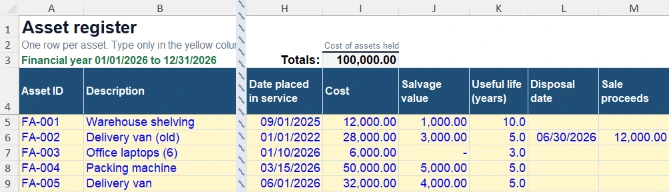
The template splits every row into two parts. You type 13 details in the yellow columns A to M, and the grey columns N to U work everything else out.
What you type (columns A to M)
| Column | What to enter |
|---|---|
| Asset ID, Description | A unique code such as FA-001, and a plain name you would recognize on a walk around the office. |
| Category | Pick from the dropdown, for example Vehicles or Computers and IT. The roll-forward and journal entries group by this. |
| Location, Tag or serial no. | Where the asset lives and the number on its label. These make the physical count fast. |
| Supplier, Invoice no. | So you can find the purchase invoice when an auditor or buyer asks. |
| Date placed in service | The date the asset was ready to use, not always the invoice date. Depreciation starts from this month. |
| Cost | Purchase price plus the costs needed to get it working, such as delivery and installation, less discounts. |
| Salvage value | What you expect to get for it at the end of its life. Leave 0 if you expect nothing. |
| Useful life (years) | How long you expect to use it. Leave it blank to use the default life for its category from the Lists sheet. |
| Disposal date, Sale proceeds | Only when you sell or scrap the asset. Leave proceeds at 0 for a write off. |
What the formulas work out (columns N to U)
| Column | What it shows |
|---|---|
| Useful life used | Your life in years, or the category default if you left it blank. |
| Monthly depreciation | (Cost minus salvage value) divided by the useful life in months. |
| Accumulated at start of year | Depreciation charged in all earlier years. |
| Depreciation this year | The charge for the financial year you set on Start here. |
| Accumulated at year end, Net book value | The two balances that must agree with your ledger. |
| Gain or (loss) on sale | Sale proceeds minus net book value, for assets sold this year. |
| Status | Active, Fully depreciated, Disposed this year, Disposed earlier, Not yet in service, or Check details when something is missing. |
What counts as cost matters more than most people expect. IAS 16 includes the purchase price with import duties and non refundable taxes, after discounts, plus costs directly needed to bring the asset to its location and working condition. Our calculator's guide walks through the IAS 16 cost rules item by item.
What is inside this fixed asset register template excel file?
The file has seven sheets: Start here for settings and the six checks, the Asset register itself, a Roll-forward by category, Journal entries for the year, a GL check against your trial balance, an Asset count list for physical checks, and Lists for your categories. You only type on four of them.
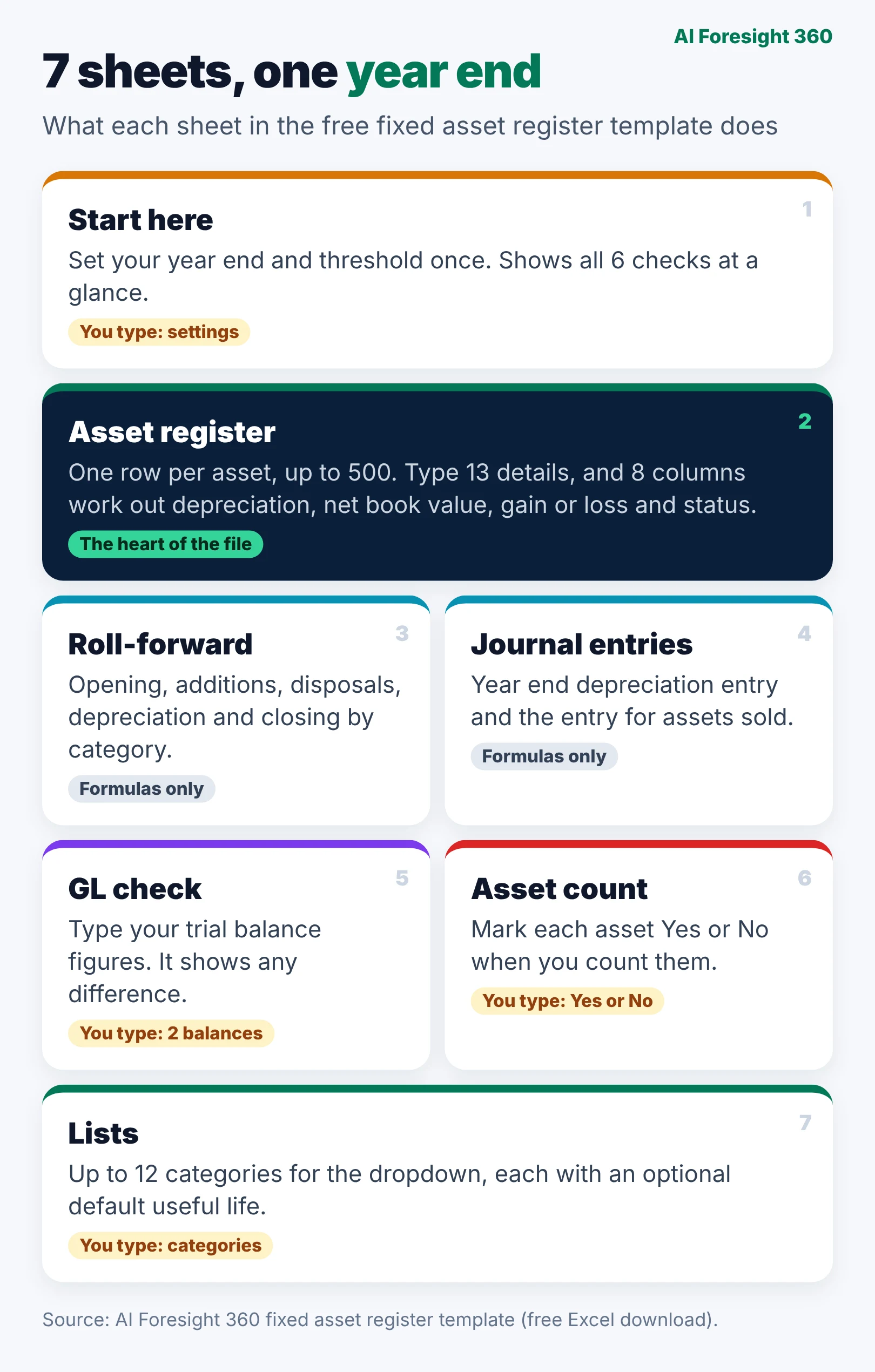
| Sheet | What it does |
|---|---|
| Start here | Company name, currency label, financial year end (the start date fills itself), an optional capitalization threshold, and the six checks. |
| Asset register | Up to 500 assets in rows 5 to 504, with totals for cost held, depreciation, accumulated depreciation, net book value and gains. |
| Roll-forward | Opening cost, additions, disposals and closing cost by category, then the same for accumulated depreciation and net book value. |
| Journal entries | The year end depreciation entry by category and the combined entry for assets sold or scrapped. Debits must equal credits. |
| GL check | Type the cost and accumulated depreciation from your trial balance. It shows each difference and says Agrees when it matches. |
| Asset count | Pulls every asset with its location and status. Mark Found Yes or No, with the date, who checked and the condition. |
| Lists | Up to 12 categories for the dropdown, each with an optional default useful life in years. |
How do you fill in the fixed asset register template?
Set your financial year end on Start here, add one row per asset in the yellow columns of the Asset register, enter a disposal date and proceeds when something is sold, type your ledger balances on GL check, and mark the asset count. Then read the six checks on Start here and fix anything flagged.
- Start hereSet the year and your thresholdEnter the financial year end date, for example 12/31/2026. The start date fills itself. Add a capitalization threshold if you use one, so smaller items get flagged.
- ListsCheck the categoriesNine common categories are ready. Rename them, add up to 12, and set a default useful life for any category if you want blank lives filled in for you.
- Asset registerAdd one row per assetType only in the yellow columns A to M. Start with assets you still own, including fully depreciated ones that are still in use, so the cost and accumulated depreciation match your books.
- Asset registerRecord sales and write offsKeep the row and add the disposal date and sale proceeds. The status changes to Disposed this year, and the gain or loss appears in column T.
- GL checkType your trial balance figuresEnter the cost and accumulated depreciation balances from your ledger at the year end. The sheet shows the difference for each.
- Asset countCount the assetsWalk around with the list, or send it to each site, and mark each asset Yes or No with the date and the person who checked it.
- Start hereRead the checks and postFix anything the six checks flag, then post the entries from the Journal entries sheet into your accounting software.
How does the template calculate depreciation?
Every asset uses straight line depreciation: cost minus salvage value, divided by the useful life in months, gives the same charge each month. The template charges a full month in the month an asset is placed in service, nothing in the month it is sold, and stops once the asset is fully depreciated.
What is the full month rule?
The full month rule treats any part of a month as a whole month at the start, and ignores the month of sale at the end. An asset placed in service on March 15 gets a full charge for March. An asset sold on June 30 gets nothing for June. It keeps every asset on whole months, so the numbers are easy to check by hand.
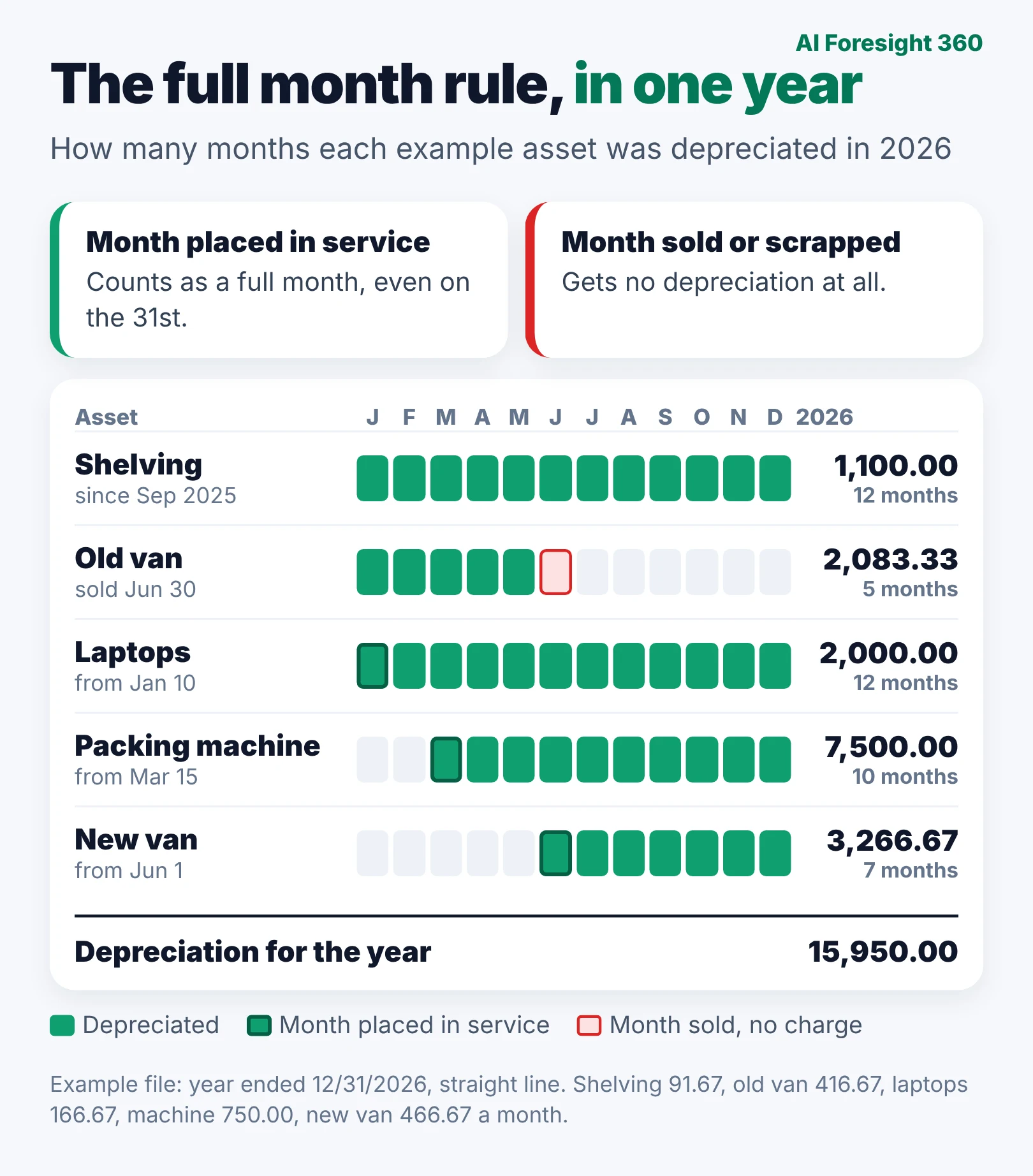
IAS 16 says depreciation begins when an asset is available for use and stops when it is held for sale or derecognized (paragraph 55). It does not prescribe a monthly convention, so whole months are a practical simplification. Check that it suits your policy and is not material for your accounts. If you need half year, mid month or actual days, our calculator explains and applies each partial year convention.
What happens when an asset is fully depreciated?
The charge stops when accumulated depreciation reaches cost minus salvage value, and the status changes to Fully depreciated. Keep the row while you still own the asset. Its cost and accumulated depreciation stay in your ledger, so removing it would break the GL check.
Can you change an asset's useful life later?
IAS 16 requires useful lives and salvage values to be reviewed at least at each financial year end (paragraph 51). A change is a change in estimate, which applies from now on. The template has one life per asset, so typing a new life rewrites earlier years. For a change in estimate, work out the new charge with the calculator's change in estimate tool and note it on the asset's row.
Worked example: how were the five assets depreciated?
For the year ended December 31, 2026, the example charges 15,950.00 of depreciation across five assets. Closing cost is 100,000.00, accumulated depreciation is 14,233.33 and net book value is 85,766.67. One van was sold on June 30 for 12,000.00, giving a gain of 6,083.33. Every figure below can be checked by hand.
| Asset and its inputs | Months in 2026 | Depreciation |
|---|---|---|
| FA-001 Warehouse shelving12,000 cost, 1,000 salvage, 10 years: 91.67 a month. In service since 09/01/2025. | 12 | 1,100.00 |
| FA-002 Delivery van (old)28,000 cost, 3,000 salvage, 5 years: 416.67 a month. Bought 01/01/2022, sold 06/30/2026. | 5 (Jan to May) | 2,083.33 |
| FA-003 Office laptops (6)6,000 cost, no salvage, 3 years: 166.67 a month. In service 01/10/2026. | 12 | 2,000.00 |
| FA-004 Packing machine50,000 cost, 5,000 salvage, 5 years: 750.00 a month. In service 03/15/2026. | 10 (Mar to Dec) | 7,500.00 |
| FA-005 Delivery van32,000 cost, 4,000 salvage, 5 years: 466.67 a month. In service 06/01/2026. | 7 (Jun to Dec) | 3,266.67 |
| Total for the year | 15,950.00 |
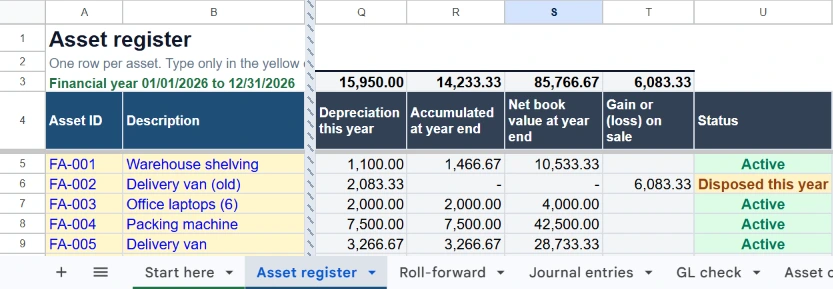
The van sale, step by step
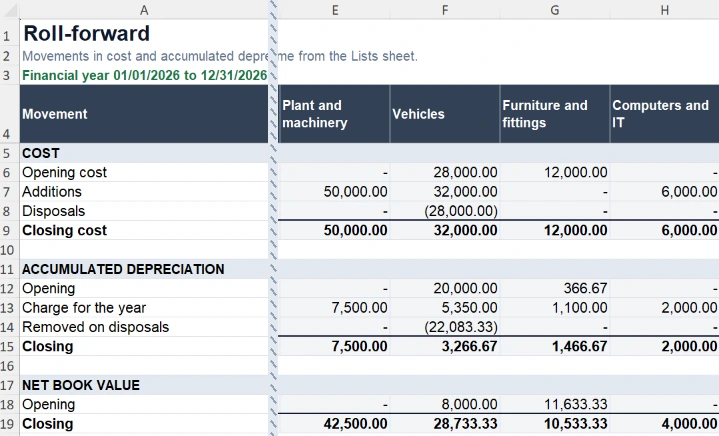
IAS 16 measures the gain or loss as the net disposal proceeds minus the carrying amount, and it goes to profit or loss, never revenue (paragraphs 68 and 71). The van's 2,083.33 for January to May is still part of this year's depreciation charge, which is why Vehicles shows 5,350.00 (2,083.33 plus 3,266.67) in the roll-forward.
How the roll-forward ties out
| Movement | Cost | Accumulated depreciation |
|---|---|---|
| Opening balance | 40,000.00 | 20,366.67 |
| Additions or charge for the year | 88,000.00 | 15,950.00 |
| Disposals (the old van) | (28,000.00) | (22,083.33) |
| Closing balance | 100,000.00 | 14,233.33 |
Closing cost minus closing accumulated depreciation gives the net book value of 85,766.67, the same figure as the register total. The opening net book value was 19,633.33: the old van at 8,000.00 and the shelving at 11,633.33.
What journal entries does the template give you?
The Journal entries sheet builds two entries from the roll-forward: the year end depreciation entry, debiting depreciation expense and crediting accumulated depreciation for each category, and one combined entry for every asset sold or scrapped during the year. A totals row confirms that debits equal credits.
If you post depreciation every month instead of once a year, use the monthly figure in column O for each asset, or build a month by month schedule and the matching depreciation journal entries in our calculator. If the sale money went somewhere other than the bank, such as a trade in against a new vehicle, change the first line of the disposal entry before you post it.
What do the six automatic checks catch?
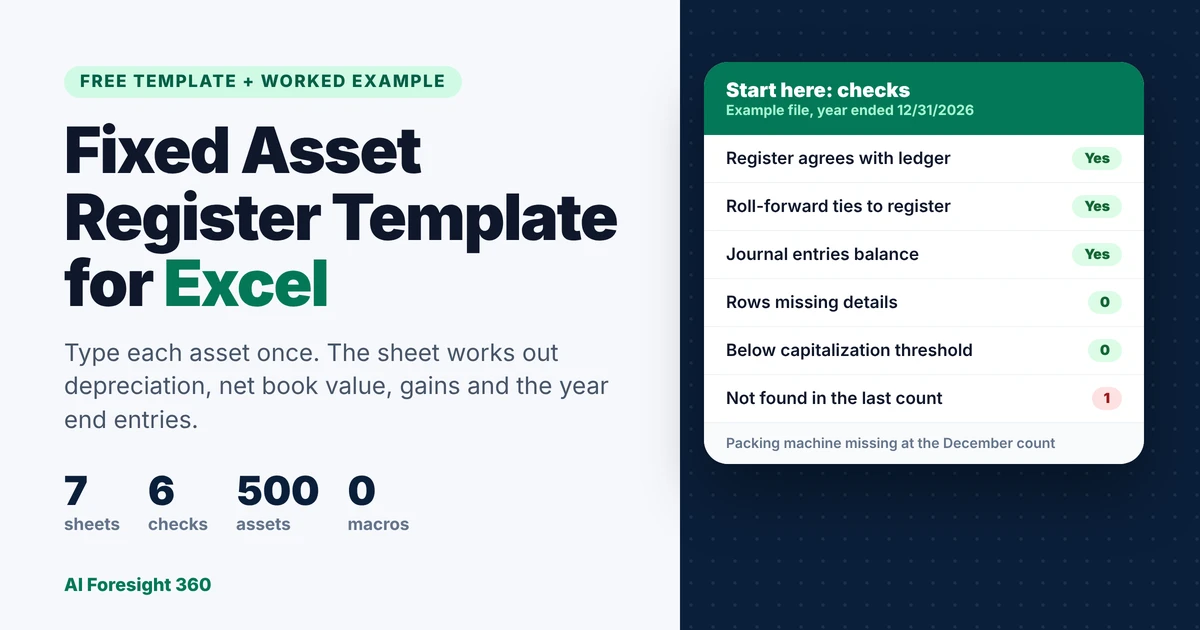
The six checks on Start here test whether the register agrees with your ledger, the roll-forward ties to the register, the journal entries balance, any row is missing a date, cost, life or category, any asset is under your capitalization threshold, and any asset was not found in the last count.
Compares register cost and accumulated depreciation with the balances you typed on GL check.
Fix: Find the purchase, sale or depreciation entry that is in one place but not the other.
Confirms the category totals add up to the register totals.
Fix: A difference usually means a row has no category, or a category is not on the Lists sheet.
Checks total debits equal total credits.
Fix: This should only fail if a formula on the Journal entries sheet was typed over.
Counts rows missing the date placed in service, cost, useful life or category.
Fix: Filter the Status column for Check details and fill in the gaps.
Counts assets that cost less than the threshold on Start here.
Fix: Decide whether each one should be expensed instead of capitalized.
Counts assets marked No on the Asset count sheet.
Fix: Search for the asset. If it is gone, enter a disposal date and 0 proceeds to write it off.
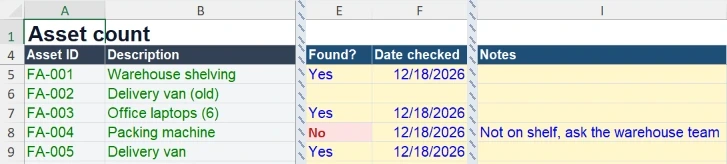
In the example, five checks pass and one flags a problem: the packing machine was marked not found on the December 18 count, with a note to ask the warehouse team. That is exactly the kind of gap a year end count is meant to surface before the accounts are signed off.
How do you reconcile the register to the general ledger?
Type the cost and accumulated depreciation balances from your trial balance at the year end into the GL check sheet. The template compares them with the register and shows the difference for each, plus the net book value. When both differences are zero, check 1 on Start here shows Yes.
In the example, the ledger shows cost of 100,000.00 and accumulated depreciation of 14,233.33, so all three lines say Agrees. When yours do not, these are the usual causes:
- An asset bought but coded to an expense account. The register has it and the ledger does not, or the reverse. Bills are the usual place this starts; our automated invoice processing guide covers checking bills before they post.
- A sale recorded only as cash in. The proceeds went to sales or other income, and the cost and accumulated depreciation were never removed.
- Depreciation posted for a different amount. Compare the posted entry with the Journal entries sheet, category by category.
- Assets that no longer exist. They sit in both places, so the GL check agrees, but the asset count will catch them.
- Rounding. The checks allow for less than half a cent, so the 14,233.33 in your ledger matches 14,233.3333 in the register.
A clean reconciliation is a standard month end and year end step. Our month end close prompts include prompts for working through reconciliation differences like these.
What capitalization threshold should you set?
Pick a book threshold you will apply consistently, then enter it on Start here so smaller purchases are flagged. For US tax, the IRS de minimis safe harbor lets businesses without an applicable financial statement deduct items up to $2,500 per invoice or item, and up to $5,000 with one.
The threshold is a policy choice, not a rule written into IAS 16 or US GAAP. Many small businesses line their book threshold up with the tax safe harbor so one decision covers both. According to the IRS page on the tangible property regulations, the de minimis safe harbor applies to amounts that are also deducted in your books, and it is an election you make each year. Ask your tax adviser before relying on it.
- Be consistent. Apply the same threshold to every purchase of the same kind.
- Think about control, not just accounting. The GFOA's guidance on capitalization thresholds says the threshold should not be the only factor, and that items under it can still need tracking. A laptop under the threshold still walks out of the door.
- Use the check. Check 5 counts anything below your threshold, so you catch small items that slipped into the register.
How do you run a physical asset count?
Print or share the Asset count sheet, which lists every asset with its location and status. Visit each location, find each asset by its tag or serial number, and mark Found as Yes or No with the date, who checked it and its condition. Anything marked No is counted in check 6 on Start here.
- Count at least once a year, close to the year end, and more often for portable items like laptops.
- Use the tag numbers. A label on each asset turns a vague search into a quick tick list.
- Look for the reverse too. Note any asset you find that is not on the list, then add it to the register.
- Act on every No. If an asset is lost, scrapped or stolen, record a disposal so the register and the ledger stop carrying it.
- Record the condition. Damaged or idle assets may need a shorter useful life or an impairment review.
Template, calculator or fixed asset software: which do you need?
Use a fixed asset register template excel file like this one for a full year end register of up to a few hundred assets with straight line depreciation. Use our free depreciation calculator to work out one asset with any method, including MACRS. Move to fixed asset software when you need tax books, many sites, barcode scanning or audit trails.
Straight line, up to 500 assets, roll-forward, journal entries, GL check and asset count in one file. Free, offline, no macros.
Reducing balance, double declining, sum of the years' digits, units of production and MACRS, with monthly schedules. Open the calculator.
Separate book and tax depreciation, many entities or sites, barcode scanning, user permissions and a full audit trail.
| You need to | Best fit |
|---|---|
| Keep a year end register and tie it to the ledger | This template |
| Work out MACRS, Section 179 or bonus depreciation | The calculator, or your tax software |
| Compare several methods for one asset | The calculator |
| Track thousands of assets across many sites | Fixed asset software |
| Keep separate book and tax registers | Fixed asset software, or two copies of this template for the book side |
Our free finance tools also include an EBITDA calculator, where your depreciation charge is the D that gets added back.
Does the template work for IFRS (IAS 16) and US GAAP?
Yes, for the core numbers. The roll-forward gives the opening and closing cost and accumulated depreciation, plus additions, disposals and depreciation by category, which IAS 16 asks for in its reconciliation. US GAAP asks for asset balances by class, accumulated depreciation, depreciation expense and the method used.
IAS 16 requires, for each class, the gross carrying amount and accumulated depreciation at the start and end of the period, and a reconciliation showing additions, disposals and depreciation, among other lines (paragraph 73). Under US GAAP, ASC 360-10-50-1 requires the balances of major classes of depreciable assets, accumulated depreciation, depreciation expense for the period and a general description of the methods used. The roll-forward covers the figures; the descriptions are yours to write.
What the template does not cover: revaluations, impairment losses and assets held for sale. Our calculator's IAS 16 vs US GAAP comparison explains where the two frameworks differ, including the revaluation model that US GAAP does not allow.
What are the limits of this template?
The template uses one method, straight line with the full month rule, and one useful life per asset. It does not do tax depreciation, revaluations, impairment or changes in estimate, posts yearly rather than monthly entries, and holds 500 assets. For most small business registers, those limits never come up.
- Straight line only. For reducing balance or units of production, use the methods comparison in our calculator.
- No tax depreciation. MACRS, Section 179 and bonus depreciation follow different rules from your books. Our calculator explains book vs tax depreciation.
- One life per asset. A change in estimate rewrites earlier years, as explained above.
- Yearly journal entries. Monthly posting needs the monthly charge from column O.
- One currency label. The currency on Start here is for reference only; there is no translation.
- 500 rows. Enough for most small businesses. Beyond that, the fixed asset register template excel approach starts to feel slow, and software is worth a look.
What mistakes should you avoid in a fixed asset register?
The most common mistakes are starting depreciation from the invoice date instead of the in service date, deleting sold assets instead of recording the disposal, leaving out fully depreciated assets still in use, mixing repairs into cost, and never counting the assets. Each one leaves the register out of step with the ledger or reality.
- Using the invoice date. A machine delivered in March but working in May starts in May.
- Deleting rows for sold assets. You lose the gain or loss and break the roll-forward. Enter a disposal date instead.
- Dropping fully depreciated assets. If you still own and use them, they stay in cost and accumulated depreciation.
- Capitalizing repairs. Routine servicing is an expense. Only costs that add to the asset belong in its cost.
- Typing over formulas. One hard typed number in a grey cell stops the row updating.
- Skipping the count. Lost and scrapped assets stay on the books for years unless someone looks.
- Throwing away the invoices. The IRS says to keep records relating to property until the period of limitations expires for the year you dispose of it (IRS: How long should I keep records?).
Can AI help you keep the register up to date?
AI chat tools can speed up the typing and checking around a register: sorting a list of purchases into capital and expense items, suggesting categories, drafting useful life ranges for you to approve, and listing likely causes of a ledger difference. Check every answer, and never paste confidential client data into a tool not approved for it.
Use the prompts below as starting points in ChatGPT, Claude or Gemini. Replace the parts in square brackets. They ask for tables you can paste straight into the template's yellow columns.
1. Sort purchases into assets and expenses
I keep a fixed asset register. My capitalization threshold is [AMOUNT] and my categories are: Buildings, Land improvements, Leasehold improvements, Plant and machinery, Vehicles, Furniture and fittings, Computers and IT, Office equipment, Other.

For each purchase below, return a table with these columns: Description, Date, Cost, Capitalize (Yes or No), Category, Reason (one short sentence).
Rules: use only the numbers I give you, do not invent dates or amounts, and if you are unsure, write Check in the Capitalize column.

[PASTE PURCHASE LINES: date, supplier, description, amount]
2. Draft useful lives for your review
Suggest a typical useful life range in years for book depreciation for each asset below, with a one line reason. Flag any asset where the life depends mainly on usage rather than time.
These are suggestions for me to review against my own policy, so say clearly where you are unsure.

[PASTE ASSET DESCRIPTIONS]
3. Find the cause of a GL difference
My fixed asset register shows cost of [REGISTER COST] and accumulated depreciation of [REGISTER ACCUMULATED DEPRECIATION].
My trial balance shows cost of [LEDGER COST] and accumulated depreciation of [LEDGER ACCUMULATED DEPRECIATION].
This year I bought [LIST PURCHASES] and sold [LIST SALES, WITH PROCEEDS].

List the most likely causes of each difference, in order, and tell me exactly what to check first in my ledger.
Before you paste anything, run it through our AI client data risk checker. For more ready made prompts, see our ChatGPT prompts for accountants, and if you would rather have AI work inside the spreadsheet, our Claude for Excel review shows what it handled in real tests.
Frequently asked questions
What is a fixed asset register?
A fixed asset register is a list of every long term physical asset a business owns, such as machinery, vehicles and computers. Each line records the asset's cost, the date it went into use, its useful life and salvage value, and its accumulated depreciation and net book value. It supports the balance sheet figures and helps you find, count and insure the assets.
Is this fixed asset register template excel file free?
Yes. Both the blank template and the filled example are free to download with no sign up. They are standard .xlsx files with formulas only and no macros, so there is nothing to enable. You can use them for your own business or for clients, and change the categories, threshold and year end to suit your books.
Does the template work in Google Sheets?
Yes. We uploaded the example file to Google Drive and opened it with Google Sheets. The register totals, the roll-forward and the six checks showed the same results as in Excel, including 15,950.00 of depreciation and a net book value of 85,766.67. Keep the file in .xlsx format or convert it with File, then Save as Google Sheets.
What depreciation method does the template use?
The template uses straight line depreciation. It takes cost minus salvage value and spreads it evenly over the useful life in months, with a full month in the month an asset is placed in service and none in the month it is sold. For reducing balance, units of production or MACRS, use our free depreciation calculator instead.
How many assets can the template hold?
The Asset register has room for 500 assets, in rows 5 to 504, and every check and total covers all of them. Keep sold assets on their rows with a disposal date so the history stays complete. If you regularly have more than 500 assets, or several companies, dedicated fixed asset software will usually be easier to manage.
Can I use the template for tax depreciation such as MACRS?
No. The template is built for book depreciation using straight line. MACRS, Section 179 and bonus depreciation follow separate tax rules and conventions, so the numbers will usually differ from your books. Use our depreciation calculator for MACRS estimates, and confirm the figures with your tax software or tax adviser before you file.
How do I record selling an asset in the template?
Leave the asset's row in place and enter the disposal date and the sale proceeds in columns L and M. The template stops depreciation the month before the sale, works out the gain or loss in column T, removes the asset from cost held, and builds the disposal journal entry. For a write off, enter 0 as the proceeds.
What capitalization threshold should I use?
Choose a book threshold you will apply consistently. Many US small businesses match the IRS de minimis safe harbor, which allows deducting items up to $2,500 per invoice or item without an applicable financial statement, or $5,000 with one. Enter your threshold on Start here, and check 5 will count any asset that costs less.
How often should I update a fixed asset register?
Add assets when you buy them and record disposals when they happen, then review the whole register at least once a year. Many businesses update it monthly as part of the month end close, so depreciation can be posted each month. Count the physical assets at least once a year, close to the financial year end.
Why does the template start depreciation in the month of purchase?
It starts in the month the asset is placed in service, which may be later than the purchase. That follows IAS 16, which starts depreciation when an asset is available for use. Charging the whole first month, and none in the month of sale, is a common simplification called the full month rule, which keeps every calculation on whole months.
Final thoughts
A good register is boring in the best way: every asset listed, every number tied to the ledger. This fixed asset register template excel file does the arithmetic and the tie outs, so your time goes on the judgment calls: what to capitalize, how long assets last and what the count turns up.
Start with the filled example to see each sheet working, then move your own assets into the blank template. Need another method or a monthly schedule for one asset? The straight line depreciation calculator covers it, and more articles like this live in our Business and AI section.
Sources we checked
- IFRS Foundation: IAS 16 Property, Plant and Equipment (full standard, paragraphs 6, 51, 55, 68, 71 and 73)
- IFRS Foundation: IAS 16 overview and amendments
- Deloitte DART: disclosures required by ASC 360-10-50-1
- IRS: Tangible property final regulations (de minimis safe harbor)
- IRS: How long should I keep records?
- GFOA: Capitalization thresholds for capital assets
All pages were read on November 21, 2026. Every figure in the worked example comes from our example file and was recalculated by hand.