
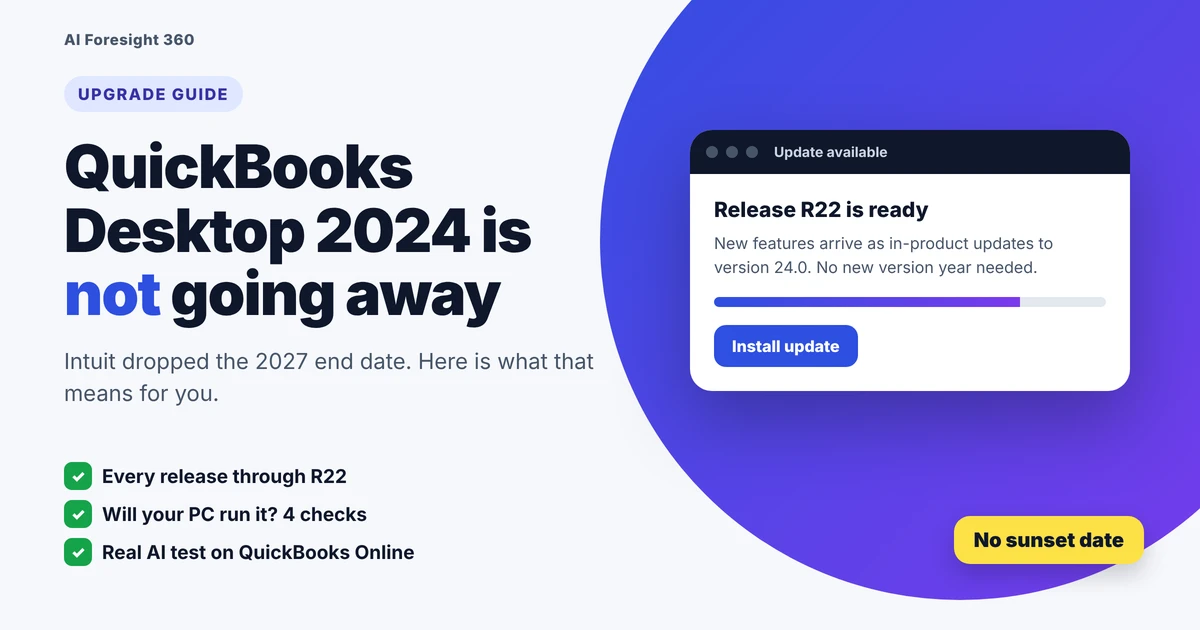
QuickBooks Desktop 2024 is not being shut down in 2027. Intuit has dropped its old three year lifecycle for version 24.0, which covers Pro Plus, Premier Plus and Enterprise Solutions. The software now gets continuous in-product updates for support, security, tax compliance and new features, with no sunset deadline. What did end is the sale of new Pro Plus, Premier Plus and Mac Plus subscriptions to US customers.
That is a big change from what most guides still say. Below you will find what Desktop 2024 includes now, how the new update model works, who can still buy or renew it, and when it makes sense to stay, upgrade or move to QuickBooks Online. We also tested what QuickBooks Online can do with an AI assistant, so you can see what a switch would actually give you.
Facts checked against Intuit's official help pages on November 14, 2026
Key takeaways
- Desktop 2024 (version 24.0) is the final annual Desktop release, but it keeps getting updates with no announced end date.
- Accept the in-product update prompts, or turn on automatic updates, to stay on a supported build.
- Desktop 2023 and older versions lost payroll, bank feeds and security updates after May 31, 2026, so upgrading to 2024 is the way to stay on Desktop.
- Intuit's no-sunset statement names Pro Plus, Premier Plus and Enterprise. It does not mention Mac Plus, so Mac users should confirm their status with Intuit.
- In our test, Claude read QuickBooks Online reports accurately and caught 3 of 4 hidden problems, something Desktop has no official AI connection for.
What's new in QuickBooks Desktop 2024?
Since Intuit stopped making yearly versions, Desktop 2024 gets new features through numbered in-product releases instead. Recent releases added smarter chart of accounts tools, new 2026 W-2 tip reporting in payroll, PO numbers on customer statements and line by line invoice profit. Some reports are Enterprise only. Here is every release from late 2024 to now.
- Search accounts by their description, not just the name All editions
- Right-click to duplicate accounts, customers, vendors and jobs All editions
- New columns showing whether an account hits the Profit and Loss or the Balance Sheet All editions
- Simpler new account setup, plus 1099 and 1096 changes for tax year 2026 All editions
- New 2026 W-2 rules: Treasury Tipped Occupation Code in Box 14b and qualified tips in Box 12 (code TP), with guided setup Payroll
- PO numbers now print on customer statements All editions
- Invoice profitability by line, with grouping, filters and subtotals All editions
- Built-in browser engine upgraded, which now requires Windows 10 or newer All editions
- Mark an estimate inactive once it becomes a sales order or invoice All editions
- Old Shipping Manager retired; the New Shipping Manager replaces it All editions
- Tax year 2025 support in QuickBooks Fixed Asset Manager All editions
- Job title is now required for employees subject to Virginia payroll taxes Payroll
- 1099-MISC Box 14 mapping moved to 1099-NEC Box 3 All editions
- Invoice Profitability report for every transaction Enterprise only
- Default email recipients for each customer's transactions All editions
- Enhanced Inventory Receiving with an inventory offset liability account Enterprise only
- Pick contact emails straight from the transaction window All editions
- Item profitability report with planned vs actual markup and margin Enterprise only
- Report filters on custom fields Enterprise only
- A "Look for" search box inside every report All editions
- Customizable Inventory Turnover report and an easier Landed Cost Calculator All editions
- Search field in every list All editions
All of these come from Intuit's release notes for Desktop 2024 and Enterprise 24.0. Not every update matters to every business, so here is where to look first:
| If you... | Look at | Why it helps |
|---|---|---|
| Run payroll with tipped staff | Release R20 | Your 2026 W-2s need the new tip codes |
| Want to know which jobs make money | Release R19 | Profit for each invoice line |
| Hold inventory | Release R11 | Turnover report you can filter |
| Clean up your books | Releases R21 and R22 | Faster account search and setup |
Want to sanity check the turnover figure that report gives you? Try our free inventory turnover calculator, which also shows your days on hand.
What are the system requirements for QuickBooks Desktop 2024?
Desktop 2024 needs 64-bit Windows 11 (or Windows Server 2016 to 2022) installed natively, an Intel or AMD processor of at least 2.4 GHz, 8 GB of RAM (16 GB recommended) and 2.5 GB of free disk space plus room for your company file. It does not run on ARM laptops, Linux or virtual machines.
How much RAM does the server need for multi-user mode?
If you host the company file on a server for several users, Intuit sizes the server's memory by headcount:
| Users on the file | Server RAM |
|---|---|
| 1 to 5 users | 8 GB |
| 10 users | 12 GB |
| 15 users | 16 GB |
| 20 or more users | 20 GB or more |
3 setups that catch people out
For Office, Intuit lists Office 2016, 2019, 2021 and Microsoft 365 as compatible for exporting reports and emailing forms. If you are refreshing Office at the same time, our Office LTSC 2024 install guide walks through the official setup.
QuickBooks Mac Plus 2024 requirements
- macOS 12 Monterey or later, on an Intel or Apple chip
- 2 GB RAM minimum (4 GB recommended) and 250 MB of storage
- An internet connection
- File conversion to and from QuickBooks for Windows 2024
Every figure here comes from Intuit's system requirements page for Desktop 2024, last updated August 4, 2026.
How do you upgrade to QuickBooks Desktop 2024?
If you have an active Pro Plus, Premier Plus, Enterprise or Mac Plus subscription, the upgrade to 2024 is free. Back up your company file, then accept the Upgrade Now prompt, use the Discovery Hub, or install through the QuickBooks Desktop Manager with your license number. One-time license owners cannot upgrade this way.
First, which path are you on?
On 2021, 2022 or 2023 with an active Pro Plus, Premier Plus or Enterprise subscription? Upgrades are included in your plan. Use the steps below.
Switch off multi-user mode first, then choose Upgrade for Free. The Mac version keeps your old copy installed automatically.
Intuit no longer sells non-subscription Desktop licenses, and new US customers can't start a Plus subscription. Your options are Desktop Enterprise or QuickBooks Online.
Intuit's support team says you can go straight to 2024 with no stepping stone versions: make a backup in the old version, then restore it in 2024.
Those rules come from Intuit's subscription and support FAQ and a QuickBooks team answer in the Intuit Community.
3 ways to upgrade on Windows
- Open QuickBooks Desktop. When the upgrade message appears, select Upgrade Now.
- Want to keep your current version too? Tick Keep old version on my computer. Leave it blank to remove it.
- Select Let's go and wait while QuickBooks downloads, installs and activates 2024.
- Select Open QuickBooks.
- Select Discovery Hub next to your profile icon.
- Choose Upgrade to QuickBooks 2024, then Proceed to upgrade, then Upgrade Now.
- Pick whether to keep the old version, select Let's go, then Open QuickBooks when it finishes.
- Find your license and product numbers in your purchase confirmation email or by signing in at camps.intuit.com.
- Open the QuickBooks Desktop Manager from Intuit's official download page.
- Enter your license info when asked and follow the on-screen steps.
- Go to Edit then Preferences.
- Select General, then the My Preferences tab.
- Select Bring back all one time messages, then OK.
- Close and reopen QuickBooks. The prompt should appear.
These steps follow Intuit's official upgrade guide for Windows and Mac, updated August 5, 2026.
How long is each QuickBooks Desktop version supported?
Under Intuit's old rule, each Desktop version got about three years. That is why 2021 lost support on May 31, 2024, 2022 on May 31, 2025 and 2023 on May 31, 2026. Version 2024 broke the pattern: Pro Plus, Premier Plus and Enterprise 24.0 now get continuous updates with no end date.
What happens when a version is discontinued?
Your software does not stop opening, and your data is not deleted. What switches off is everything that talks to Intuit's servers, according to Intuit's discontinuation policy for Desktop 2023:
- Desktop Payroll and payroll tax updates
- Online banking and bank feeds
- Desktop Payments
- Live technical support
- Online Backup
- Critical security updates
- Emailing forms and reports, plus multi-currency
- Opening your company file
- Entering transactions by hand
- Running reports on your existing data
- Making local backups
Running payroll on a discontinued version is the real risk: tax calculations stop updating, and Intuit warns that paychecks may show inaccuracies. If you are still on 2023 or older, the upgrade steps above get you back to a supported build. Intuit also stopped selling new Desktop Plus subscriptions to US customers after September 30, 2024.
What should you check before upgrading?
Most failed upgrades come from skipped preparation, not from the upgrade itself. Before you start, make a fresh backup, confirm your PC meets the 2024 requirements, have your license number ready, get every user out of the file and pick a quiet time away from payroll day. The checklist below covers all ten steps.
Keep that backup for at least a month. If something looks wrong after the upgrade, you can restore it in your old version and try again.
What can QuickBooks Online do with AI that Desktop 2024 can't? We tested it
Desktop 2024 has no official Claude connector, while QuickBooks Online works with Intuit's Claude connector. We asked Claude two real business questions about a practice company with hidden errors. Every figure matched QuickBooks, it caught 3 of 4 planted problems in the profit and loss, and it only half caught a duplicate invoice.
| Test | What we asked | Result |
|---|---|---|
| 1. Sales review | Top customers, best service and anything that looks off | Partial: right numbers, duplicate flagged only as a possibility |
| 2. Month vs month P&L | What changed most between September and October | Strong: 3 of 4 traps caught, asked before changing a setting |
Test 1: Who are my top customers, and does anything look off?
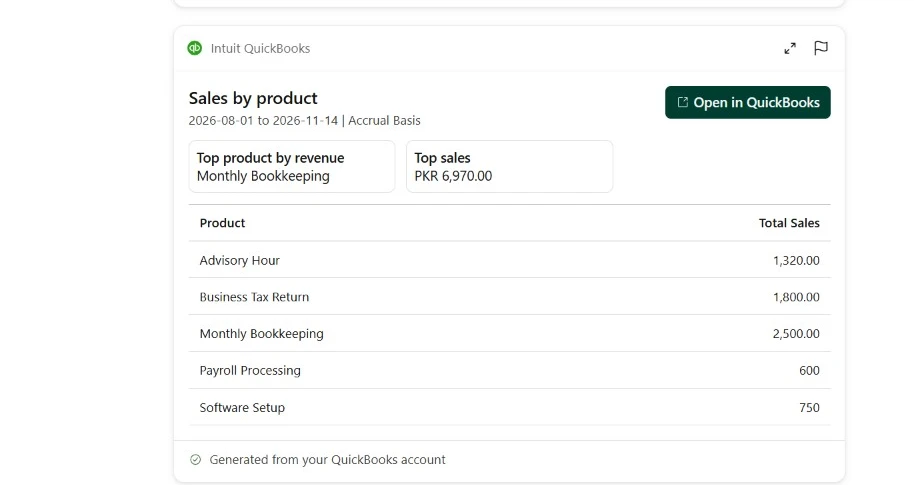
Using my QuickBooks, show me sales by customer and by product or service from August 1, 2026 to today. Who are my top 3 customers and my best-selling service? Point out anything in the numbers that looks off. Don't change anything.Claude pulled two QuickBooks reports and returned a total of 6,970.00 from 6 customers. It ranked Harbor Cafe first at 1,950.00 (28%), then Bluepeak Dental at 1,640.00 and Cedar & Pine at 1,550.00, and named Monthly Bookkeeping as the top service at 2,500.00. We checked every percentage against the reports: all correct.
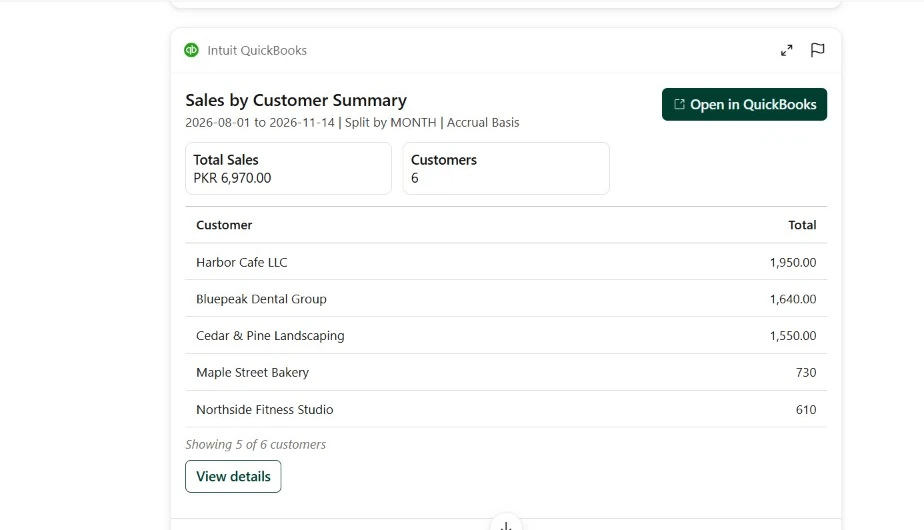
The trap: Harbor Cafe's total includes invoice 1008, an exact copy of an earlier 650.00 invoice. Without it, Harbor Cafe drops to 1,300.00 and Bluepeak Dental is the real top customer. Claude came close:
- Every total and percentage
- Spotted the doubled Harbor Cafe bill and offered to check the invoices
- Noticed the amounts looked too small for rupees, so the currency or file might be wrong
- Flagged batch invoicing: October held 59% of sales
- Still ranked Harbor Cafe as the top customer
- Did not confirm the duplicate or adjust the totals on its own
Test 2: What changed between September and October?
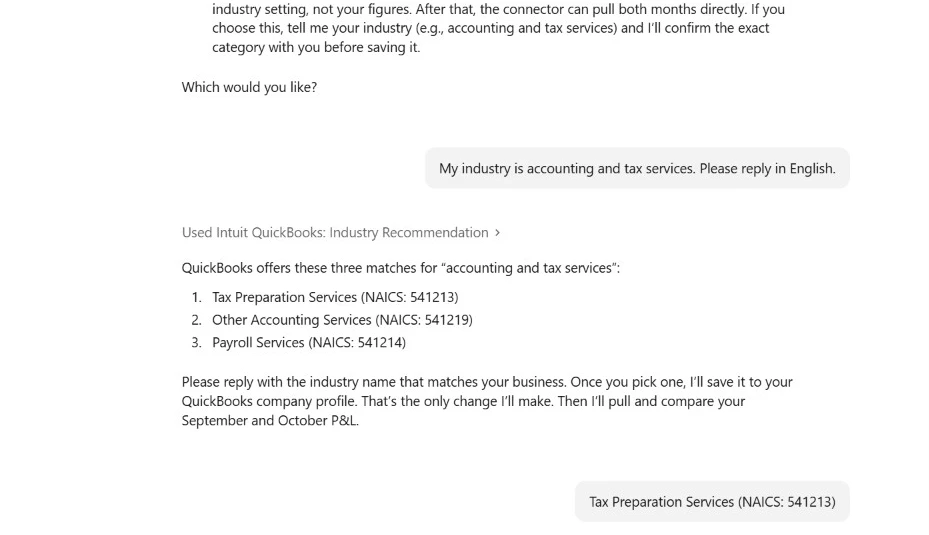
Compare my profit and loss for September 2026 and October 2026 from QuickBooks. Which income and expense lines changed the most, and does anything look unusual? Don't change anything.This test started with a surprise. Intuit's connector refused to build a profit and loss report until an industry was saved on the company profile. Because our prompt said "Don't change anything", Claude stopped, explained why, and asked us how to continue.

Once we gave the go-ahead, it showed three QuickBooks industry matches, saved only the one we picked, and confirmed that no figures were touched.
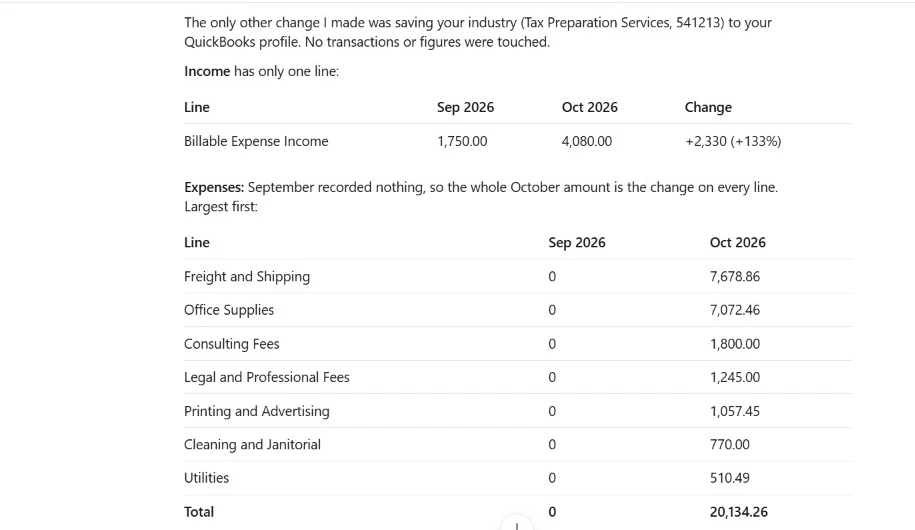
Then came the comparison. Every income and expense line matched our QuickBooks report, including the swing from a 1,750.00 profit in September to a 16,054.26 loss in October.
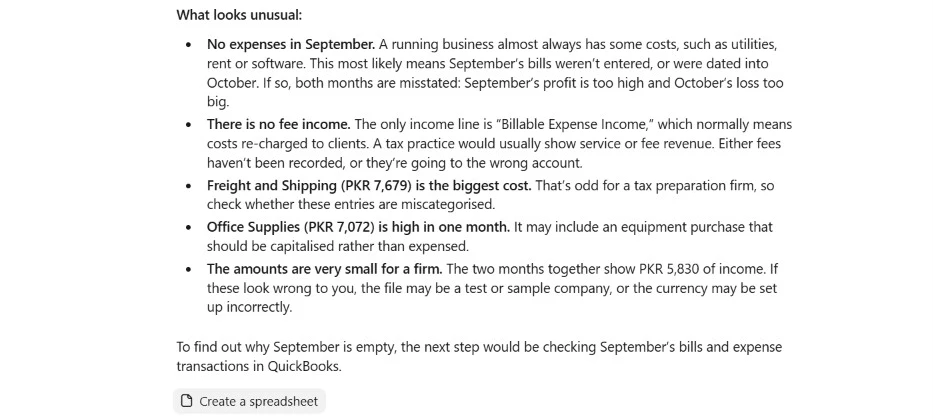
- Zero September expenses: likely missing or misdated bills
- Service fees posted to "Billable Expense Income", the wrong account
- Freight is odd for a tax firm
- Office supplies might need to be capitalized
- The duplicate 650.00 invoice inside October income, so it reported +2,330 growth instead of the real +1,680
One more catch, this time from Intuit's card rather than Claude. The P&L card said it compared against the "prior 61 day period (Jul 02, 2026 to Aug 31, 2026)", while Claude's written answer correctly compared September with October. Read Claude's text, not just the card.

- QuickBooks Desktop has no official Claude connector, so this kind of plain English review only works after a move to Online.
- The AI reads reports well, but a duplicate invoice still needs a human or an invoice level check. Our free AP register Excel template flags duplicates automatically.
- Keep approvals on. Claude asked before saving even a profile setting. Our guide to AI agent security for small business covers the permission habits that matter.
Before you connect real client books to any AI tool, run them through our free AI client data risk checker. And for five more workflows, including collections reminders and invoices created by chat, read our full Claude QuickBooks integration test. If you are weighing assistants, our Claude vs ChatGPT for bookkeeping comparison shows how the two differ on the same tasks.
Should you stay on Desktop 2024, move to Enterprise or switch to QuickBooks Online?
If Desktop 2024 does everything you need, staying is now a safe choice, since it has no shutdown date. Move to Desktop Enterprise if you are growing past what Pro Plus or Premier Plus can handle. Switch to QuickBooks Online if you want cloud access from anywhere, no server to maintain, or AI tools that only connect to Online.
The three options side by side
- No shutdown date for Pro Plus and Premier Plus
- No data move, no retraining
- New features keep arriving as updates
- Not sold to new US customers
- Still needs Windows on Intel or AMD
- Mac Plus long term support is unconfirmed
- The only Desktop edition still sold to new customers
- Up to 40 users at once and 200+ reports, per Intuit
- Same screens as Pro and Premier, so the move is easy
- Costs more than Pro Plus or Premier Plus
- Cloud access needs a hosting provider
- Works in a browser on any computer, including Macs and ARM laptops
- Intuit's AI agents and the Claude connector work with Online
- No server, backups or updates to manage
- Some Desktop features have no match
- Inventory and bank connections start fresh
- A monthly subscription for every company
Intuit describes Enterprise's limits and hosting option on its Desktop 2023 discontinuation page. Curious what the AI side looks like in practice? Our review of Intuit's AI agents covers the tools built into QuickBooks Online, and our roundup of the best AI bookkeeping agents for small business compares the wider market.
What changes if you switch to QuickBooks Online?
Intuit's guide to moving from Desktop to Online, updated November 5, 2026, says most of your data moves with you, but five things work differently from day one:
Frequently asked questions
Is QuickBooks Desktop 2024 being discontinued?
No. Intuit says Desktop 2024 Pro Plus, Premier Plus and Enterprise Solutions 24.0 won't be discontinued in May 2027 and have no sunset deadline. Intuit has moved away from its old three year lifecycle and commits to keep version 24.0 updated with support, security patches, tax compliance updates and new features. Accept the in-product updates when QuickBooks prompts you.
How long will Desktop 2024 be supported?
Intuit has not published an end date. Its help page says there is no sunset deadline for this release and that it will keep version 24.0 up to date for years to come. The one exception to watch is Mac Plus 2024, which Intuit's statement does not mention. Check with Intuit before planning several years ahead on a Mac.
Can I still buy QuickBooks Desktop Pro Plus or Premier Plus?
Not as a new customer in the United States. Intuit stopped selling new Pro Plus, Premier Plus, Mac Plus and Desktop Enhanced Payroll subscriptions after September 30, 2024. Existing subscribers can keep renewing. If you are new, your choices are QuickBooks Desktop Enterprise, which Intuit still sells in Silver, Gold, Platinum and Diamond plans, or QuickBooks Online.
Is there a QuickBooks Desktop 2025?
Intuit has replaced yearly version releases with in-product updates to version 24.0. Instead of installing a new version year, you get a message inside QuickBooks Desktop when an update is ready. Recent releases, such as R19 to R22 in 2026, added features like line level invoice profit and chart of accounts tools without a new version number.
Is the upgrade from 2023 to 2024 free?
Yes, for active subscribers. Intuit says upgrades to the latest version are included in Pro Plus, Premier Plus, Enterprise and Mac Plus subscriptions at no additional cost. Back up your company file, then use the Upgrade Now prompt, the Discovery Hub or the QuickBooks Desktop Manager. Owners of old one-time licenses cannot upgrade this way.
What happens if I keep using Desktop 2023?
The program still opens and your data stays, but after May 31, 2026 Intuit switched off its connected services for 2023. Payroll, bank feeds, Desktop Payments, Online Backup, live support, emailing forms and security updates no longer work. Intuit also warns that payroll tax calculations stop, so paychecks may show inaccuracies on a discontinued version.
Does Desktop 2024 work on Windows 10?
It still installs, but Intuit strongly recommends Windows 11 because Microsoft stopped Windows 10 security updates on October 14, 2025. Desktop 2024 needs 64-bit Windows installed directly on an Intel or AMD computer. Windows 10 S Mode, ARM processors, Linux, emulators and virtual machines are not supported, according to Intuit's system requirements page.
Can I run Desktop 2024 on a Mac?
Not the Windows version. Intuit does not support running it through emulators or virtual machines. Mac users need QuickBooks Mac Plus 2024, which requires macOS 12 Monterey or later on an Intel or Apple chip, 2 GB of RAM and 250 MB of storage. It can convert company files to and from QuickBooks for Windows 2024.
Will my data move if I switch from Desktop to QuickBooks Online?
Intuit says most of your data moves with you, but some things change. Accrual basis reports match while cash basis reports may differ, users must be invited again, inventory starts fresh on your move date using first in first out, and bank connections must be redone. Some Desktop features have no direct match in QuickBooks Online.
Can AI tools like Claude read QuickBooks Desktop data?
Intuit's official Claude connector works with QuickBooks Online, not Desktop. In our test on a practice Online company, Claude matched every figure in QuickBooks' reports and caught three of four planted problems in a profit and loss comparison. It flagged a duplicate invoice only as a possibility, so a human check is still needed.
Final thoughts
The big news is the one most guides still miss: QuickBooks Desktop 2024 is not shutting down in 2027. If you are on Pro Plus, Premier Plus or Enterprise 24.0 and it does the job, you can stay, keep renewing and accept the updates.
If you are still on 2023 or older, upgrade now, because payroll, bank feeds and security updates have already stopped on those versions. And if you want cloud access or an AI assistant that can read your books, plan a move to QuickBooks Online, keeping in mind that AI still needs a human to confirm what it flags. More step by step guides like this live in our AI Guides and Tutorials section.
Sources we checked
- Intuit: Desktop 2024 release notes and continuous support update
- Intuit: Desktop 2024 system requirements
- Intuit: Upgrade QuickBooks Desktop for Windows and Mac
- Intuit: QuickBooks Desktop 2023 service discontinuation policy
- Intuit: Can't buy QuickBooks Desktop as a new US subscriber
- Intuit: Common QuickBooks Desktop questions on subscriptions and support
- Intuit: How features and data transfer from Desktop to Online
- Intuit Community: upgrading from Desktop 2016 to 2024
- Accountability Advisor: Intuit departs from the 3 year lifecycle for Desktop 2024
All pages were read on November 14, 2026. Test results come from our own run on a practice QuickBooks Online company on the same date.