
Choosing between Claude vs ChatGPT for bookkeeping used to be a question about writing quality. In 2026 it is a question about which one connects to your accounting system, what it is allowed to change once connected, and which mistakes it makes when nobody is checking. Both tools now write directly into QuickBooks. Only one connects to Xero. And both of them make the same three coding errors that a business owner will not catch until year end.
This guide covers what each tool can genuinely do with your books today, what each costs, and the three errors worth watching for. It also gives you a reconciliation file with a published answer key so you can test either tool yourself in ten minutes rather than taking anyone’s word for it.
When it comes to writing Excel VBA macros specifically, the differences are smaller than you might expect. We tested both tools on four real accounting tasks and found that both passed the same tests, with small gaps in formatting and code caution.
How We Researched Claude vs ChatGPT for Bookkeeping
Every capability and price in this comparison of Claude vs ChatGPT for bookkeeping comes from official sources: Intuit’s product documentation and newsroom, Xero’s media releases, Anthropic’s pricing page, and OpenAI’s Help Center. Nothing here is drawn from aggregator sites, which have repeatedly published wrong figures for both tools.
This is a research based comparison, not a bench test, and it does not claim otherwise. Where a claim depends on how a tool performs rather than what it is documented to do, the article says so and hands you the test data instead. Plenty of competing articles announce that they tested five tools yet never publish a single input file or a single wrong answer.
Prices and features in this category change often. Everything below was verified in August 2026.
Claude vs ChatGPT for Bookkeeping: Which One Should You Use?
For most small businesses running QuickBooks in the United States, the two tools are close enough that price and habit should decide it. For anyone on Xero, Claude is currently the only one of the two with an official integration. For firms handling client books, neither should be given write access without a review step.
| Situation | Better choice | Why |
|---|---|---|
| QuickBooks, US, solo owner | Either | Same connector capabilities since July 2026 |
| Xero, any market | Claude | Official Xero connector, no ChatGPT equivalent |
| Cheapest paid entry point | ChatGPT | Go plan at $8 per month |
| Cheapest plan with full features | Claude | Pro at $17 per month on annual billing |
| Spreadsheet heavy month end | Either | Both ship a spreadsheet integration |
| Writing into client books | Neither, without review | Confirmation prompts are not a review process |
The model comparison matters less than most articles suggest. What matters is the plumbing between the tool and your ledger, and whether a human reads the output before it becomes a journal entry.
Claude vs ChatGPT for Bookkeeping Inside QuickBooks: What Can Each Do?
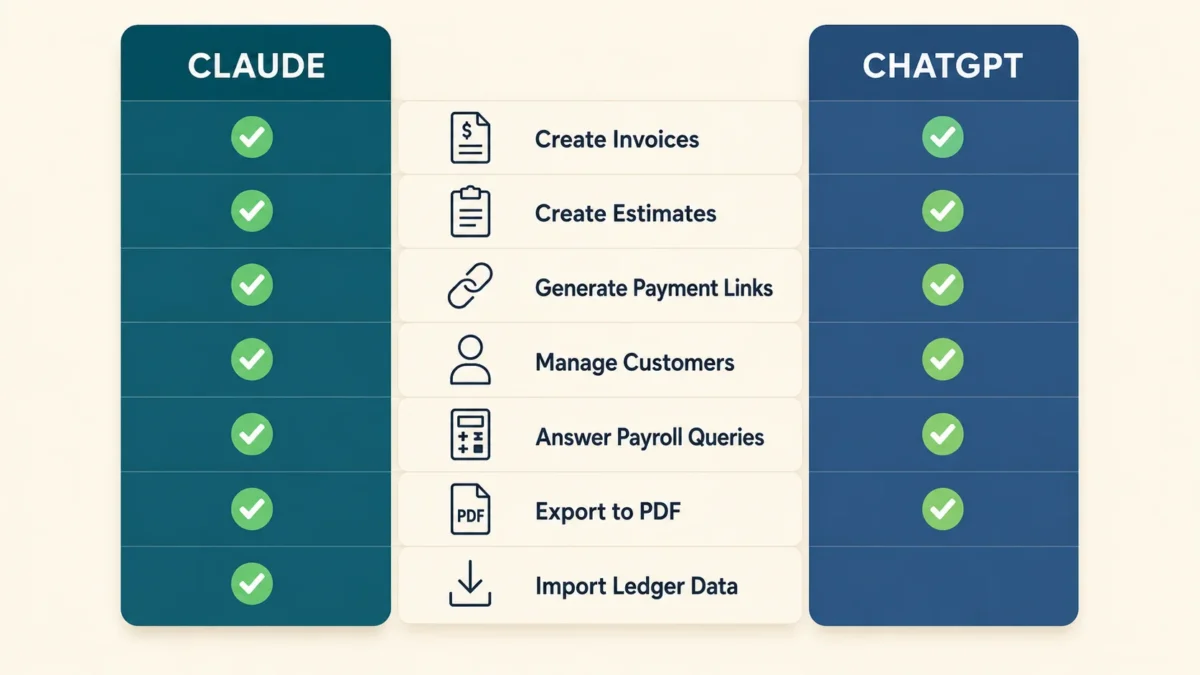
Both can now create and send invoices, manage estimates, generate payment links, add customers, and answer payroll questions using live QuickBooks data. Intuit built the same capability set for both platforms and shipped it in July 2026. This is the single biggest change in this category during 2026, and most comparison articles have not caught up with it.
Intuit holds multi year partnerships with both Anthropic and OpenAI. In Intuit’s own announcement of the expanded features, published 28 July 2026, the company describes bringing actionable sales invoicing, payroll and lending intelligence to Claude and ChatGPT, and states plainly that this moves beyond read only access to your data.
The shared capability list covers invoicing end to end, recurring invoices, overdue payment reminders, estimates, payment links, customer creation, product and service items, and PDF downloads of any invoice or estimate.
On the Claude side, Intuit’s QuickBooks connector documentation adds an important detail: asking Claude to import transactions causes QuickBooks to categorize and import them into your General Ledger. Destructive actions such as deleting an invoice require your confirmation first. The connector is currently available to United States customers only.
The ChatGPT side arrived through a separate agreement. OpenAI’s partnership announcement with Intuit describes a multi year strategic partnership bringing Intuit app experiences into ChatGPT, and the QuickBooks app went live for logged in Free, Plus and Pro accounts in the US.
If you want the deeper walkthrough of setup and permissions on the Claude side, our guide to the Claude QuickBooks integration for accountants covers the connection steps and the access scopes in detail. For the Intuit native agents that sit inside QuickBooks itself rather than inside a chat window, see our Intuit AI agents review.
The QuickBooks capability gap that still exists
Neither tool watches your books. Both act only when prompted inside a conversation. There is no trigger that fires when an invoice falls overdue or a bill arrives, which means neither is an automation platform in the sense that a bookkeeper would use the word.
Does Xero Work With Both Tools?
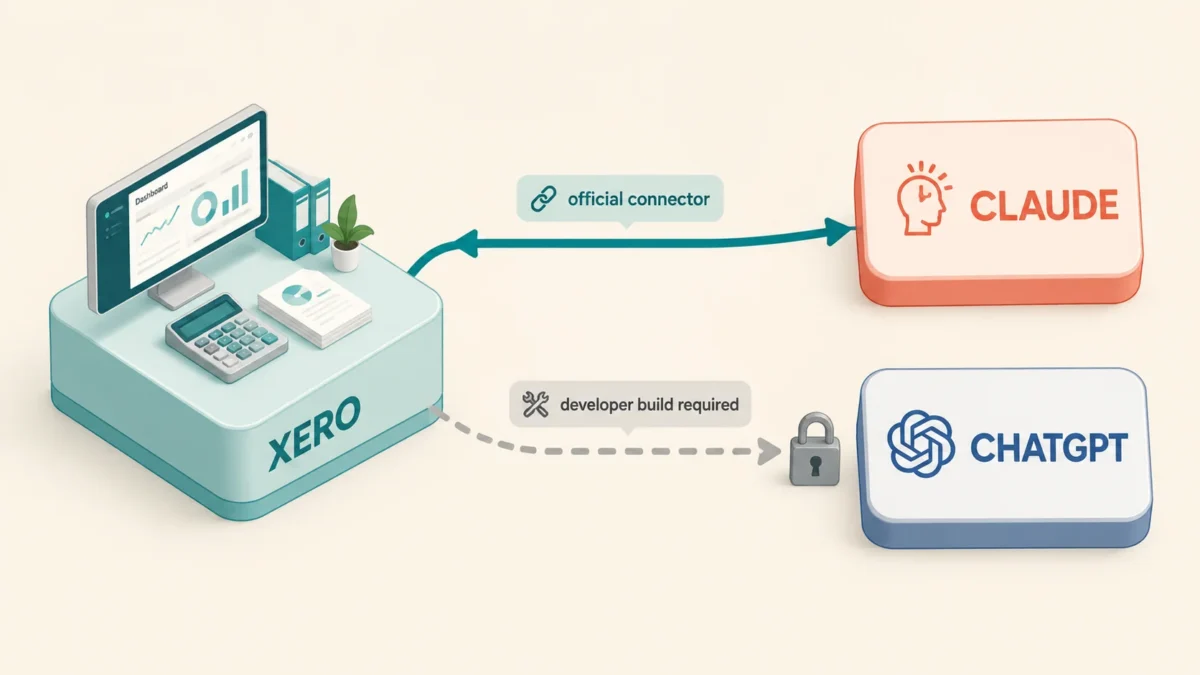
No. In any comparison of Claude vs ChatGPT for bookkeeping this is the sharpest split: Xero has an official Claude integration and no equivalent official ChatGPT app. This is the clearest functional difference between the two tools for bookkeeping in 2026, and it matters most in the United Kingdom, Australia and New Zealand where Xero holds far more small business share than it does in the United States.
Xero announced a multi year partnership with Anthropic in March 2026 and confirmed the live Claude integration in a media release dated 12 May 2026. The partnership runs in both directions: Xero’s financial data and tools became available inside Claude, and Xero’s own agent JAX draws on Claude’s reasoning for financial analysis inside Xero.
Xero also states that financial data shared between the platforms is used solely for the user’s specific session and that proprietary business data is never used to train Claude’s models. That is a meaningful commitment for anyone handling client data under UK GDPR.
Connecting ChatGPT to Xero is possible but it is a developer project rather than a toggle, requiring a hosted endpoint and your own application credentials. For a bookkeeper without engineering support, treat it as unavailable.
How Much Does Claude vs ChatGPT for Bookkeeping Cost in 2026?
Paid entry starts at $8 per month with ChatGPT Go and $17 per month with Claude Pro on annual billing. For bookkeeping specifically, the cheapest tier is rarely the right one, because file upload limits and data analysis capacity are exactly what the entry plans restrict.
| Plan | Claude | ChatGPT |
|---|---|---|
| Free | $0 | $0 |
| Entry paid | Not offered | Go, $8 per month |
| Standard paid | Pro, $17 annual or $20 monthly | Plus, $20 per month |
| High usage | Max, from $100 per month | Pro, $100 or $200 per month |
| Team seat | $20 annual, $25 monthly | $20 annual, $25 monthly |
| Team minimum | 2 users | 2 users |
Sources: Anthropic’s pricing page, OpenAI’s Help Center articles on ChatGPT Plus, Pro tiers and Business seats, and OpenAI’s announcement of ChatGPT Go at $8 per month in the US.
Two practical notes. ChatGPT Go excludes the advanced reasoning models, which is precisely the capability that reconciliation work needs, so it is a poor choice for books despite the price. And Claude Pro is the only plan in this table that drops below $20 through annual billing.
Costly Error 1: Coding Sales Tax Remittances as an Expense
The first of three errors that show up across Claude vs ChatGPT for bookkeeping work involves tax payments. A sales tax or VAT payment to a revenue authority is a settlement of a liability you already recorded, not a cost of doing business. Coding it to an expense account overstates your expenses and leaves the tax liability sitting on your balance sheet unreleased. Both tools make this mistake when the chart of accounts offers a plausible expense line.
The mechanism is simple. A payment described as “State Department of Revenue, sales tax remittance, Q2” reads as a payment to an authority, and pattern matching pushes it toward taxes as an expense. The correct treatment debits Sales Tax Payable.
The damage compounds quietly. Your profit and loss shows costs you did not incur, your balance sheet carries a liability that should have cleared, and the error repeats every filing period until somebody reconciles the control account.
What to do: review every payment to a tax authority before posting. If a tool codes one of these to an expense account, treat that as a signal to check its other liability postings in the same batch.
Costly Error 2: Treating Owner Draws as Business Expenses
The second recurring error in Claude vs ChatGPT for bookkeeping work concerns the owner. Money a sole proprietor or partner takes out of the business is an equity movement, not an expense. Coded wrongly, it reduces reported profit, understates the owner’s tax position, and misstates the capital account. Neither tool can detect this reliably because the transaction description rarely says what it is.
A line reading “Transfer to personal checking” carries no account signal at all. A tool that codes it confidently rather than asking has guessed. The same problem applies to charitable donations made by an unincorporated business, where the correct treatment depends on the entity type and often belongs in the owner’s drawings rather than in a business deduction.
This category is where the difference between a bookkeeping tool and a language model shows most clearly. The information needed to code the transaction correctly is not in the transaction.
What to do: never let either tool code owner or director transactions unsupervised. Give it your entity type in the prompt, and treat any confident answer on an ambiguous item as a prompt to check rather than a result to accept.
Costly Error 3: Accepting a Reconciliation That Silently Balances
The third error is the costliest. The most dangerous output in Claude vs ChatGPT for bookkeeping work is a reconciliation that appears to balance but does not. A tool that cannot find the discrepancy and reports success anyway produces something that looks finished and passes a quick glance. This is materially worse than a tool that says it cannot reconcile the accounts.
Two discrepancy types are hard for both tools. The first is a duplicate debit, where the bank has charged the same supplier payment twice and both lines look legitimate in isolation. The second is a transposition, where the cash book records 540.00 against a bank entry of 450.00, a 90.00 difference that is easy to miss inside a month of activity.
Missing items such as bank charges and unpresented cheques are comparatively easy, and both tools tend to find them. The hard two are where a reconciliation quietly goes wrong.
What to do: always ask for the closing balance on both sides and the difference between them as separate figures, then check that the listed reconciling items actually sum to that difference. If they do not, the reconciliation is not complete regardless of what the summary says.
Test It Yourself in Ten Minutes
Rather than asking you to trust a claim about performance in Claude vs ChatGPT for bookkeeping, here is a controlled reconciliation with a published answer key. Run it on whichever tool you are considering and grade the result yourself. This takes about ten minutes.
The scenario. A single bank account for July 2026. Opening balance 12,450.00 on 1 July. Twenty four transactions appear correctly in both the bank statement and the cash book. Five discrepancies are planted.
The correct answer:
| Reconciling item | Amount | Side |
|---|---|---|
| Account maintenance charge | 38.50 | Bank only |
| Direct debit, telecom supplier | 129.99 | Bank only |
| Duplicate supplier debit, 17 July | 2,210.00 | Bank only, charged twice |
| Unpresented cheque 10442 | 1,275.00 | Cash book only |
| Transposition, receipt recorded as 540.00 against bank 450.00 | 90.00 | Cash book overstated |
Bank statement closing balance: 9,039.57. Cash book closing balance: 10,233.06. Difference: 1,193.49, with the bank lower than the book. The five items above sum exactly to that difference.
How to grade it. Give the tool both files and the opening balance, ask for both closing balances, the difference, and every reconciling item. Do not give hints and do not follow up. Then check three things: did it get 1,193.49, did it find the duplicate and the transposition, and did it invent any transaction that was not in the data. Run it twice in separate chats. A tool that gives two different answers to the same reconciliation is telling you something important.
Claude vs ChatGPT for Bookkeeping: Which Tool Handles Each Job?
Neither tool wins across the board on documented capability. Claude leads on accounting system coverage because of the Xero connector. ChatGPT leads on entry price. On the jobs themselves, the two are close, and the deciding factor is your review process rather than your model choice.
| Bookkeeping job | Claude | ChatGPT | Notes |
|---|---|---|---|
| Bank reconciliation from a CSV | Capable | Capable | Both handle missing items well, both struggle with duplicates and transpositions |
| Invoice coding to nominal accounts | Capable | Capable | Both need your entity type and capitalisation policy stated in the prompt |
| Month end accrual list | Capable | Capable | Neither knows your cut off policy unless told |
| Sales tax or VAT review | Use with caution | Use with caution | Jurisdiction rules change, verify against the authority |
| Client query email | Capable | Capable | Lowest risk task on this list |
| Writing into QuickBooks | Yes, US only | Yes, US only | Same feature set since July 2026 |
| Working with Xero | Yes, official connector | No official app | Clearest difference between the two |
For the spreadsheet side of month end, both vendors ship an integration, and our guide to Claude for Excel for accountants covers what that automation realistically reaches.
What Neither Tool Should Do Without Human Sign Off
Whichever way the Claude vs ChatGPT for bookkeeping decision goes, neither tool should finalise a period, file a return, or post to the ledger unreviewed. Both can produce confident, well formatted output that is wrong, and confirmation prompts inside a connector are a safety catch, not an approval process. The person signing the accounts remains responsible for every figure.
Three specific limits are worth writing into your own procedures. Do not let either tool close a period. Do not accept a coding decision on an ambiguous transaction without confirming the underlying policy. And do not treat a reconciliation as complete until the reconciling items sum to the stated difference.
None of this makes the tools unusable. It makes them assistants that prepare work for review, which is what a competent junior does. The failure mode is treating either one as a reviewer.
If you are weighing full automation rather than conversational assistance, our comparison of AI bookkeeping agents for small business covers the tools built specifically for that job, and our broader look at ChatGPT vs Claude for accountants covers the advisory and professional work that sits above transaction processing.
Frequently Asked Questions
Is Claude vs ChatGPT for bookkeeping a close call in 2026?
Neither is clearly better for QuickBooks users in the United States, because Intuit shipped the same connector capabilities to both platforms in July 2026. Claude is the better choice for anyone using Xero, which has an official Claude connector and no equivalent ChatGPT app. Cost favours ChatGPT at the entry tier and Claude on annual billing.
Can Claude or ChatGPT post transactions into my accounting software?
Yes, both can write into QuickBooks through Intuit’s official integrations, including creating and sending invoices and estimates, generating payment links, and adding customers. Claude’s connector can also import and categorize transactions into your General Ledger. Both are currently limited to United States QuickBooks customers.
How much does Claude vs ChatGPT for bookkeeping cost per month?
Claude Pro is $17 per month on annual billing or $20 monthly. ChatGPT Plus is $20 per month with no annual option. ChatGPT Go is cheaper at $8 per month but excludes the advanced reasoning models that reconciliation work depends on, so it is a poor fit for books.
Does Claude vs ChatGPT for bookkeeping risk hallucinated numbers?
Both can produce incorrect figures, and the risky failure is a reconciliation that reports success without actually balancing. Duplicate transactions and transposition errors are the two discrepancy types most often missed. Always verify that the listed reconciling items sum to the stated difference before accepting any reconciliation.
Can I use Claude or ChatGPT for bookkeeping in the UK?
Partly. The QuickBooks integrations for both tools are limited to United States customers at present. Xero’s Claude connector is not restricted in the same way, which makes Claude the more practical option for UK bookkeepers, though UK GDPR obligations still apply when client financial data enters any AI tool.
Which side of Claude vs ChatGPT for bookkeeping is safer for client data?
Both vendors state that connected accounting data is not used to train their models, and Xero confirms that data shared through its Claude integration is session specific. Business and Team tiers on both platforms exclude training on your content by default. The larger risk is process, not platform: unreviewed output reaching the ledger.
The Bottom Line
The Claude vs ChatGPT for bookkeeping decision is no longer decided by which model writes a better sentence. It is decided by which one reaches your accounting system and what your review process looks like once it does. For QuickBooks in the United States, either works and the price difference is small. For Xero, Claude is the only realistic option today.
The three errors in this article, sales tax remittances coded as expenses, owner draws treated as business costs, and reconciliations that balance on paper but not in reality, will each cost you more than the subscription. All three are caught by a review step that takes minutes.
Run the reconciliation test above before you commit to either tool. Ten minutes of checking against a known answer is worth more than any comparison article, including this one.
If you would like help building a finance workflow around these tools, with proper review controls and reporting that your accountant will accept, get in touch with AI Foresight 360. For more head to head analysis of AI tools for finance teams, browse our AI comparisons library.

Ahmad Hussain
ACCAAhmad builds advanced Excel models, Power BI dashboards, and AI automation for businesses. He writes AI Foresight 360 himself, and every pricing figure and feature claim is verified against official documentation at the source.
Connect on LinkedIn