Two of the biggest names in AI now sell the same promise to small business owners: describe a job, walk away, come back to finished work. OpenAI launched ChatGPT Work on July 9, 2026. Anthropic has been shipping Claude Cowork since January and made it generally available in April. If you run a small firm and you are trying to decide between them, the marketing pages are not going to help you much, because both describe roughly the same product.
The real differences are buried in plan availability, pricing structure, and how each one handles the specific work small businesses actually do: messy spreadsheets, client emails, and reports that have to go out every Monday whether you feel like it or not.
This ChatGPT Work vs Claude Cowork comparison focuses on that decision, for businesses with one to fifty people rather than enterprise IT departments.
A note on how this comparison was built
Every pricing figure and feature claim here comes from official vendor documentation, checked at the source in August 2026, with links at each claim so you can verify anything yourself. This is a documentation based evaluation rather than a first person test.
That distinction matters in a ChatGPT Work vs Claude Cowork comparison right now, because several competing pieces currently claim months of controlled benchmarking and publish precise sounding statistics with no source attached. Where the honest answer is that something depends on your setup, this article says so.
What is ChatGPT Work and what does it actually do?
ChatGPT Work is an agent mode inside ChatGPT that takes a described outcome, plans the steps, and produces a finished file rather than a chat reply. It launched on July 9, 2026, runs on OpenAI’s GPT-5.6 model family, and outputs spreadsheets, documents, presentations, and shareable web apps.
In any ChatGPT Work vs Claude Cowork discussion this is the starting point: the design idea is that you stop copying and pasting. Instead of asking for text and assembling the deliverable yourself, you describe what “done” looks like and ChatGPT Work builds it.
It reaches your data through plugins. You connect the systems your business already runs on, such as Slack, Microsoft Teams, Google Drive, SharePoint, email, calendars, CRMs, and project trackers, and the agent pulls context from them as it works. You can also point it at a specific app by typing the @ symbol followed by the app name.
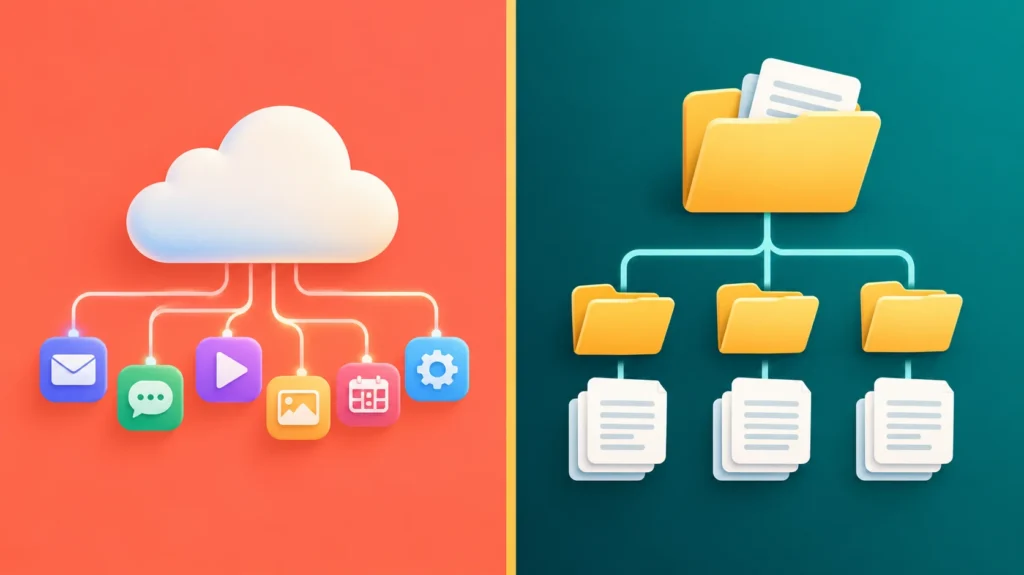
For a small business, the practical shape of this is cloud first. ChatGPT Work is strongest when your files already live in connected services and weakest when your important documents are sitting in folders on a laptop. If you have never used an agentic tool before, our complete guide to AI agents covers the underlying concepts in plain language.
What is Claude Cowork and how is it different?
Claude Cowork is Anthropic’s agentic workspace, built around the Claude desktop app, and its defining trait is direct access to your file system. It launched in January 2026, reached general availability on April 9, 2026, and expanded to web, iOS, and Android in July.
The difference from ChatGPT Work is architectural rather than cosmetic. Cowork works on folders you explicitly grant it, reading, writing, renaming, and reorganising real files in place. There is no upload and download cycle. You give it a folder of client documents and it operates on that folder.
It runs on Anthropic’s current flagship models, with Opus 5 listed as the top tier model on Anthropic’s pricing page. It connects to Microsoft 365, Google Workspace, and Slack, and supports plugins for specific domains including finance and legal work.
For a small business, this makes Cowork strongest when your working life happens in folders. A bookkeeper with twelve client folders on a laptop is a much better fit for Cowork than for a cloud first agent. If your work sits mostly in Excel, our review of Claude for Excel for accountants goes deeper on that specific workflow.
ChatGPT Work vs Claude Cowork: which plans actually include each one?
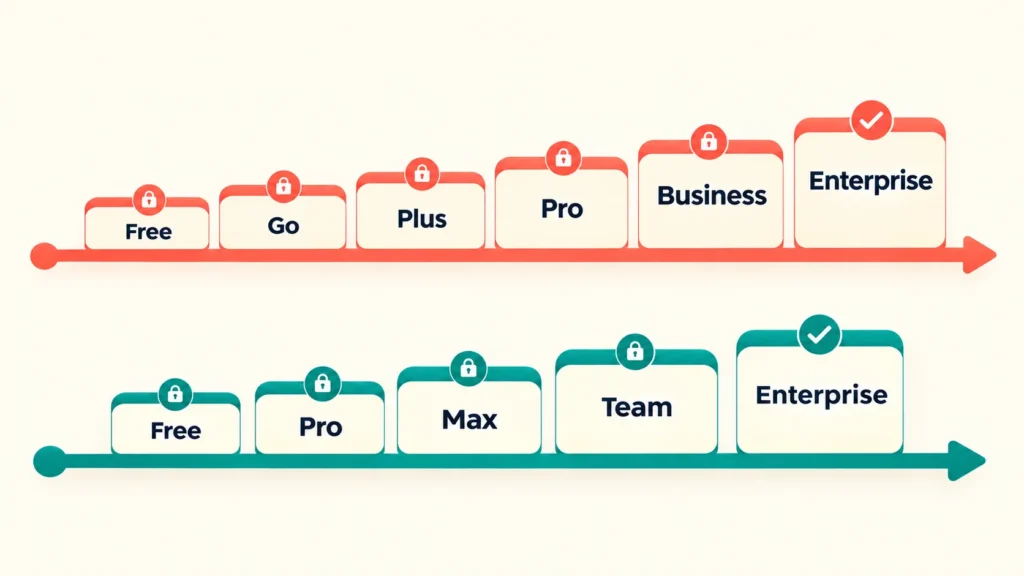
This is the question most comparisons get wrong, and it is the one that decides whether you can try either tool this week. ChatGPT Work availability depends on which device you open it on, not just which plan you pay for. Claude Cowork availability depends purely on whether you pay at all.
OpenAI’s own ChatGPT pricing page lists ChatGPT Work as “Limited (desktop app)” for both the Free and Go tiers, and as “Desktop, web, and mobile” for Plus and Pro. In other words, a free ChatGPT account does get ChatGPT Work, but only inside the desktop application on Windows or Mac. Open ChatGPT in a browser on a free account and Work is not there.
Plenty of published comparisons state flatly that Free and Go users get no access at all. That is incorrect, and it matters, because it means a small business owner can install the desktop app and evaluate ChatGPT Work at no cost before committing to a subscription.
Claude Cowork works the opposite way. It is consistent across every device but gated behind payment. Anthropic’s pricing page lists Cowork as included on Pro, Max, Team, and Enterprise. It is not included on the Claude Free plan at any tier of access.
| Access question | ChatGPT Work | Claude Cowork |
|---|---|---|
| Available on a free account | Yes, limited, desktop app only | No |
| Available in a browser on free tier | No | No |
| Cheapest paid tier that includes it | Plus | Pro |
| Consistent across desktop, web, mobile | From Plus upward | Yes, on all paid plans |
| Included on business or team plans | Yes, Business and Enterprise | Yes, Team and Enterprise |
The practical takeaway for a small business is that ChatGPT Work has a genuine free trial path and Claude Cowork does not. If budget is the binding constraint, that asymmetry is the single most useful fact in this comparison.
How much does each one cost for a small business?
Cost is where the ChatGPT Work vs Claude Cowork question gets simpler than expected, because neither tool is sold separately. Both are bundled into their parent subscription and bounded by that plan’s usage allowance, so the real question is which subscription tier your business needs. All figures below come from the official vendor pages.
| Plan | Price | Agent included |
|---|---|---|
| ChatGPT Free | $0 | Work, limited, desktop only |
| ChatGPT Go | $8 per month | Work, limited, desktop only |
| ChatGPT Plus | $20 per month | Work, all platforms |
| ChatGPT Pro | From $100 per month | Work, all platforms |
| ChatGPT Business | $20 per user per month annually, $25 monthly, 2 or more users | Work, all platforms |
| ChatGPT Enterprise | Custom pricing | Work, all platforms |
| Claude Free | $0 | No Cowork |
| Claude Pro | $17 per month annually at $200 up front, $20 monthly | Cowork included |
| Claude Max | From $100 per month | Cowork included |
| Claude Team Standard | $20 per seat monthly on annual billing, $25 monthly | Cowork included |
| Claude Team Premium | $100 per seat monthly on annual billing, $125 monthly | Cowork included |
| Claude Enterprise | $20 per seat per month plus usage at API rates, billed annually | Cowork included |
Two details in that table deserve more attention than they usually get.
First, Anthropic’s Team plan covers teams of 2 to 150 people. Several widely read pricing roundups claim a five seat minimum, which would exclude most of the businesses reading this article. The official page does not impose that floor. A two person practice can buy a Team plan with central billing and admin controls.
Second, Claude Enterprise is not custom quoted in the way OpenAI’s Enterprise tier is. Anthropic publishes a figure of $20 per seat per month plus usage billed at API rates. OpenAI does not publish an Enterprise number at all. For a small business that number is mostly academic, but it is a real transparency difference.
The cheapest realistic entry point is close to identical: $20 per month for ChatGPT Plus, or $17 per month for Claude Pro if you pay a year up front. At two or more people, both team tiers land at $20 per seat annually.
The cost that does not appear on the pricing page
Agentic tasks consume far more of your plan allowance than chat does. A single request that reads a dozen files, queries a connector, and assembles a deck is not one message, it is a long multi step run.
Anthropic is explicit that usage limits reset on a rolling five hour session window with weekly caps layered on top, and that when you hit a limit you can wait, upgrade, or turn on usage credits billed at standard API rates. OpenAI similarly marks unlimited usage as subject to reasonable use policies.
Neither company publishes a message count you can budget against. For a small business, the honest planning advice is to start at the cheapest tier that includes the agent, run your actual recurring work for a month, and see whether you hit limits before you commit to a higher plan.
Which one handles messy spreadsheets and bookkeeping files better?

On financial data the ChatGPT Work vs Claude Cowork gap is smaller than most write ups suggest. Neither tool has a documented accuracy advantage, and any comparison claiming a precise percentage difference is inventing it. What genuinely differs is where the file lives and how it gets there.
Claude Cowork’s file system access is the meaningful advantage for bookkeeping work. If you have a folder of downloaded bank CSV exports, receipts, and prior period workbooks, Cowork can be pointed at that folder and work across all of it without you uploading anything. Output lands back in the folder as a real file.
ChatGPT Work reaches files through connected services rather than the local disk. If your books already live in Google Drive or SharePoint, that is a distinction without a difference. If they live in a folder called Clients on your desktop, it is a real workflow tax.
Both handle the underlying analytical work competently. Both will misread a badly structured spreadsheet, which is why neither should be pointed at a client ledger without review. For a wider view of what is available in this category, see our roundup of AI bookkeeping agents for small business.
The realistic answer for a bookkeeping heavy practice is Cowork, on the basis of file handling rather than intelligence.
Can either one run your recurring weekly reports?

Both tools support scheduled recurring tasks, so this is not the differentiator it is often presented as. The real distinction is which plans unlock scheduling and where the task executes when your laptop is closed.
Anthropic’s documentation confirms that scheduled tasks in Cowork are available on all paid plans, and that they run remotely, so a task fires on its cadence even when your computer is asleep or the desktop app is closed. You describe the job once, choose a cadence, and review results when they land.
On the OpenAI side, scheduled tasks show as unavailable on the Free tier and available on Go, Plus, Pro, Business, and Enterprise. ChatGPT Work can perform an action once, repeat it on a schedule, or trigger on an event.
For a small business the comparison comes down to this. If you want a Monday morning report assembled before you open your laptop, both can do it, but Cowork’s remote execution on every paid plan is the simpler promise. On the ChatGPT side you need at least the Go tier for scheduling, and the Free tier is out entirely.
Common small business uses that work well on either: a weekly cash position summary, a Monday pipeline update, a monthly expense categorisation pass, and a recurring competitor or industry scan.
What about client data and security?
Both tools are designed to touch real business data, which makes the data handling terms more important than the feature list. The headline difference is what happens to your content on consumer versus business plans.
On ChatGPT consumer tiers, OpenAI states that content is used to train models with an opt out available. On ChatGPT Business and Enterprise, there is no training on business data by default. Anthropic lists model training as opt out on Free, Pro, and Max, and as none by default on Team and Enterprise.
If you handle client financial records, that difference alone is a reasonable argument for stepping up to a business tier on either platform rather than running client work through a personal subscription.
Cowork’s local file access cuts both ways. Granting an agent write access to a folder of client documents is a meaningful decision, and it should be paired with a backup and a habit of reviewing changes rather than trusting them. ChatGPT Work’s connector based model keeps a layer of separation, though it also means granting the agent access to whole cloud services.
A practical control for a small firm: create a dedicated working folder or a dedicated connected drive for agent tasks, keep source records outside it, and review outputs before anything reaches a client.
If your reporting workflow needs designing properly rather than automating in place, AI Foresight 360 builds Power BI dashboards and financial reporting systems for small firms, and a well structured report is usually a better foundation for automation than a messy one.
Which one should your small business choose?
There is no single ChatGPT Work vs Claude Cowork winner, and any comparison that declares one is not looking closely at how differently these businesses operate. The right choice depends on where your files live, how many people need access, and whether you can test before paying.
| Business type | Better fit | Why |
|---|---|---|
| Solo, tight budget, wants to test first | ChatGPT Work | Free desktop access lets you evaluate before paying anything |
| Solo, files on local drive | Claude Cowork | Direct folder access removes the upload cycle entirely |
| 2 to 5 people, already on Microsoft 365 | ChatGPT Work | Deeper native integration with the Microsoft stack |
| 2 to 5 people, mixed tools | Either, at $20 per seat | Team pricing is effectively identical, so choose on workflow |
| Bookkeeping or accounting heavy | Claude Cowork | File system access suits document heavy client work |
| Deck and proposal heavy | ChatGPT Work | Built specifically to output finished presentations and sites |
| Needs recurring automation on the cheapest plan | Claude Cowork | Scheduled tasks on every paid plan, running remotely |
If you already pay for one of these, the honest advice is to start there. Both tools reward accumulated context, connected accounts, and learned habits far more than any capability gap between them justifies switching for.
For a broader view of how the two underlying assistants compare on professional work, see our ChatGPT vs Claude comparison for accountants, and our full ChatGPT review covers the wider platform.
What neither tool does well
Both products in this ChatGPT Work vs Claude Cowork matchup are new, and treating them as finished is the most common way small businesses waste money on them.
Neither is reliable without review. Both will occasionally misread a document, make a reasonable but wrong assumption, or produce a confident output built on a misunderstanding. For client facing or compliance relevant work, the review step is not optional.
Neither publishes usage limits you can plan a budget around. You cannot know in advance how many agent tasks your subscription buys.
Neither replaces a properly designed process. An agent pointed at a disorganised filing system produces disorganised output faster. The businesses getting real value from these tools generally cleaned up their file structure first.
Both are also changing quickly. ChatGPT Work is weeks old and still rolling out. Cowork’s web and mobile versions were still in beta as of July 2026. Any comparison, including this one, deserves rechecking in a quarter.
Frequently asked questions
Is ChatGPT Work free?
Partly. OpenAI’s pricing page lists ChatGPT Work as limited and desktop app only on the Free and Go tiers, and as fully available across desktop, web, and mobile from Plus upward. So you can try ChatGPT Work at no cost by installing the desktop app, but browser and mobile access requires a paid plan.
Is Claude Cowork included in Claude Pro?
Yes. Anthropic’s pricing page lists Claude Cowork as included on Pro, Max, Team, and Enterprise plans. Claude Pro costs $17 per month when billed annually at $200 up front, or $20 billed monthly. Cowork is not available on the Claude Free plan.
Which is cheaper for a two person business?
They are effectively equal. ChatGPT Business is $20 per user per month on annual billing and starts at two users. Claude Team Standard is $20 per seat per month on annual billing and covers teams from 2 to 150 people. At monthly billing both rise to $25 per seat.
Can both tools run scheduled recurring tasks?
Yes. Claude Cowork supports scheduled tasks on all paid plans, running remotely so they execute even with your computer closed. ChatGPT Work supports scheduled tasks on Go, Plus, Pro, Business, and Enterprise, but not on the Free tier.
Which is better for accounting and bookkeeping?
Claude Cowork generally suits bookkeeping better, not because it is more accurate but because it works directly on local folders. For practices with client documents stored on a laptop or network drive, this removes the constant upload and download cycle that ChatGPT Work’s connector based approach requires.
Should I use both?
Many professionals do, and the ChatGPT Work vs Claude Cowork choice is not always exclusive. The tools have genuinely different shapes, with ChatGPT Work stronger on cloud connected workflows and finished deliverables, and Claude Cowork stronger on local file operations. For most small businesses, though, paying for two subscriptions is hard to justify until one has clearly proven its value.
The verdict
The ChatGPT Work vs Claude Cowork decision is less about which tool is smarter and more about where your work physically sits. If your business runs in cloud services and you want to test something before paying, ChatGPT Work’s free desktop access makes it the natural starting point. If your business runs on folders full of client documents and you want recurring automation on the cheapest paid tier, Claude Cowork fits better.
At the entry level the money barely separates them, roughly $20 per month either way, and at two or more people the team tiers match almost exactly. That makes workflow fit, not price, the deciding factor for most small firms.
Whichever you choose, start on the cheapest tier that includes the agent, point it at one genuinely repetitive task, and measure whether it saves time before you scale up. These tools reward businesses that already know which process they want automated, and they punish the ones hoping the software will figure that out for them.
Written by Ahmad Hussain, ACCA. All pricing and availability verified against official OpenAI and Anthropic documentation in August 2026. Both products are updating rapidly, so confirm current figures before purchasing.

Ahmad Hussain
ACCAAhmad builds advanced Excel models, Power BI dashboards, and AI automation for businesses. He writes AI Foresight 360 himself, and every pricing figure and feature claim is verified against official documentation at the source.
Connect on LinkedIn